

Recruiting and HR systems · A comparison guide

ATS or HR system: what is the difference, and which do you need?

An ATS, or applicant tracking system, runs recruiting: jobs, candidates and screening stages, up to the decision whom to make an offer to. An HR system runs the people who were hired: employee file, attendance, leave and data for the payroll department. The practical difference sits at the hand-over, when a candidate becomes an employee.

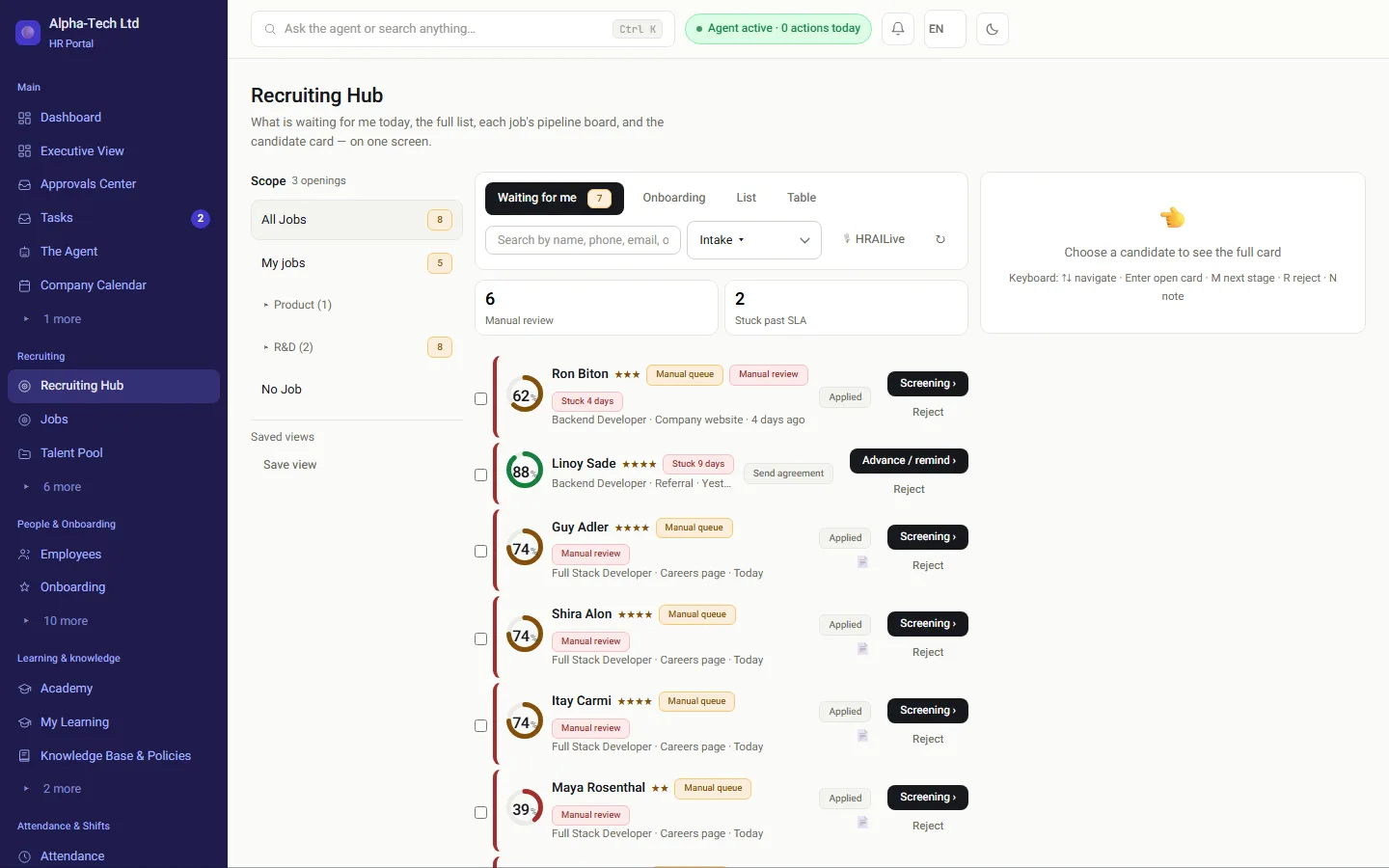
The recruiting center in HRAI: screened and ranked candidates waiting for review
The recruiting center in the demo environment. This guide compares categories of systems, not specific products.

At a glance

Is the problem inside the systems, or between them?

Each system is strong on its own side. What decides the outcome is what happens to one person’s details when they move from recruiting to work.

Two separate systems ATSJobs · candidates · screening The seamRetyping,a file or an API HR systemFile · attendance · leave Payroll department Two versions of the same person start here One system for both sides JobCandidateOfferAgreementOnboardingEmployee file Payroll department Details go in once and flow from recruiting to the employee file and payroll, with no retyping
A separate ATS and HR system versus one system for both sides: where details are typed again.

Definitions

What is an ATS, and what is an HR system?

Definitions

An ATS tracks candidates: where they came from, which stage they are at, who interviewed them and what was decided. An HR system, also called an HRIS or HR management system, manages employees: the personal file, documents, attendance, leave and payroll data.

Also called: candidate management system, recruiting software, HR software, HRIS.

ATS: many people, briefly

Built for recruiting teams and hiring managers. Follows candidates for a few weeks, and is measured by the speed and quality of screening.

HR system: the same people, for years

Built for HR, payroll and management. Follows employees through the whole employment, and is measured by the accuracy of the data in the file and at payroll.

So each is strong on its own side, and the real question is what happens at the seam.

Comparison

What does each category cover, area by area?

The areas follow one person’s path, from the job to the salary. Note the offer-and-agreement row: that is exactly where the line between the two categories runs.

ATS compared with an HR system, area by area
AreaTypical ATSTypical HR system
Recruiting pipeline and screening stagesCore of the systemUsually basic, or a separate module
Branded careers pageUsually includedVaries, sometimes an add-on
CVs from email and job boardsUsually includedRare
Job offer and employment agreement (the seam)Varies: some stop at the offer, few cover the agreement and signingUsually a document uploaded to the file by hand
Employee onboardingUsually out of scopeUsually included
Attendance and hoursOut of scopeIncluded, or in a separate attendance system
Sending data to the payroll departmentOut of scopeUsually included, in the format the payroll department accepts

This is a general picture of the categories. Products cover more or less, so check every row with the vendor itself.

When it is enough

When is a recruiting system on its own enough?

A standalone ATS is a reasonable choice in three situations. In all others, think about the seam first.

You already have an HR system that worksAnd the connection exists, has been tested, and someone owns it.
Recruiting is most of the workAnd few candidates become your employees, for example when you recruit for clients.
Onboarding, agreements and payroll are outsourcedTo a provider that receives the data in order.
In every other case: the question is not which system is better, but who moves the information from one side to the other, and what happens on the day they do not.

The seam

Where does the gap open, between the offer and day one?

Many problems happen after the decision to hire and before day one, exactly the stage neither category was built for.

Double typingName, ID number, address and salary are typed again in the second system, and that is where mistakes appear.
Terms that changed on the wayThe offer was agreed in the third round, and the agreement was written from the first.
Onboarding that starts lateNobody told HR the offer was accepted, and the forms go out only on day one.
Onboarding opened by mistakeCandidates who declined the offer still get a link to the forms and a portal user.

What happens inside the seam, from the offer to the signed agreement: offer letter or employment agreement. And what comes after it: the onboarding checklist for Israel.

Before you choose

Which seven questions should you ask any vendor?

  1. What moves to the employee file at the moment of hiring?Which fields, at what moment, and does someone have to click something for it to happen.
  2. Offer, agreement and onboarding: in the same system?And if not, what connects them, and who maintains the connection when one side is updated.
  3. What does a hiring manager see?The whole system, or only what is waiting for their decision.
  4. How is the match score calculated?Is there a rationale, and what happens to people below the threshold. Four tests you can run on any system: what a good system refuses to do (Hebrew).
  5. How does data reach the payroll department?In which format, how often, and who approves before it leaves.
  6. What happens when an offer is declined?Does the process stop, or does something keep running in the background.
  7. Where is the information stored and who can access it?Storage location, role-based permissions, and a record of who viewed and who changed what.

Which two questions also touch the law?

Screening questions and match scores are subject to the Equal Employment Opportunities Law, 5748-1988 (חוק שוויון ההזדמנויות בעבודה), which prohibits discriminating against job seekers in hiring, among other grounds because of sex, age, pregnancy, parenthood, religion, nationality, place of residence or reserve duty (section 2).

And what happens to the people not hired: the Notice to Employee and Job Candidate Law, 5762-2002 (Hok Hoda'a la'Oved, חוק הודעה לעובד ולמועמד לעבודה) requires updating in writing, at least once every two months, a candidate who took part in an interview or a test, and notifying them of rejection no later than 14 days from the day someone else was hired for the role (section 3A). There are exceptions, for example an employer of up to 25 employees.

Every 2 monthsat least: a written update to candidates who were interviewed or tested
14 daysto notify rejection, from the day someone else was hired
Up to 25employees: an example of an exception to the duty (section 3A)

The exceptions and how they apply to you depend on the circumstances. Check them with an employment lawyer.

In HRAI

How does HRAI handle recruiting and HR without a seam?

The recruiting side

One candidate card for every decision

In HRAI, recruiting and day-to-day HR are the same system. On the recruiting side:

  • A job wizard with recruiting stages, and a branded careers page
  • An email address per job that takes in CVs, also from job boards
  • Screening questions, a match score and automatic emails to candidates
  • An AI voice-interview module
  • A hiring manager sees only what is waiting for them
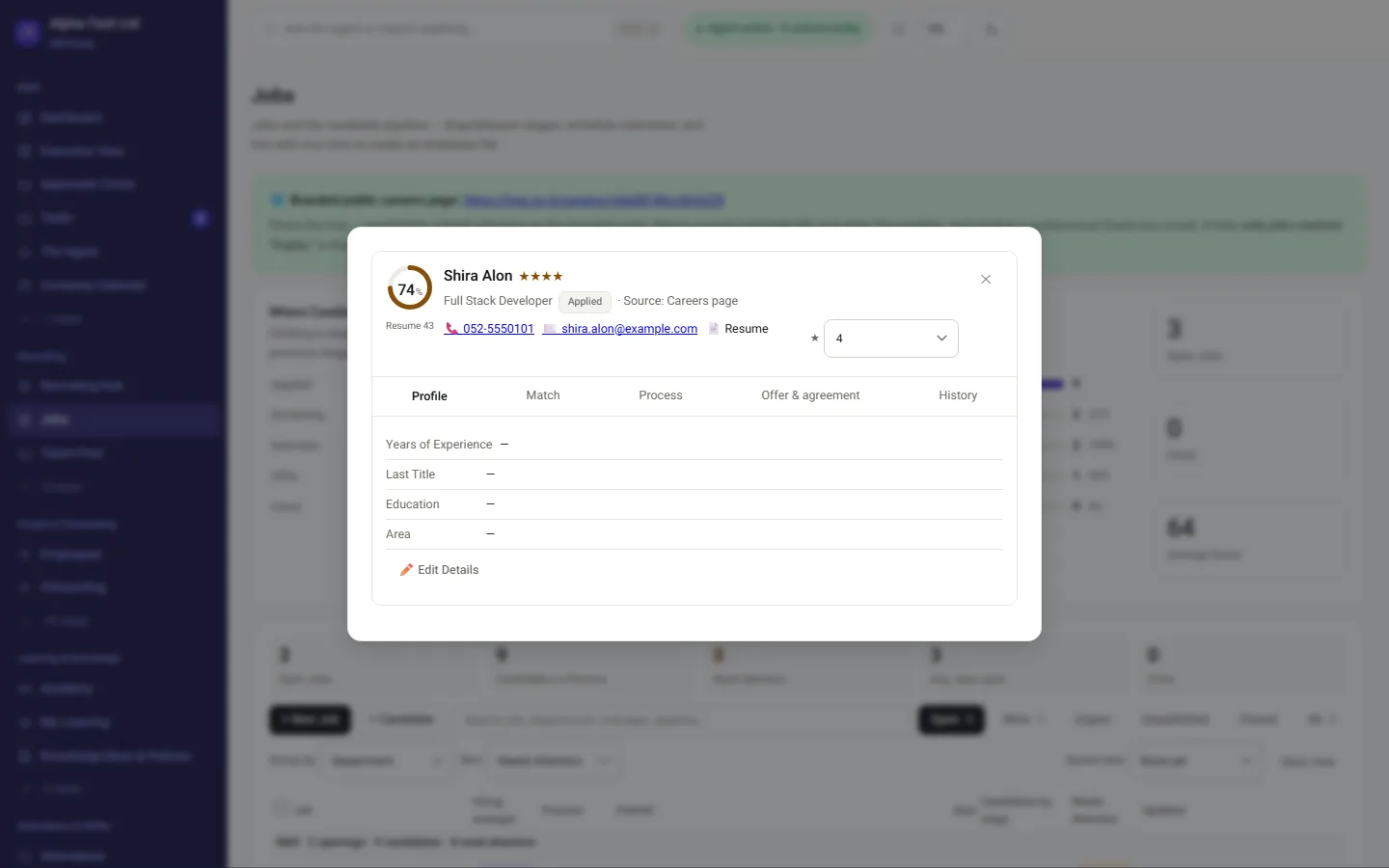
A candidate card in HRAI: match score, answers to screening questions and what happened automatically
From hiring onward

From hiring to the file, with no retyping

There is no transfer between systems: the offer and the agreement are built from details already given, onboarding opens once both sides have signed, and attendance and data go from there to the payroll department.

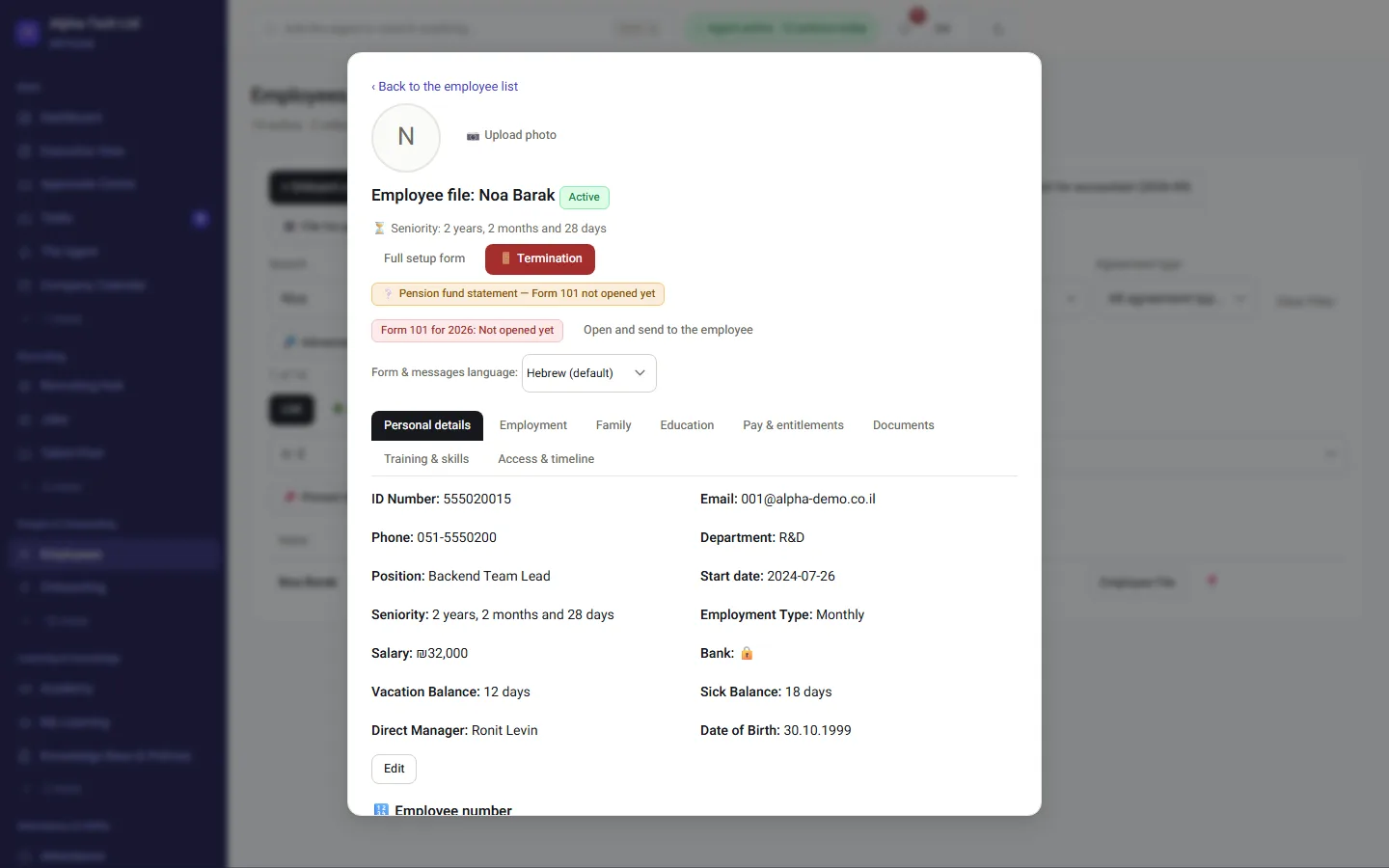
In practice: the employee file opens with the details from recruiting, and nobody types them again.

More: recruiting and talent pool · why HRAI.

An employee file in HRAI in onboarding status, with the details that came from recruiting

Get started

See the seam close on a real job

In the demo we take one job from posting, through offer and agreement, to onboarding that opens by itself, and see what moves between stages with no retyping.

Sources

Official sources for this guide

  1. Equal Employment Opportunities Law, 5748-1988, Nevo (Hebrew)Section 2: prohibition of discrimination against job seekers in hiring.
  2. Notice to Employee and Job Candidate (Terms of Employment and Screening and Hiring Procedures) Law, 5762-2002, Nevo (Hebrew)Section 3A: written updates to candidates who took part in screening, notice of rejection, and the exceptions to the duty.

Nevo texts are consolidated versions; the authoritative text is the one published in the official gazette (Reshumot). All sources are in Hebrew. Sources checked on October 24, 2026.

Frequently asked

What people ask before they start

What is the difference between an ATS and an HR system?

The difference is whom they handle and for how long. An ATS follows candidates for a few weeks, until the decision whom to make an offer to. An HR system follows employees for the whole employment. So an ATS is measured by the speed and quality of screening, and an HR system by the accuracy of the data in the employee file and at the payroll department.

Does an HR system include recruiting too?

Sometimes. Some HR systems include a basic recruiting module, and some systems cover both sides fully. Check exactly what is included: a pipeline per job, a careers page, CVs taken in from email, and what happens at the moment of hiring.

Can an existing ATS be connected to an HR system?

Usually yes, by API or by exporting files. Before connecting, check which fields move and when, what happens when one system is updated, and who is alerted when a transfer fails. A connection with no owner can stop working without anyone noticing.

What should move from recruiting to the employee file?

At least: personal details, the role, the terms agreed in the offer, the signed agreement and the start date. When they move by themselves, onboarding starts from details that were already checked. When they are typed again, two versions of the same person are created.

What is a match score in a recruiting system?

A number that sums up how well the CV and the answers to screening questions match the job requirements. It is an aid for first-pass screening, not a decision. A good system explains how the score was calculated, and sends anyone below the threshold to a person for review instead of rejecting them automatically.

Get started

Book a demo

Leave your details and we will get back to you within one business day to set a time for a 30-minute demo on your own processes. If it turns out not to be a fit, we will say so.

About the details you share. Data controller: Career and Content ltd (operator of HR AI), company no. 515523934, [email protected]. You are not legally required to provide them; without a name and email we cannot get back to you, and that is the only consequence. The information is used to respond to your inquiry, kept for up to 24 months, and shared only with our email provider and our sales team. You may review, correct or delete it at any time at the same address — Privacy Policy (Hebrew), English summary.