Onboarding · A checklist for Israel

New employee onboarding checklist for Israel, stage by stage

Good onboarding splits into four periods. Before day one you settle terms, documents such as the written notice of terms and Form 101, equipment and permissions. On day one you welcome the employee into the team. In week one you train and set goals. At month end you review together what works and what is missing.

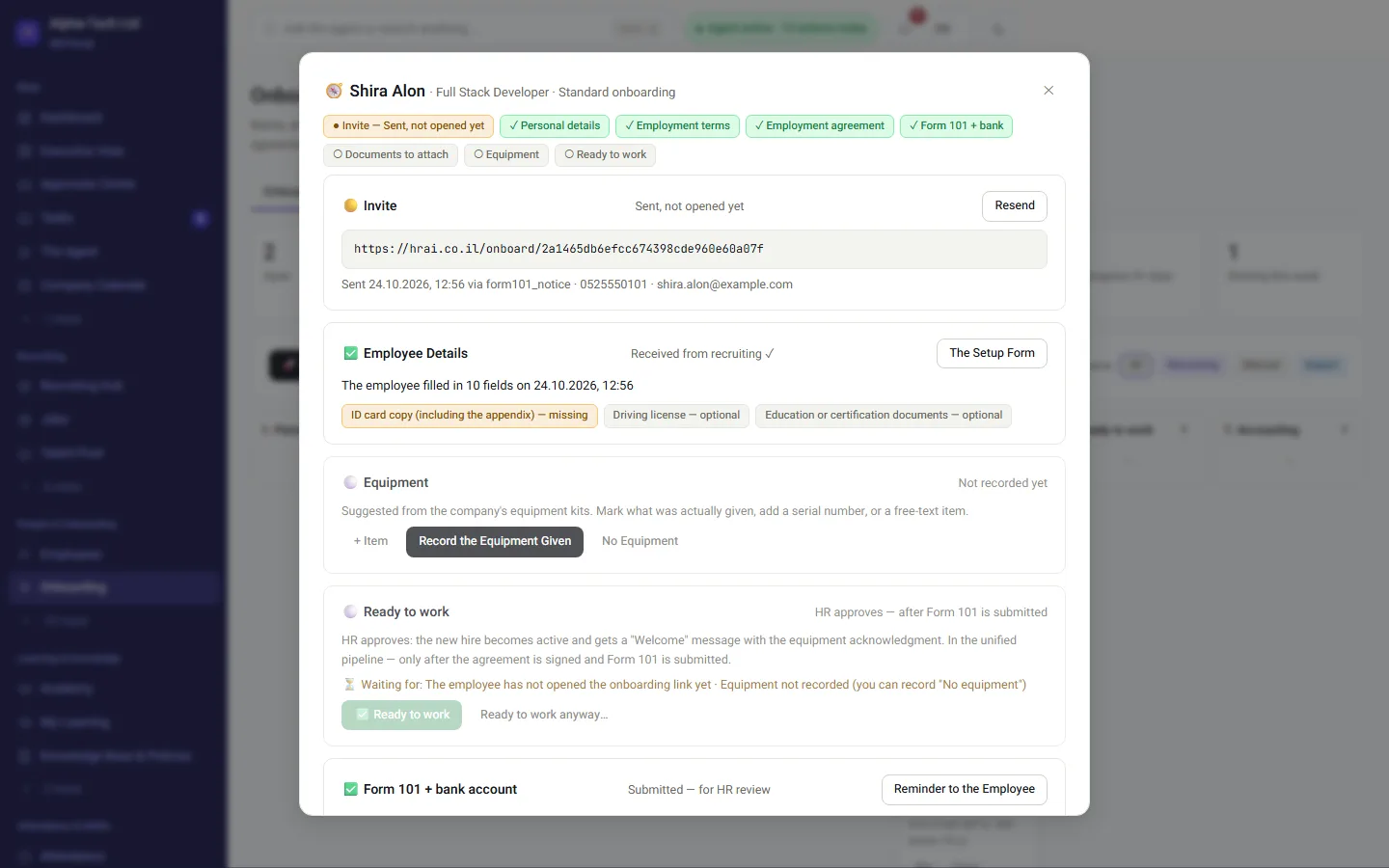
The onboarding journey in HRAI: every stage for a new employee, what is done and what is still blocking
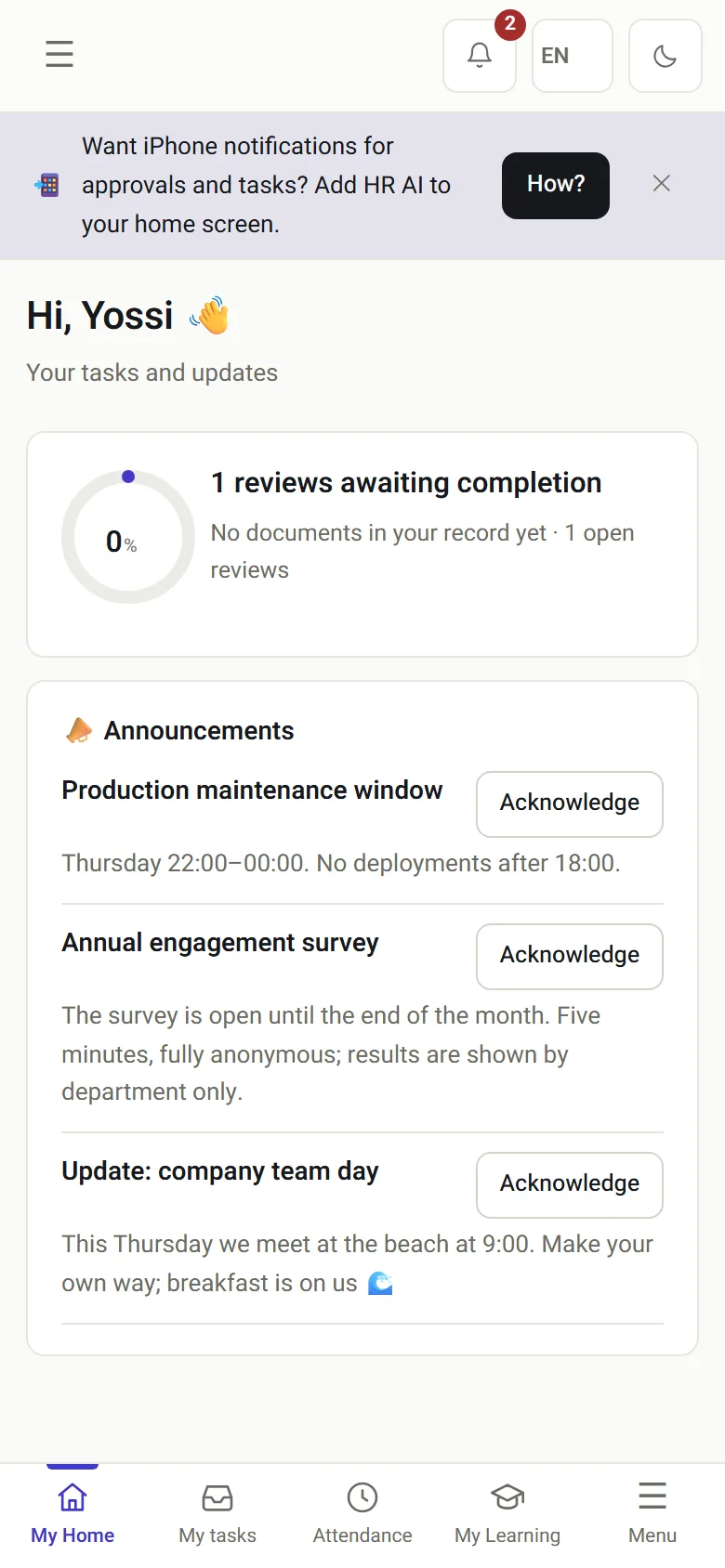
The employee portal on a phone on day one: tasks and updates
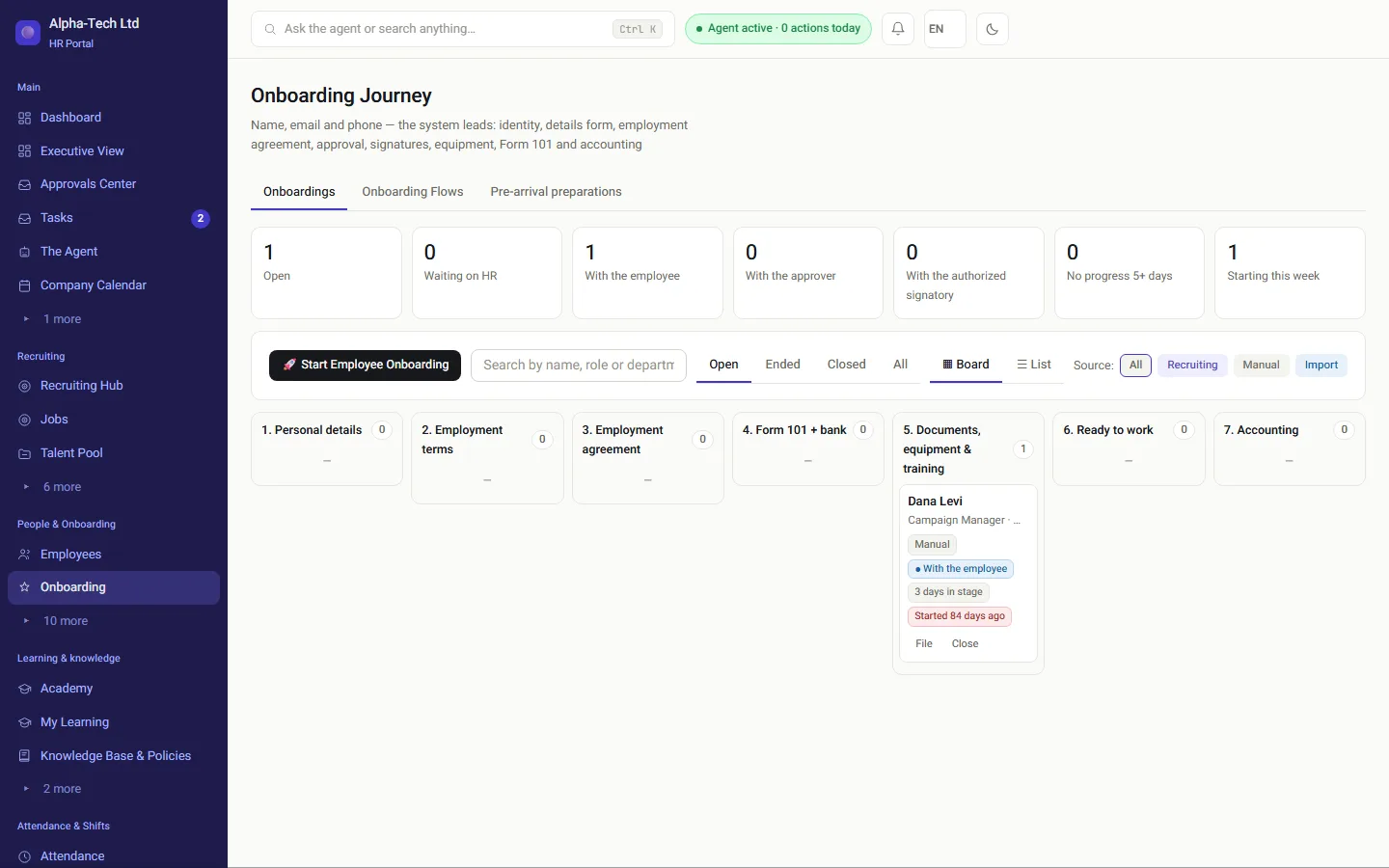
The onboarding journey on desktop and the employee portal on a phone. The list is a starting point; adapt it to the role and the organization.

At a glance

Four periods, 30 items

This is the whole of onboarding at a glance. Print it, or copy it into your task tool, and write an owner next to each item. An item with no owner is one everybody assumes someone else will remember.

  1. Agreement signed → day one 1 · Before day one (10 items) Terms in writing · details, bank and Form 101 · equipment and permissions
  2. Day one 2 · On day one (8 items) The manager’s welcome · logging in for real · a small first task
  3. Days 2–5 3 · In week one (6 items) A written training plan · first-month goals · a short check-in
  4. Days 6–30 4 · In month one (6 items) A structured feedback talk · checking the first salary · closing onboarding
Onboarding starts the day the agreement is signed, not the morning the employee walks in.
4periods, from signing to the end of month one
30items on the list: 10, 8, 6, 6
30 daysthe legal deadline for the written notice of terms

Stage 1

What do you prepare before day one?

1 · Before day one2 · On day one3 · In week one4 · In month one

10 items · Mostly HR, the new employee and IT

Everything that can be closed remotely is closed now, so the first morning is about people, not forms.

  1. Terms of employment in writingAn employment agreement, or a written notice of the terms of employment. The Notice to Employee and Job Candidate Law, 5762-2002 (Hok Hoda'a la'Oved, חוק הודעה לעובד ולמועמד לעבודה) requires the notice no later than 30 days from the start of work; before day one is better. The difference between the documents: offer letter or employment agreement.
  2. Personal details and an emergency contactAddress, phone, a copy of the ID card, and who gets a call if something happens.
  3. Bank account detailsSo the payroll department can pay the first salary on time.
  4. Form 101The employee tax card: filled in and given to the employer at the start of work, before the first salary is calculated, and updated at the start of every tax year. How to do it from a phone: digital Form 101.
  5. Pension fund and provident fundsChoosing a pension fund or provident fund, or the details of an existing fund the employee wants to keep.
  6. Equipment for the roleLaptop, phone, access card, tools or clothing. Order ahead: equipment that arrives late means days without work.
  7. Accounts and permissionsEmail, internal systems and team channels. Only what the role needs, not a copy of whoever left.
  8. A place to workDesk, parking, key or entry code. For remote employees: what is shipped and when.
  9. A buddy for the first weeksA teammate who can take small questions without anyone feeling they are interrupting.
  10. A welcome messageTime, address, who to ask for at the entrance and what to bring. One short message saves ten questions.

Stage 2

What happens on the first day?

1 · Before day one2 · On day one3 · In week one4 · In month one

8 items · Mostly the line manager

Day one sets the impression. The goal: people go home feeling they were expected, with one thing they already did.

  1. A welcome from the line managerA one-to-one meeting in the morning, not a straight hand-off to HR.
  2. Meeting the team and a tourWho sits where, who does what, and where the kitchen is.
  3. Actually logging inCheck the passwords work that same morning. A permission opened on paper is not yet a permission that works.
  4. Recording attendanceHow to clock in and out, and what to do if you forget. Clocking in from a phone: mobile time clock.
  5. Documents still openWhat is still missing, and who needs to complete it: the employee, HR or the manager.
  6. Safety briefingAccording to the risks of the role. The regulations require repeating it as needed and at least once a year, and recording who was briefed, when and on what in a training log.
  7. Procedures and policiesThe policy on using systems and information, and also the sexual-harassment prevention policy: every employer brings it to employees’ attention, and an employer of more than 25 employees publishes an adapted policy.
  8. A small first taskSomething real that can be finished by the end of the day.

Stage 3

What happens in the first week?

1 · Before day one2 · On day one3 · In week one4 · In month one

6 items · The line manager; HR closes the documents

Now you move from welcome to learning: what is learned, from whom, and how you know it works.

  1. A professional training planWhat is learned, from whom and in which order. In writing, so it does not depend on anyone’s memory.
  2. Meetings with key interfacesThe teams and people the role works with, each in a short meeting of its own.
  3. Goals for the first monthTwo or three, in writing, with a way to know whether they were met.
  4. A first-week check-inThe manager asks what is clear, what is not and what is missing. Ten minutes is enough.
  5. Document checkEverything opened before day one is closed, and the details reached the payroll department.
  6. The employee portalWhere to see a payslip, request leave and ask a question, without hunting for whom to ask.

Stage 4

What closes the first month?

1 · Before day one2 · On day one3 · In week one4 · In month one

6 items · The manager and HR, together

At month end you stop, listen and close. It is also the moment to learn what to improve next time.

  1. A structured feedback conversationAt month end, with the line manager, against the goals set in week one.
  2. Feedback on onboarding itselfOne question for the employee: what was missing in your first weeks? The answer improves the next onboarding.
  3. Checking the first salaryThat hours, personal details and deductions are right. A mistake on the first payslip is remembered for a long time.
  4. Equipment receiptWhat was handed over, to whom, and in what condition.
  5. Continued trainingWhat is left to learn, and who supports from here.
  6. Closing onboardingOne person marks onboarding as finished, after every item above is closed.

Ownership

Who owns each onboarding item?

Four people, four lanes. When each knows what is theirs and by when, nothing falls between the chairs.

Who does what in onboarding, by period
OwnerBefore day oneDay oneWeek oneMonth one
HRTerms in writing; checking details and documents—Details to the payroll departmentFeedback and closing onboarding
The new employeeDetails, documents and bank——Feedback on onboarding
IT and operationsOrdering equipment; opening accountsEquipment and permissions active——
The line managerRequesting permissions for the roleWelcome and teamTraining and goalsFeedback and closing onboarding
HR

Terms in writing before day one, checking details and documents, and sending details to the payroll department before the first salary.

The new employee

Fills in details, documents and bank details before day one, and HR checks them. At month end, says what was missing.

IT and operations

Equipment ordered ahead and ready on day one. Accounts and permissions, as requested by the manager, active on the first morning.

The line manager

The welcome, training and goals in the first days and week. At month end: the feedback conversation and closing onboarding, with HR.

Legal items on the list, such as the notice of terms, the safety briefing and the policy, depend on the size of the organization and the type of work. Check the duties that apply to you with an employment lawyer.

Common mistakes

Which five mistakes stall onboarding?

Double typingDetails already given during recruiting are typed again in another system, and that is where mistakes in the name, ID number or bank details appear.
Equipment and permissions at the last minuteThe order goes out only when the employee is already in the building, and day one is spent waiting.
A manager who does not know who is comingHR knows, but the line manager finds out that morning. A proper notice a few days ahead solves it.
Permissions copied from a leaverConvenient, but the new employee gets access to information their role does not need.
Onboarding nobody closesWithout a feedback conversation and an explicit close, open items stay open until someone stumbles on them months later.

In HRAI

What does the checklist look like when the system holds it?

The onboarding journey

See what is missing, and with whom

In HRAI, onboarding opens by itself once both sides have signed the employment agreement. The onboarding journey shows at any moment what is done, what is missing and who it is waiting for.

  • Every onboarding in the column of its stage, on one board
  • Every step marked: done, waiting or blocking
  • No need to ask by email what the status is
The onboarding board in HRAI: each new employee in the column of their current stage
On the phone

Employees complete it from their phone

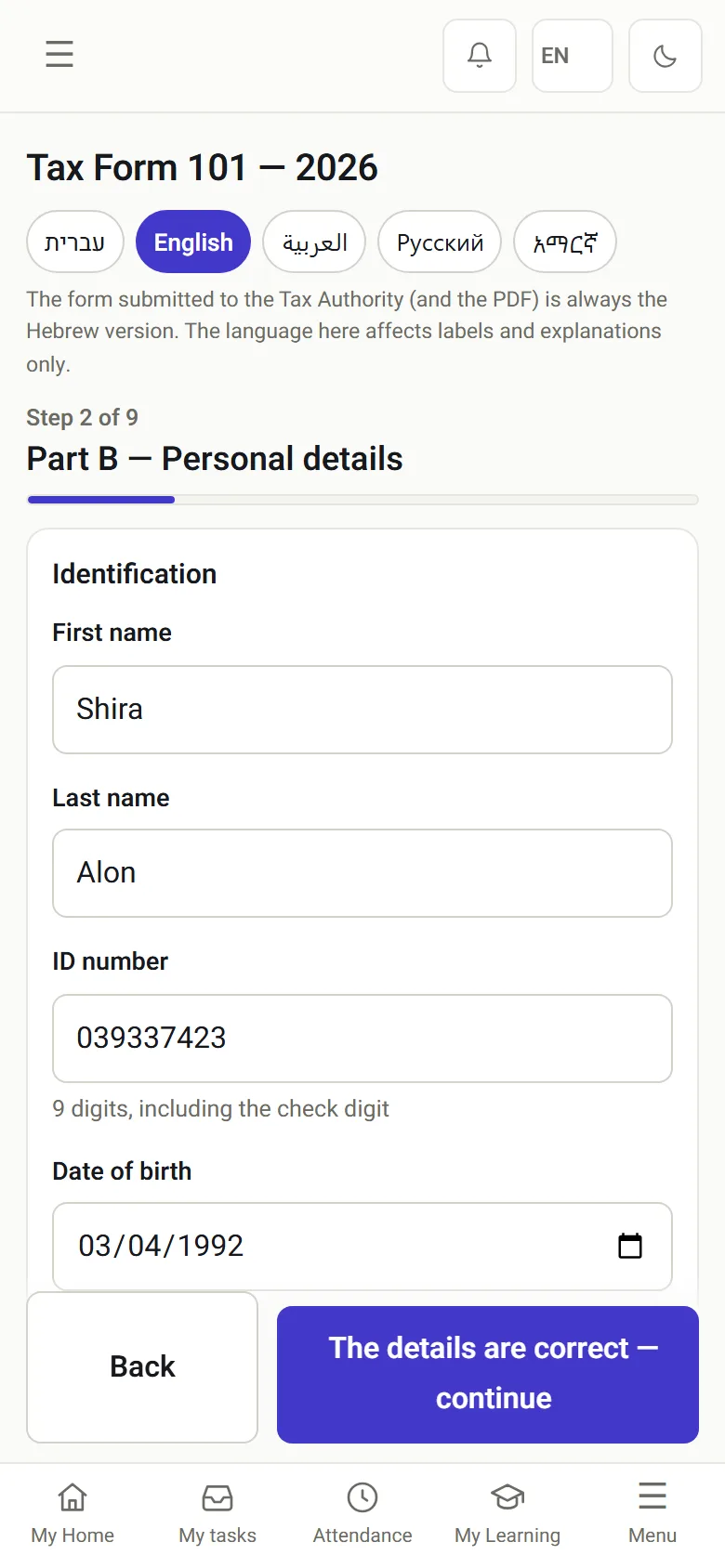
Employees get a phone wizard: personal details, documents and bank details. Form 101 arrives pre-filled from the recruiting details, in five languages including English. And the employee portal is open from day one.

Tip: field and shift workers complete the administrative part this way too, without coming to the office.

The full picture: digital onboarding.

Form 101 opened in English on a phone, pre-filled from the recruiting details
The employee portal on a phone on day one: tasks and updates

Get started

Onboarding that does not depend on anyone’s memory

In the demo we open onboarding for a sample employee, complete it from a phone, and see how each item on the list closes and who gets a reminder when something is stuck.

Sources

Official sources for this guide

  1. Notice to Employee and Job Candidate (Terms of Employment and Screening and Hiring Procedures) Law, 5762-2002, Nevo (Hebrew)Section 1: written notice of the terms of employment no later than 30 days from the start of work. Section 2(d): a written employment agreement that includes all the details meets the duty.
  2. Employee card and request for tax relief and tax coordination by the employer (Form 101), Israel Tax Authority, gov.il (Hebrew)The form employees fill in for the employer at the start of work and at the start of every tax year, for calculating tax on the salary.
  3. Labor Inspection Organization (Provision of Information and Employee Training) Regulations, 5759-1999, Nevo (Hebrew)Regulation 3: briefing on preventing risks, repeated at least once a year. Regulation 6: the training log.
  4. Prevention of Sexual Harassment (Employer Obligations) Regulations, 5758-1998, Nevo (Hebrew)Regulation 2: bringing the prohibition and the policy to employees’ attention. Regulation 8: an adapted policy for an employer of more than 25 employees.

Nevo texts are consolidated versions; the authoritative text is the one published in the official gazette (Reshumot). All sources are in Hebrew. Sources checked on October 24, 2026.

Frequently asked

What people ask before they start

When should onboarding start?

On the day the agreement is signed, not the day the employee arrives. If several weeks pass before the start date, keep in touch along the way: a short message from the manager, and in the week before the start, practical details about day one. It also reduces the chance that a hired candidate changes their mind.

Which documents do you need from a new employee in Israel?

Usually: personal details and an emergency contact, a copy of the ID card, bank account details, Form 101 (the employee tax card) and the choice of a pension or provident fund. Depending on the role, add a confidentiality agreement, degree certificates, a professional license or a driving license. Ask only for what the role needs, and keep it in the employee file, not in email.

Who owns onboarding, HR or the line manager?

Both, with a clear split. HR owns the documents, permissions and the link with the payroll department. The line manager owns the welcome, professional training, goals and feedback conversations. Most failures happen when nobody was named for a particular item.

How long does onboarding take?

The administrative part usually closes before day one or during the first week. Professional onboarding takes longer, and this checklist covers the first month, which ends with a structured feedback conversation.

How do you onboard employees who have no computer?

Build the process for the phone: a personal link, details and documents from the phone, ID photos taken with the camera, and clocking in from the phone. Field, production and shift workers complete the administrative part this way without coming to the office.

How do you know onboarding is finished?

When every item on the list is closed: documents in the file, details sent to the payroll department, equipment handed over, permissions active, and the month-end feedback conversation held. It is worth having one person mark the close explicitly, so an open item does not quietly disappear.


Get started

Book a demo

Leave your details and we will get back to you within one business day to set a time for a 30-minute demo on your own processes. If it turns out not to be a fit, we will say so.

About the details you share. Data controller: Career and Content ltd (operator of HR AI), company no. 515523934, [email protected]. You are not legally required to provide them; without a name and email we cannot get back to you, and that is the only consequence. The information is used to respond to your inquiry, kept for up to 24 months, and shared only with our email provider and our sales team. You may review, correct or delete it at any time at the same address — Privacy Policy (Hebrew), English summary.