Integrations and export

Payroll integrations for Israel: what we export, and how sure we are

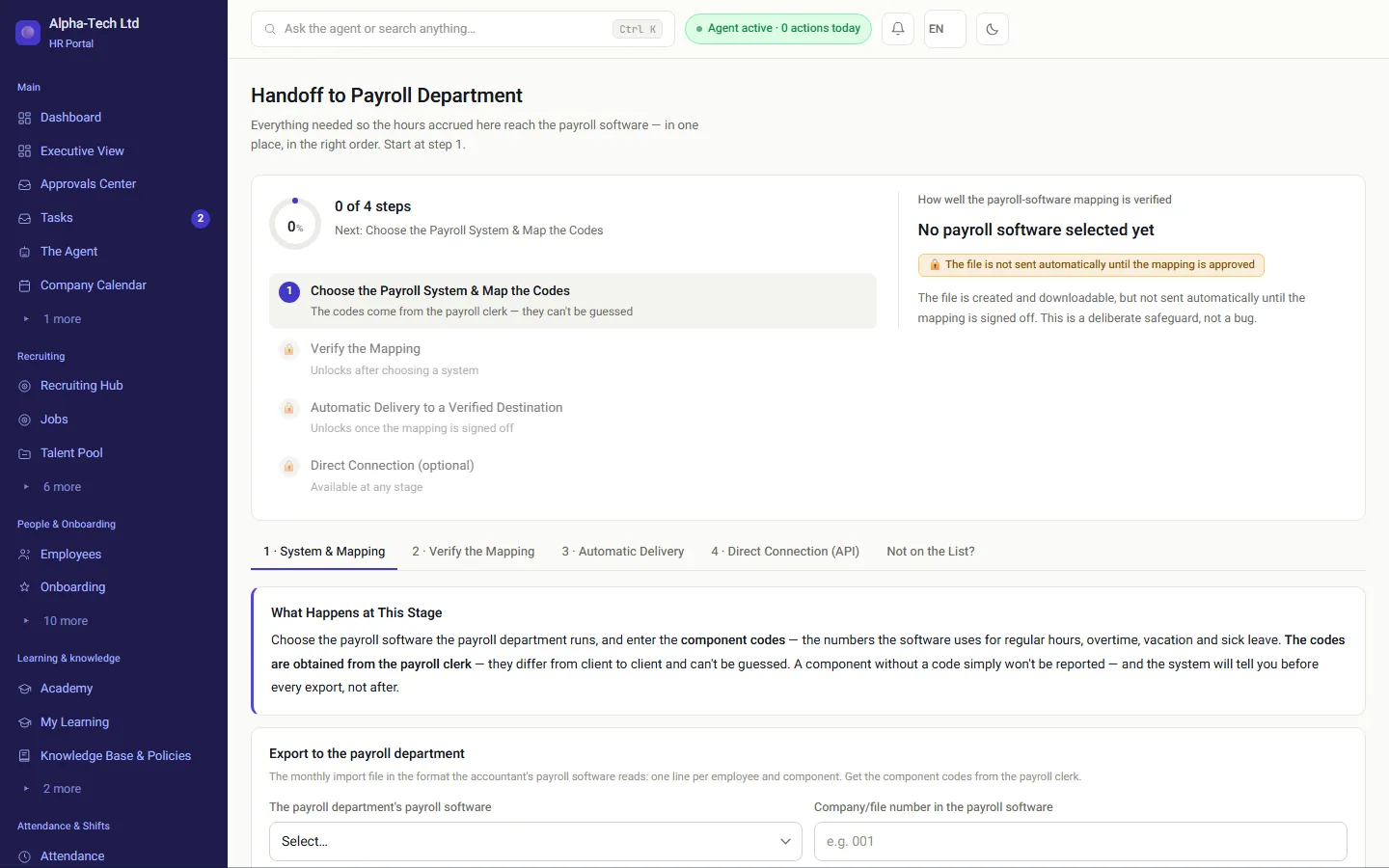
HRAI sends approved attendance and pay components to Israeli payroll systems through 13 connectors. Each connector states a confidence level, and a file whose critical field is only an assumption is held: generated and reviewable, but not sent until a payroll accountant signs off the mapping. HRAI prepares the inputs; your payroll department keeps calculating pay.

One Michpal QDIV record, 62 characters, exactly as HRAI generates it
104Company no.3
2607Year-month4
000004471Employee no.9
305123457ID no.9
בGross1
0—1
122Component3
0000018250Quantity10
+±1
0000000000Price10
+±1
000Client3
······Filler6
1Type1

Each field carries its own confidence level. For Michpal and Shiklulit (TAMAL) the structure comes from the vendor’s official document; for systems that have not published a specification, the fields are marked as assumptions and the file is held until a payroll accountant signs it off. The one-character gross field holds a Hebrew letter, as the specification defines it.

Last reviewed

For readers outside Israel

How does payroll work for an Israeli company?

Israeli payroll is usually calculated by a payroll department: an in-house team or an external payroll service, working in a local payroll system. HRAI does not replace it. HRAI collects and approves the inputs, attendance, leave, expenses and changes to terms, and delivers them in the format that payroll system imports.

The monthly hand-off

One approved month, delivered in your payroll system’s format

  • Attendance is approved before export; hours not yet approved are not counted
  • Hour components are sent as quantities, so the payroll system does its own calculation
  • Expense reimbursements and travel allowance are sent as amounts
  • Delivery by file, SFTP or API, depending on the connector
In practice: the exact structure is checked once with your payroll department during setup.
The HRAI payroll hub: the monthly report, export format and delivery to the payroll department
Approved monthattendance, leave, expensesHours: quantitiesExpenses: amountsTravel allowance:amountsPayroll departmentits own format · file, SFTP or API
Approved monthattendance, leave, expensesHours: quantitiesExpenses: amountsTravel allowance: amountsPayroll departmentits own format · file, SFTP or API
Quantities for hours, amounts only where the component is an amount by nature.

The list

Which payroll systems does HRAI connect to, and how sure is each one?

This table is derived from the connector catalog in the code, the same module that generates the files for customers. A new connector appears here by itself, and a confidence level that changes after calibration is updated here.

VerifiedVerified against a real import file that was accepted DocumentedFrom the vendor’s official specification InferredDerived from third-party integration documents AssumedOur best estimate, needs calibration before delivery
Payroll system connectors and their confidence levels
SystemConfidenceStructureDelivery
MichpalDocumentedFixed-width, 62 charactersSent directly
Shiklulit (TAMAL)DocumentedFixed-width, 126 charactersSent directly
Hilan / Hilan-TechAssumedCSV, structure set per customerHeld until the mapping is signed off
Oketz TrioInferredCSVSent directly
Harmony (Synel)AssumedCSV, structure set per customerHeld until the mapping is signed off
MeravAssumedCSV, structure set per customerHeld until the mapping is signed off
ShomritAssumedCSV, structure set per customerHeld until the mapping is signed off
HargalAssumedCSV, structure set per customerHeld until the mapping is signed off
Hashavim OtzmaAssumedCSV, structure set per customerHeld until the mapping is signed off
Malam PayrollAssumedCSV, structure set per customerHeld until the mapping is signed off
HashavshevetAssumedCSVHeld until the mapping is signed off
PriorityAssumedCSV, structure set per customerHeld until the mapping is signed off
Generic CSVDocumentedCSVSent directly

9 of the 13 connectors are currently in held delivery. That is not a gap, it is the statement: most long-established Israeli payroll systems do not publish their attendance import structure, and it is set per customer with the payroll accountant. “Verified” is reserved for a connector checked against a real accepted import file, and no connector is at that level today.

From attendance to payroll

How does a month get from HRAI to the payroll department?

Six stations. The two amber ones are gates: a file that fails the round trip, or whose mapping is not signed off, does not go out.

1ApprovedattendanceManual entriesapproved bysomeone else2Month lockedThe approved monthis frozen3File generatedIn the payrollsystem’s ownformat4Round-tripcheckParsed back fromthe samespecification5Readable twinThe payrollaccountant reviewsa table6Deliver or holdFile, SFTP or APIHeld untilsign-off ifassumed
1Approved attendanceManual entries approved bysomeone else2Month lockedThe approved month is frozen3File generatedIn the payroll system’s ownformat4Round-trip checkParsed back from the samespecification5Readable twinThe payroll accountant reviewsa table6Deliver or holdFile, SFTP or APIHeld until sign-off if assumed

How it is checked

How is a file checked without a vendor test environment?

A round trip for every fixed-width file

The file is generated, then parsed back by a parser derived from the same specification. A byte in the wrong position fails the check and the file is stopped. CSV has no positions to break, so there the readable twin is the check.

A confidence level on every field

Not on the connector, on the field. The connector’s level is set by its weakest field, because one field in the wrong position spoils the whole record.

Held delivery

A critical field at the assumed level means the file is generated and downloadable but not sent to the payroll department. The payroll accountant’s sign-off on the mapping is what releases it.

A readable twin for the payroll accountant

Every file gets a table: employee, component, code, quantity. The payroll accountant reviews that, not the ASCII.

Why all this is needed: long-established Israeli payroll systems have no test environment. There is no sandbox and no API to run an integration test against, and no way to know a file was accepted other than asking the payroll accountant. So correctness has to come from the structure itself.

For your accountant

Can the monthly report go straight to the accountant?

Set a destination

The CFO or HR enters an address and chooses which reports: hours, pay, or the payroll file.

The address confirms itself

One email with a one-time activation link goes out. Until it is clicked, nothing is sent there.

The report goes out monthly

On the chosen day, for the previous month. It can also be sent manually at any time.

A receipt stays behind

What was sent, to whom, how many employees, and a SHA-256 fingerprint of the file, with a backup to download again.

✓ on a number: a gate, where the next step waits for a person’s approval

A pay report requires pay permission for every employee in scope, not just some of them: a partial report sent to the payroll department looks exactly like a full one, and the difference only shows on the payslip. An hours-only report is not a sum of money, so it needs no pay permission, and it has no ID numbers, salaries or bank details in any column.

Not on the list

What if your payroll system is not in the catalog?

You submit a request from inside the system and attach what you have: the interface specification your vendor gave you, a historical import file your system already accepted, or the API documentation. We review it and build a dedicated connector, a file in your format or a connection to an external API.

The connector starts in held mode, because every field in the draft is marked as an assumption: it produces a file for review and does not send it to the payroll department until the payroll accountant signs off the mapping. One custom connector per company, at extra cost.

Ask about a system that is not listed

The bottom line

What can you check, rather than take on trust?

13payroll connectors in the catalog this page is built from
3with a structure from the vendor’s official document
9in held delivery, stated rather than hidden
0files sent after a failed round-trip check

What these numbers do not say: a connector that is not in held delivery is sent directly, and that includes connectors whose structure comes from an official document or from integration documents, not from a real import file that was accepted. That is why the confidence level is shown to the payroll accountant before every export.

Payroll accountant

Reviews the readable twin and signs off the mapping that releases a held file.

HR

Approves attendance and leave, and locks the month.

Finance

Chooses the accountant’s address and gets a receipt for every delivery.

IT

Sets up SFTP delivery where the connector uses it.

Guide: getting attendance to the payroll department without errors →

Why the hours record matters: Amendment 24 explained →

Frequently asked

What people ask before they start

Which payroll systems does HRAI export to?

To the main Israeli payroll systems, 13 connectors in all: Michpal, Shiklulit (TAMAL), Hilan / Hilan-Tech, Oketz Trio, Harmony (Synel), Merav, Shomrit, Hargal, Hashavim Otzma, Malam Payroll, Hashavshevet, Priority, Generic CSV. The generic CSV is accepted by most payroll departments, and there is a request path for a dedicated connector to a system that is not listed. A system that is not listed is not supported today, and we say so rather than claim to connect to everything.

What is the confidence level shown for each connector?

There are four levels: verified against a real import file that was accepted; documented from the vendor’s official specification; inferred from third-party integration documents; and assumed, our best estimate, labeled as such. We show it because some Israeli payroll vendors do not publish their attendance import structure, which is then set per customer with the payroll accountant.

What if our structure is different?

That is the normal case, not the exception. You upload one historical import file that your payroll system has already accepted, and HRAI aligns the specification with it and updates the confidence level. Alternatively, you attach the interface specification your vendor gave you.

How do you know a file is correct without testing it in the payroll system?

Every fixed-width export makes a round trip: the file is generated and then parsed back by a parser derived from the same specification. A single byte in the wrong position fails the check and the export stops. CSV has no fixed positions, so instead every file, of either kind, gets a readable twin, the same data as a table, which the payroll accountant reviews instead of raw ASCII.

Can the report go straight to our accountant?

Yes. You set a destination email address, and it must confirm itself through a one-time activation link before anything is sent to it. After that the report goes out monthly, and every delivery leaves a receipt with a SHA-256 fingerprint of the file that was sent and a backup copy you can download and compare.

What if our payroll system is not on the list?

There is a path for that. You submit a request from inside the system with the interface specification or a sample import file, and we build a dedicated connector, either a file in your format or a connection to an external API. It starts in held mode and produces a file for review, which is not sent to the payroll department until a payroll accountant signs off the mapping. One custom connector per company, at extra cost.

Do you send overtime as amounts or as quantities?

Quantities only for hour components, on purpose. Some payroll systems calculate the payment from the hours themselves, and sending an amount as well would cause a double calculation. Amounts are sent only for components that are amounts by nature, such as expense reimbursements and travel allowance.


Get started

Book a demo

Leave your details and we will get back to you within one business day to set a time for a 30-minute demo on your own processes. If it turns out not to be a fit, we will say so.

About the details you share. Data controller: Career and Content ltd (operator of HR AI), company no. 515523934, [email protected]. You are not legally required to provide them; without a name and email we cannot get back to you, and that is the only consequence. The information is used to respond to your inquiry, kept for up to 24 months, and shared only with our email provider and our sales team. You may review, correct or delete it at any time at the same address — Privacy Policy (Hebrew), English summary.