

Attendance · Mobile clock-in · Amendment 24

Mobile time clock for Israel: clock in from the portal, WhatsApp, an NFC tag or a QR code

A mobile time clock records clock-in and clock-out from the employee's own phone instead of a fixed terminal: a tap in the portal, a WhatsApp message, an NFC tag or a QR scan. HRAI records every punch with its time and method, and adds location only where the site requires it.

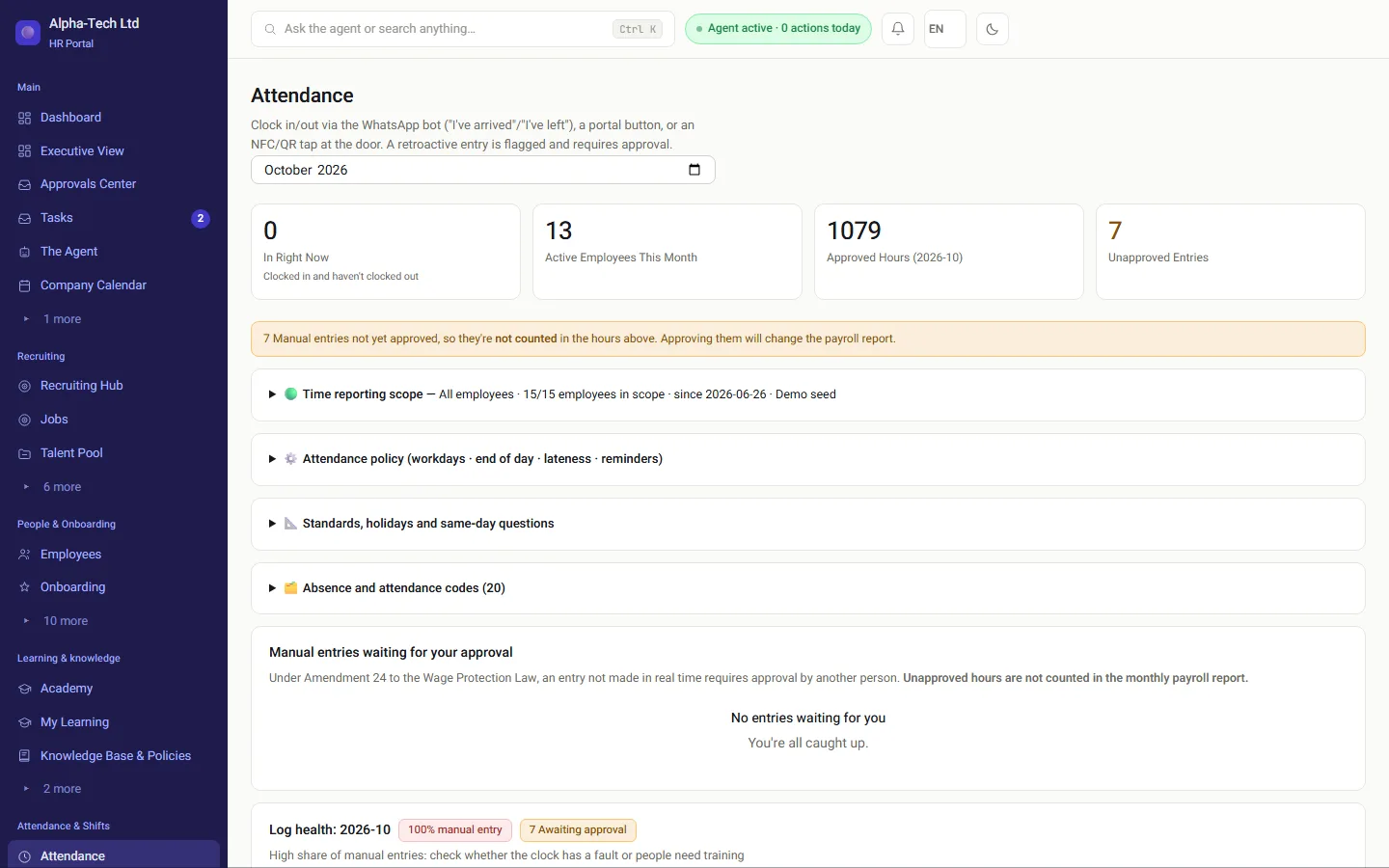
HR attendance screen: who is in right now, and manual entries not yet approved and therefore not counted in the hours
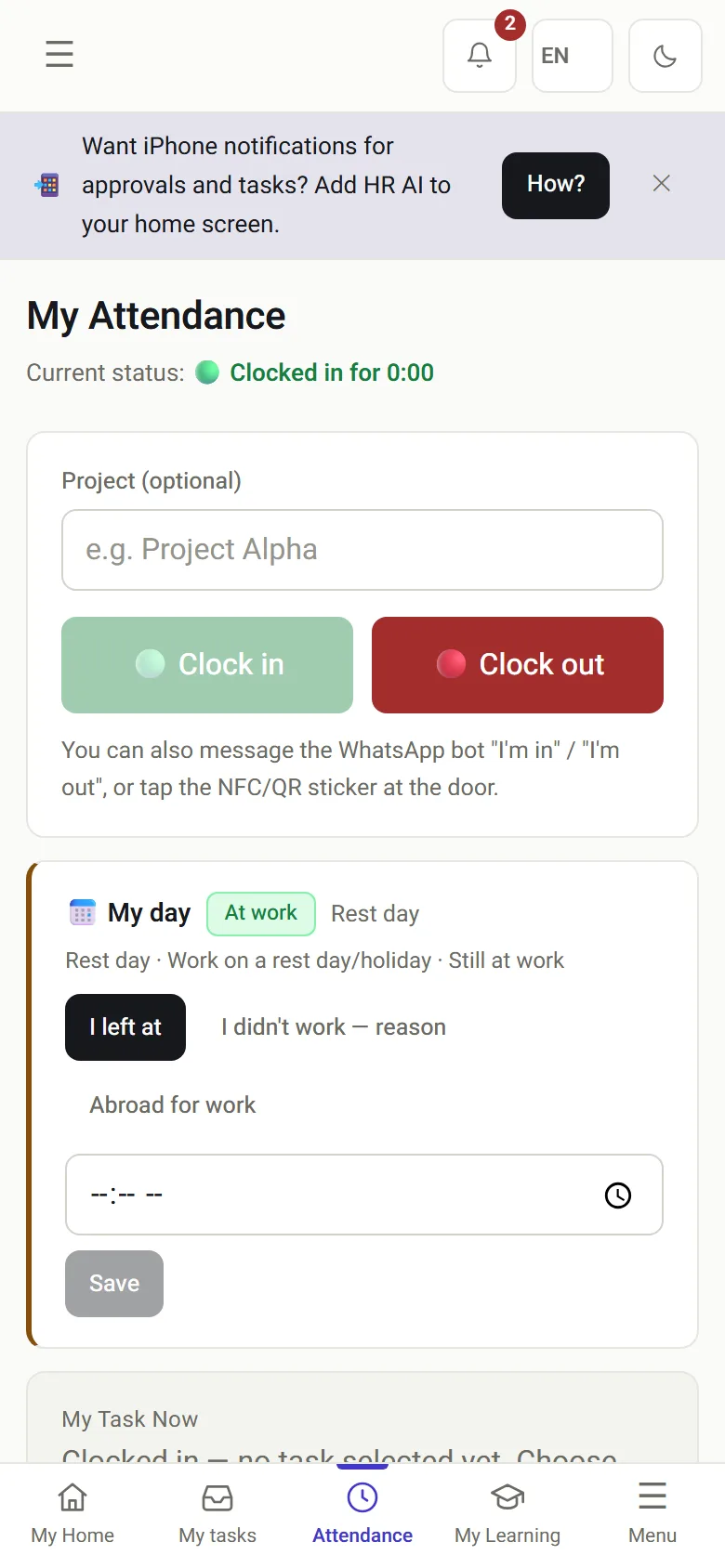
My attendance on a phone: status in, clock-in and clock-out buttons, and my day
The employee clocks in on the phone, HR sees the full picture.

Last reviewed

Definition

What is a mobile time clock?

In short

A mobile time clock is a record of working hours kept from employees' own phones. Instead of queuing at a terminal, each person clocks in from the device already in their pocket, and the entry goes straight into the attendance card, the planned shift and the monthly report for the payroll department.

Also called: attendance app, phone clock-in, WhatsApp clock-in, NFC time clock, QR time clock.

Who it is for

Who needs a time clock on the phone?

A mobile clock fits employees who do not sit in one office. The punch happens in the field, and the hours reach the payroll department without anyone copying them from a sheet.

Technicians at customer sitesThey start the day at the customer's address, not in the office.
Teams across several branchesEach branch with the clock-in method that suits it.
Working from homeA clock-in button on the phone, with no trip to a terminal.
Shifts at a site without a terminalAn NFC tag on the wall or a QR code, and that is it.

How it works in HRAI

From the first punch to the file for the payroll department

Whatever way employees clock in, it all lands in the same record. Manual corrections wait for approval, and the locked month leaves in the format the payroll department imports.

Clock-inPortal · WhatsApp · NFC · QR· PINDay record: time,method, siteManual entry: secondapproverLocked month: datafixedPayroll departmentFile · SFTP · API
Clock-inPortal · WhatsApp · NFC · QR · PINDay record: time, method,siteManual entry: secondapproverLocked month: data fixedPayroll departmentFile · SFTP · API
Several ways to clock in, one record, one file for the payroll department

Clock-in methods

Which ways can employees clock in?

Employee portal on a phone

Clock-in and clock-out buttons in the phone's browser. Fits working from home and at customer sites.

WhatsApp bot

Write clock in or clock out, and the bot replies with a confirmation and the time. Fits employees who do not want an app.

NFC tag

A tag fixed at the site, or a terminal with an NFC reader. Tap the phone or the tag, nothing to type.

QR code

The terminal shows a code that changes every few minutes. Scan it from the phone, including on an iPhone, with nothing to install.

Personal code at a terminal

For employees without a smartphone: type a personal code at the terminal on site.

01 · The employee

Clocking in from the phone already in the pocket

In the portal it is one tap. On WhatsApp it is a one-word message. Either way the entry lands in the same attendance card.

Clocking in · WhatsApp chat

Clock in

Clock-in recorded at 07:58 · Central branch. Have a good shift!

Clock out

Clock-out recorded at 16:04. Today: 07:58–16:04.Times and site are illustrative. A manual completion of a day like this would go to someone else for approval.

My attendance on a phone: status in, clock-in and clock-out buttons, and my day

Location

Is location checked, and when?

For each site you decide whether to verify location, and how: a virtual fence around the registered address, an approved network, or a tag and code physically at the site. Location is collected only at the moment of the punch, with no continuous tracking during the day. A punch the system is less confident about is not rejected: at sites where the organization has set this, it goes for approval.

07:0008:0009:0010:0011:0012:0013:0014:0015:0016:0017:00Clock-in · 07:58Location checked hereClock-out · 16:04Location checked hereDuring the day: no location trackingLocation is checked only at sites with location verification. A terminal at the site needs no location. Times are illustrative.
070911131517Clock-in · 07:58Location checked hereClock-out · 16:04Location checked hereDuring the day:no location trackingLocation is checked only at siteswith location verification.A terminal at the site needs none.Times are illustrative.
Two points a day, and no more

How the confidence score of each punch is built, and what each signal adds: attendance and clock-in verification.

HR

What happens to manual entries and missing days?

02 · Approval

A manual completion goes to someone else

Forgot to clock in? Complete it manually, and the entry is marked as such. It arrives in the approvals center, alongside leave and expenses.

  • The entry is marked as a manual completion, with who entered it and when
  • The approval belongs to someone else, not the person who entered it
  • Until it is approved, its hours are not counted in the payroll report
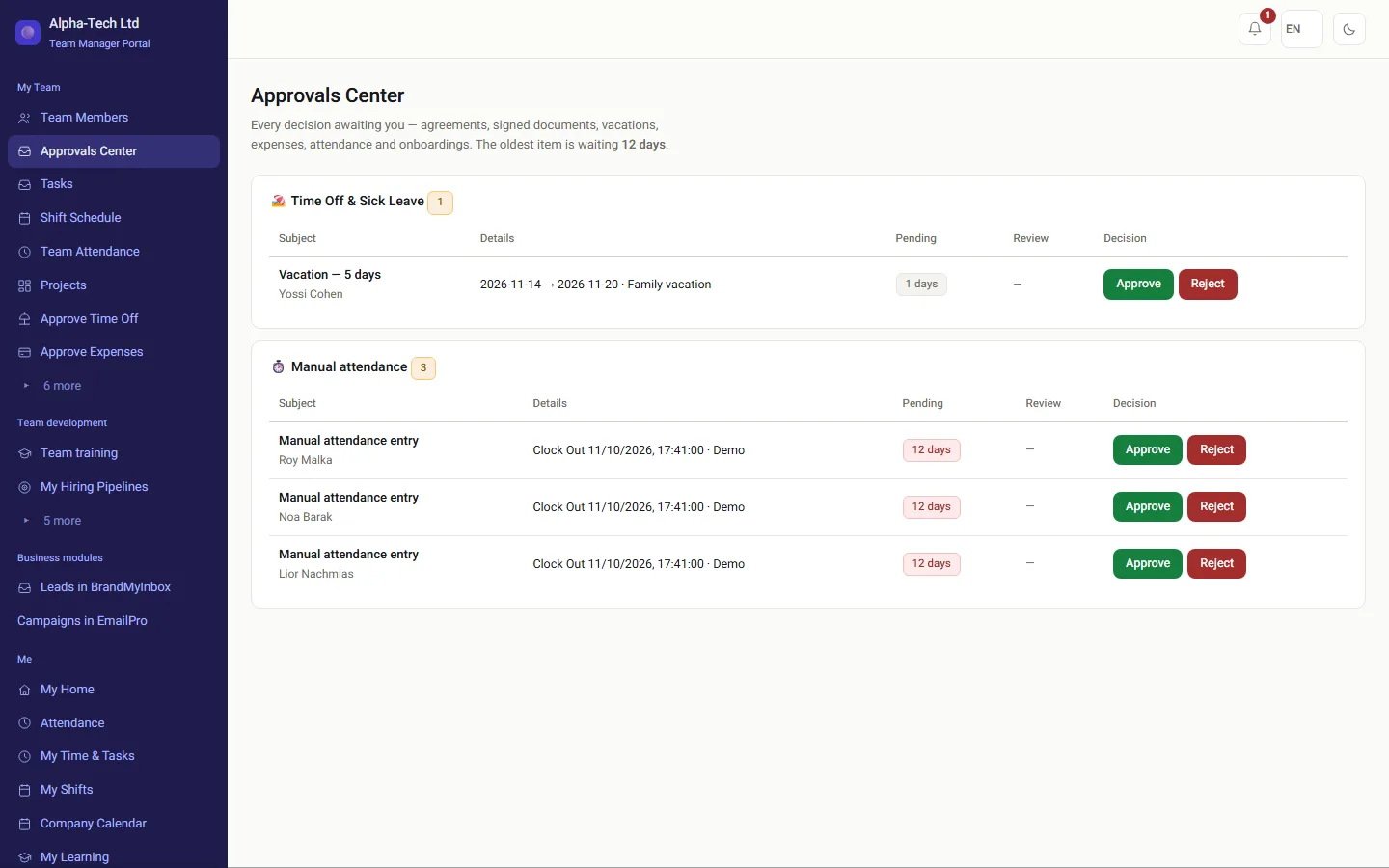
Approvals center: manual attendance entries waiting for approval, with approve and reject buttons
03 · Gaps

A day with no report does not vanish at month end

The attendance gaps screen shows every working day with a missing report, not only a card left open.

  • A holiday, reported absence or business trip is not counted as a gap
  • The bot asks the employee the same day, an hour after the expected start of the shift
  • A gap that is not closed goes up to the manager, and then to HR
In the demo: we clock in together on WhatsApp and in the portal, and watch a manual completion go to approval.
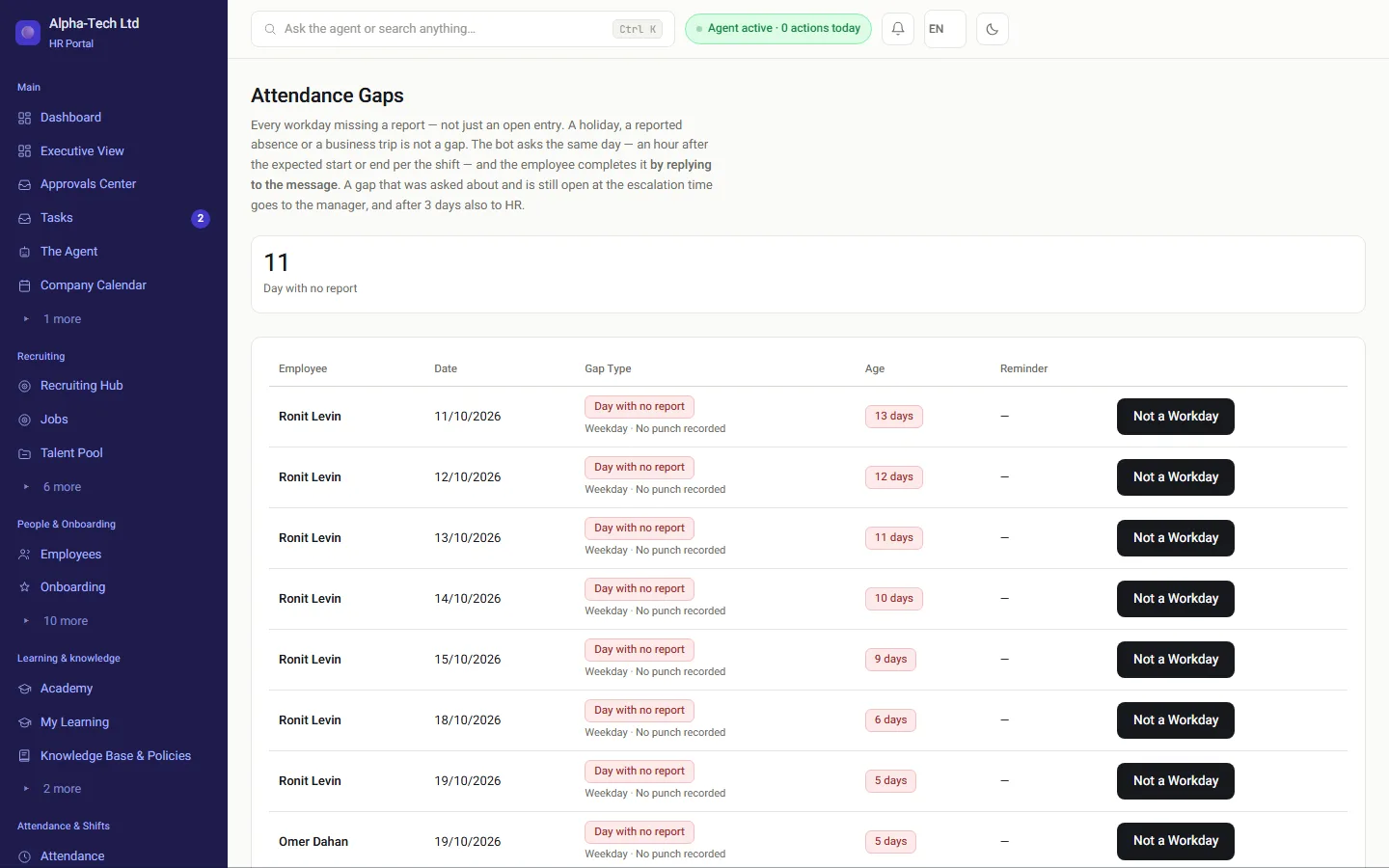
Attendance gaps screen: days with no report by employee, date and age of the gap
The full sequence, step by step

Set up sites

For each site choose the clock-in methods and decide whether to verify location. The employee list is loaded from a file.

Employees clock in

From the portal on a phone, on WhatsApp, with NFC, with QR or with a personal code at a terminal. Each punch keeps the time and the method.

Hours are matched to the shift

Each punch connects to the planned shift, and where needed to a task or project. Leave and sick days appear on the same board.

Manual corrections wait for approval

A manual completion is marked and goes to someone else for approval. Until then its hours are not counted for payroll.

Lock the month

Once the month has been checked it is locked, and from then on the data is fixed.

Export to the payroll department

The data leaves in the format the payroll department imports: as a file, over SFTP or through an API.

✓ on a number: a gate, where the next step waits for a person’s approval

Amendment 24

What does Amendment 24 require of an attendance record?

Amendment 24 to the Wage Protection Law (Tikun 24 le-Hok Haganat Ha-Sachar, תיקון 24 לחוק הגנת השכר) (2008) requires the payslip to show the number of hours actually worked. The same amendment added to the Hours of Work and Rest Law that the hours register is kept on an ongoing basis and includes the hours actually worked, and that a record not kept by mechanical, digital or electronic means is signed daily by the employee and approved by a person the employer appointed (source: Book of Laws, Knesset website (Hebrew)). The mobile clock is built around that record.

What is required An ongoing record of the hours actually worked What HRAI does Every punch is saved the moment it happens, with the time, the method and the site
What is required A record not kept by digital means is signed daily by the employee and approved by a person the employer appointed What HRAI does A manual completion is marked as such, with who entered it and when, and goes to someone other than the person who entered it
What is required The payslip shows the number of hours actually worked What HRAI does Only approved hours are counted in the payroll report, and the locked month leaves in the payroll department's import format
Ways to keep an hours record in Israel, compared
Paper sheetFixed terminalMobile clock in HRAI
Kept on an ongoing basisOnly if filled in dailyYes, at the terminalYes, at the moment of the punch
Employee signature on each dayRequired for a non-digital recordDigital recordDigital record
Manual correctionsIndistinguishable from the restDepends on the systemMarked, approved by someone else
Field and remote workHard to verifyNot coveredPortal, WhatsApp, NFC, QR; location per site
To the payroll departmentRetypedExportLocked month as file, SFTP or API

The full explainer, with a calculator: Amendment 24 explained · In detail: what an Israeli payslip must show.

Roles

Who sees what?

The employee

Clocks in from the phone, on WhatsApp, with a tag or a code, and sees their own day.

The manager

Sees the team's attendance and receives gaps that were not closed in time.

HR

Sees who is in now and what waits for approval, and locks the month.

The payroll department

Receives a locked month, in the format it imports.

Sources

Official sources for this page

  1. Wage Protection Law (Amendment No. 24), 5768-2008, Book of Laws 2162, Knesset website (Hebrew)
  2. Wage Protection Law, 5718-1958 (section 24 and the Schedule), consolidated version, Nevo (Hebrew)

Sources checked on . This page describes the product and general Israeli rules. It is not legal advice.

Frequently asked

What people ask before they start

Can employees clock in on WhatsApp?

Yes. At the start of a shift the employee writes clock in to the company bot (or the Hebrew word for "arrived"), and at the end clock out. The system records each clock-in with the time and the channel it came from, and replies in the employee's language. It suits employees who do not want to install an app, because WhatsApp is already on their phone.

How does an NFC or QR time clock work?

With NFC there are two options: a tag fixed at the site that employees tap with their phone, or a terminal with a reader that they tap a personal tag on. With QR, the terminal shows a code that changes every few minutes and employees scan it from their phone without installing anything. A code photographed yesterday is no longer valid.

Does HRAI track where employees are during the day?

No. There is no continuous tracking during the day. Location is collected only at the moment of clocking in or out, and only at sites where the organization has set up location verification. A terminal installed at the site does not need location at all.

What happens when someone forgets to clock in?

The entry can be completed manually. It is marked as a manual entry and waits for approval by someone else, who is not the person who entered it. Until it is approved, its hours are not counted in the payroll report.

Do employees have to install an app?

Not necessarily. The portal opens in the phone's browser, WhatsApp is already installed for most employees, and QR scanning works without an installation. For those who prefer it, there is also an app for iOS and Android. Whichever way an employee clocks in, the punch lands in the same attendance card and the same monthly report.

How do the hours reach the payroll department?

When the month has been checked it is locked, and the system produces the data in the format the payroll department imports. It is sent as a file, over SFTP or through an API, depending on what your payroll department works with.

Does Israeli law require a particular kind of time clock?

No particular device. Amendment 24 to the Wage Protection Law requires the hours record to be kept on an ongoing basis and to include the hours actually worked; a record that is not kept by mechanical, digital or electronic means must be signed daily by the employee and approved by a person the employer appointed. A mobile clock is one way to keep such a record.

Get started

Book a demo

Leave your details and we will get back to you within one business day to set a time for a 30-minute demo on your own processes. If it turns out not to be a fit, we will say so.

About the details you share. Data controller: Career and Content ltd (operator of HR AI), company no. 515523934, [email protected]. You are not legally required to provide them; without a name and email we cannot get back to you, and that is the only consequence. The information is used to respond to your inquiry, kept for up to 24 months, and shared only with our email provider and our sales team. You may review, correct or delete it at any time at the same address — Privacy Policy (Hebrew), English summary.