HR software for Israel · from the first role to the final settlement

One HR system for Israel, from the open role to the payroll department

HRAI is one HR system for companies that employ people in Israel. It runs recruiting, employment agreements signed on a phone, onboarding with a digital Form 101, attendance, shifts and tasks, then hands the payroll department a locked monthly file in the format it imports. Management opens one dashboard each morning.

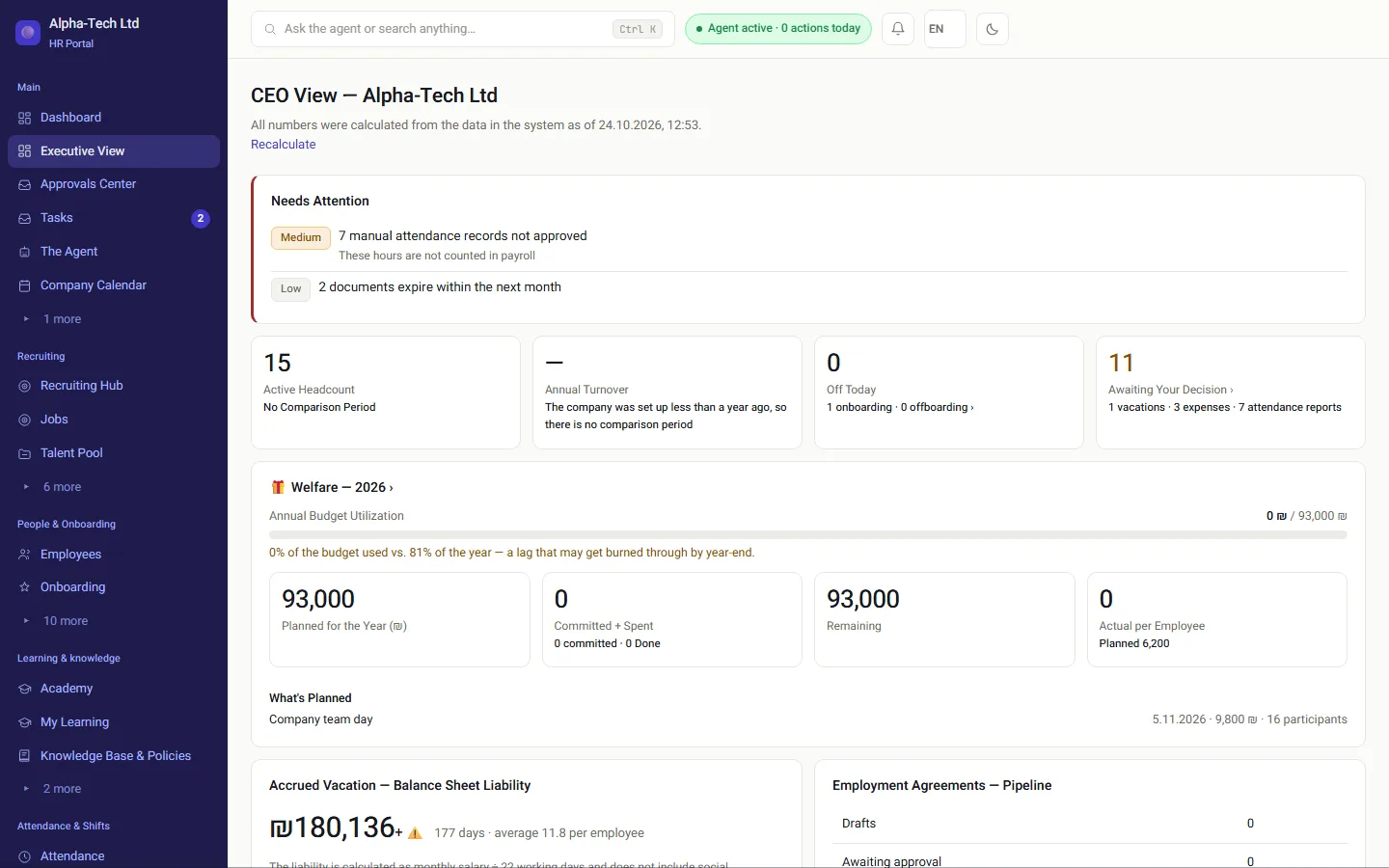
The CEO view in HRAI: what needs attention, headcount, who is on leave today, the wellbeing budget and the status of employment agreements
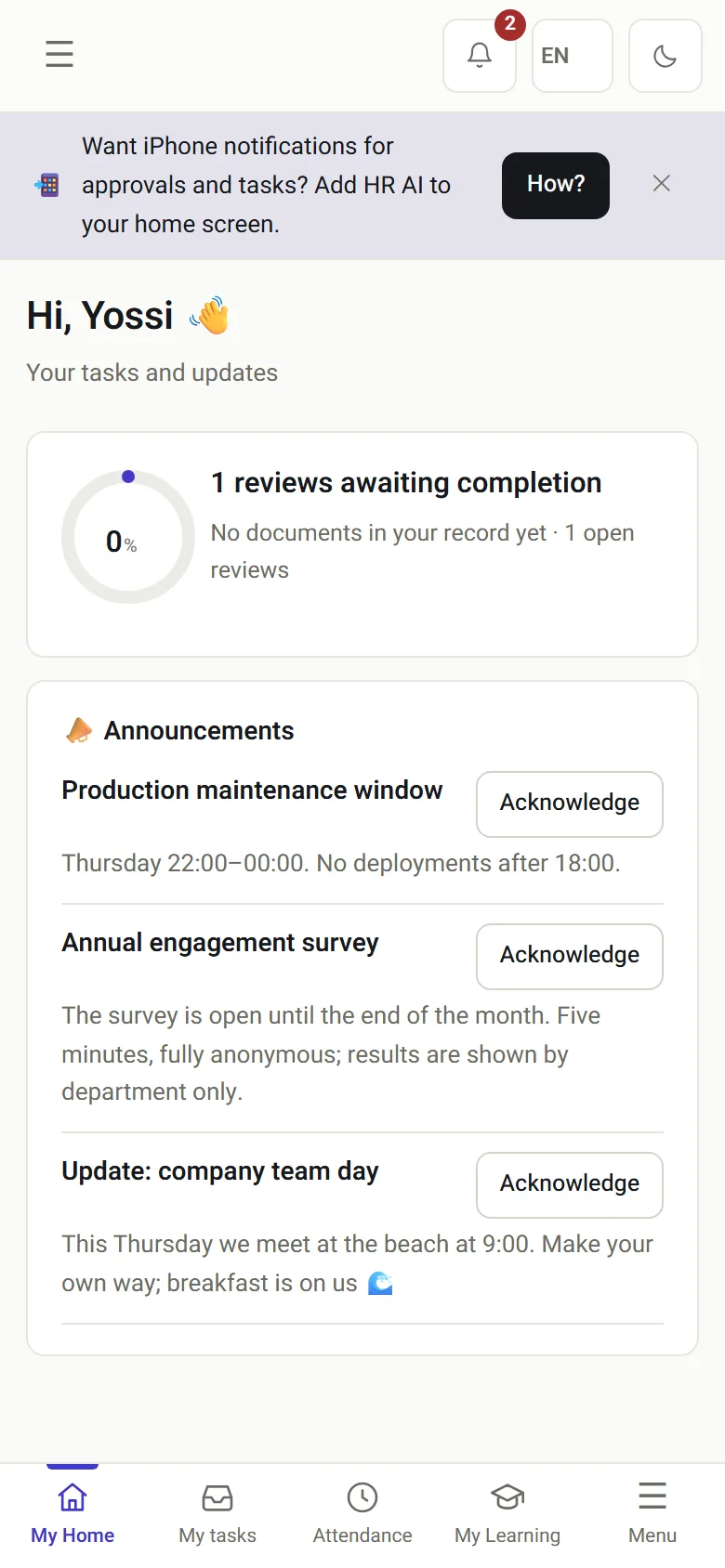
The employee home screen on a phone: tasks, messages and an offer to save the system to the home screen
The CEO view on desktop and the employee home screen on a phone, from the demo environment (fictional people and figures).

In one sentence

What is HRAI?

Definition

HRAI (HR AI) is an Israeli HR platform that runs the whole employee lifecycle in one system: recruiting, employment agreements with e-signature, onboarding with a digital Form 101, attendance and shift scheduling, and a monthly file for the payroll department. It is built for Israeli employment law and payroll practice.

In practice that means one record per person, from the first application to the last payslip input, and a system that does the follow-up: it reminds, escalates and documents, so the people who run HR can spend their time on people.

Where it hurts today

What does HR look like when every step lives in a different tool?

CVs everywhereIn email, in WhatsApp and on several job boards, with no single list of who applied and what was decided.
An agreement passed hand to handA Word file by email, a fix over the phone, and in the end nobody is sure which version was signed and when.
Onboarding stuck on one documentA paper Form 101, an ID copy that never arrived, and nobody knows who is holding it up.
Hours fixed in Excel on the last daySomeone corrects attendance a moment before it goes to the payroll department.
Without a system
  • Candidates scattered across email, WhatsApp and job boards
  • The agreement goes out as a file, and every change is another email round
  • Details retyped into the agreement, Form 101 and the file
  • An attendance gap is discovered at month end
With HRAI
  • Every candidate in one queue, with a match score and an owner
  • The agreement is sent from the candidate card, signed on a phone and kept with every version
  • Details from recruiting fill the agreement, Form 101 and the file
  • The gap is asked about on WhatsApp the same day, and the month closes clean

How it works

How does HRAI take a hire from the open role to payroll?

Six stations. Each one hands the next what is already known. You decide; the system takes care of the next step.

1RecruitingCareers page andan inbox per roleA match score forevery application2Send theagreementTemplate, approvedPDFor a one-off PDFwith a reasonDefault step3Two signaturesThe candidate,with an SMS codethen the companysignatory4Onboarding and101One file opens byitselfForm 101 arrivespre-filled5AttendancePhone, WhatsApp,NFC, QRManual fixes needapproval6PayrolldepartmentA locked monthin the format itimports
1RecruitingCareers page and an inbox perroleA match score for everyapplication2Send the agreementTemplate, approved PDFor a one-off PDF with a reasonDefault step3Two signaturesThe candidate, with an SMScodethen the company signatory4Onboarding and 101One file opens by itselfForm 101 arrives pre-filled5AttendancePhone, WhatsApp, NFC, QRManual fixes need approval6Payroll departmentA locked monthin the format it imports
An offer step before the agreement is optional: add it in the role's process or for a single candidate.

The stations

What happens at each station, in the real screens?

01 · Recruiting

Every candidate in one queue, with a score and an owner

CVs from the branded careers page, from the dedicated email address of each role and from your existing talent pool land in the same queue and get a match score against the role's requirements.

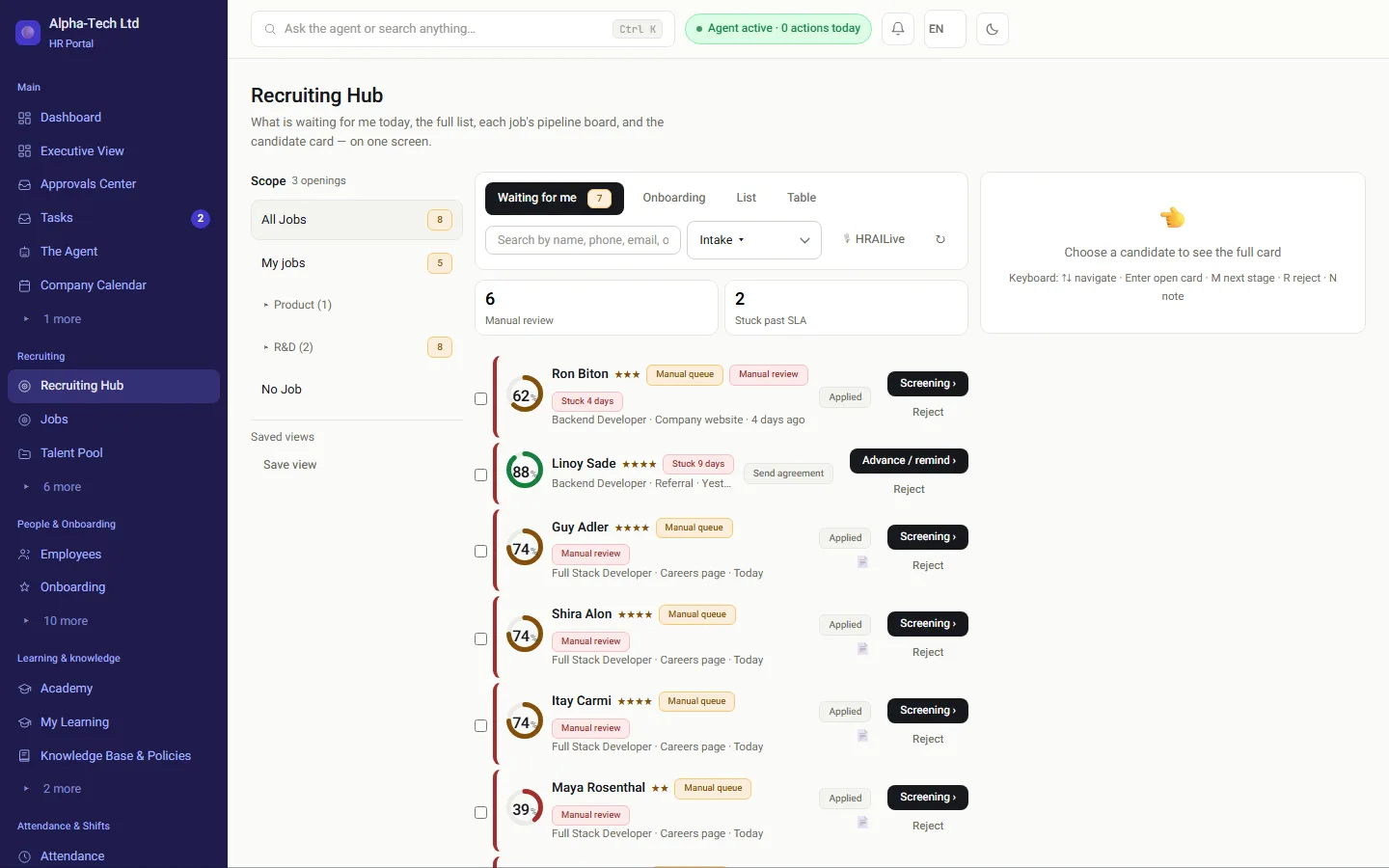
  • The recruiting center shows what is waiting for you: manual review, stuck candidates and what is scheduled for today
  • A candidate below the threshold goes to a manual review queue, never to automatic rejection
  • Emails to candidates are edited on screen and sent after approval

Recruiting in HRAI →

The recruiting center: screened and ranked candidates waiting for action
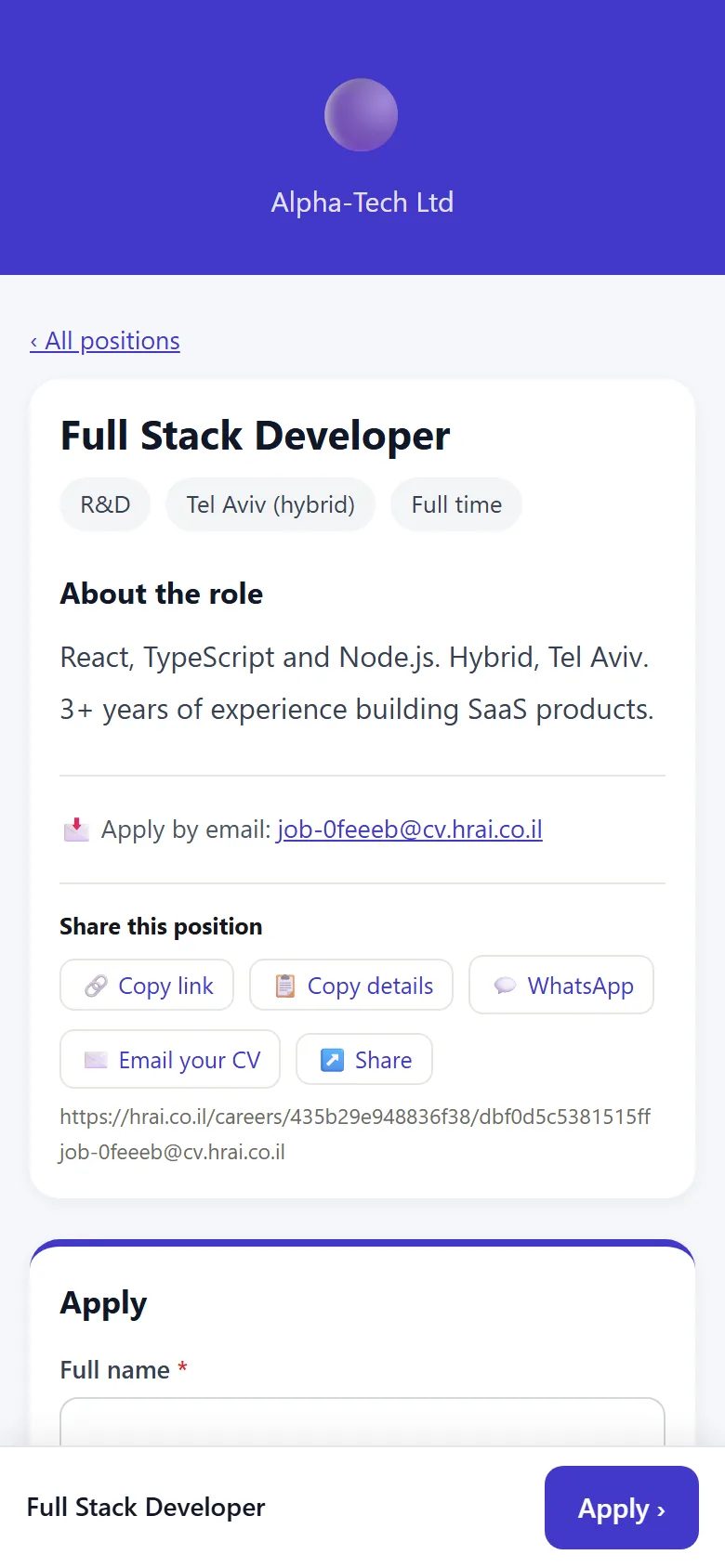
The company's branded careers page on a phone
02 · The agreement

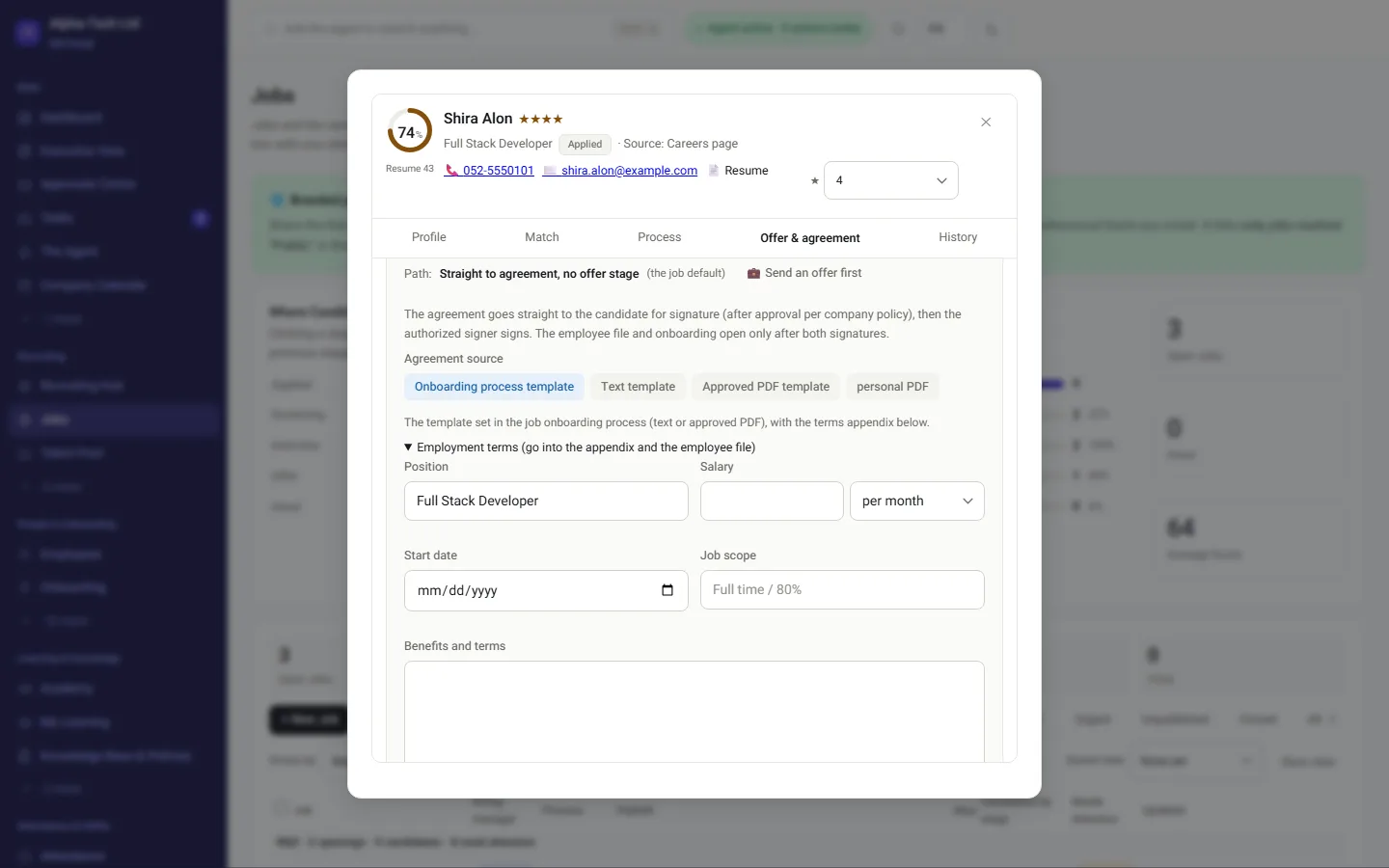
After the interviews, send the agreement straight from the card

The default is sending the agreement. An offer step before it is optional, per role or per candidate.

  • Four sources: the onboarding template, a text template, an approved PDF template, or a one-off PDF with a written reason
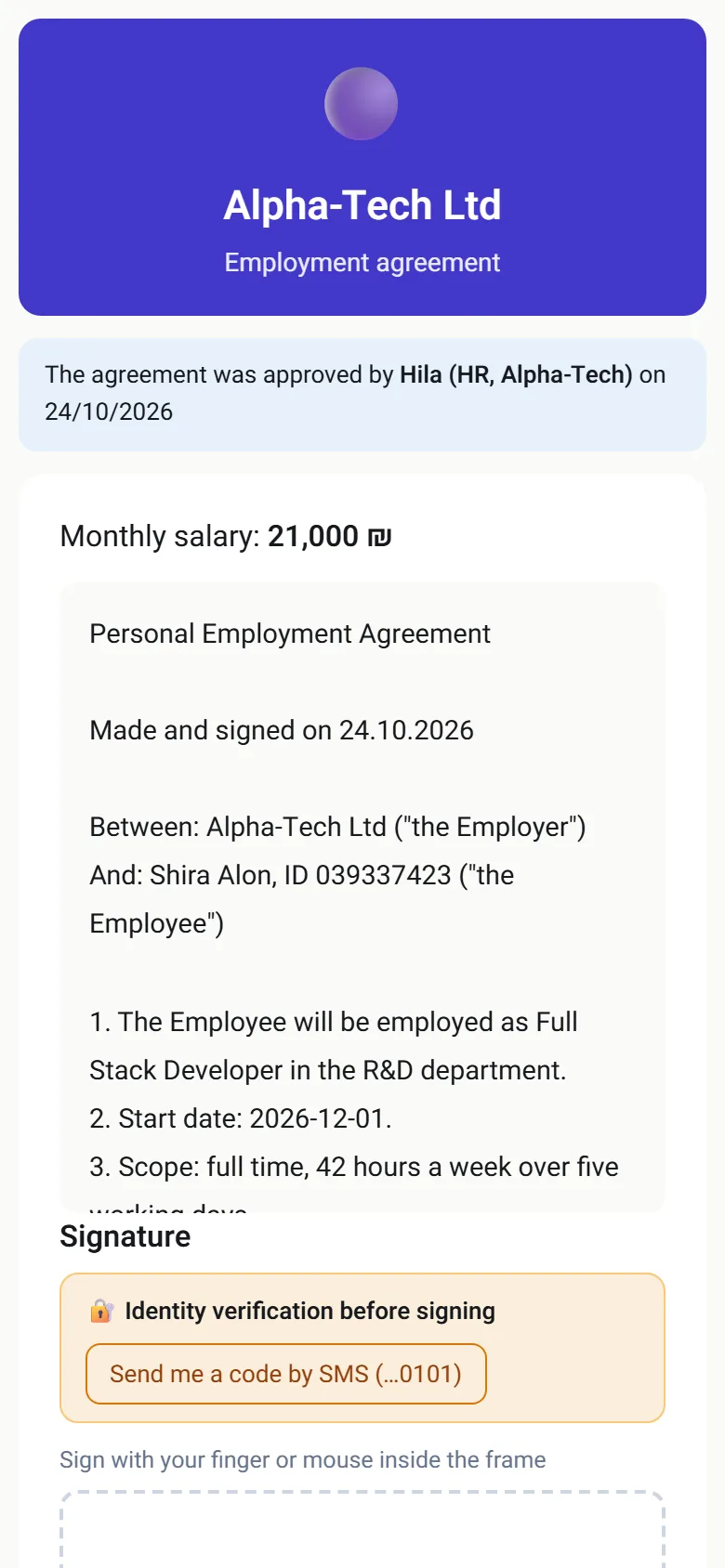
  • Approvals under company policy, then the candidate signs through a link with an SMS code
  • Once the company signatory signs, one file and onboarding open, with nothing retyped
  • Per role, you can allow change requests from the candidate and internal comments from the team
In the demo: send an agreement to a demo candidate, sign it on a phone, and watch the employee file open.

E-signing employment agreements →

The candidate card: send an agreement directly, without an offer step, and choose its source
The candidate's signing page on a phone: the agreement text and identity check by SMS code before signing
03 · Onboarding and Form 101

The file opens by itself, and Form 101 arrives half-filled

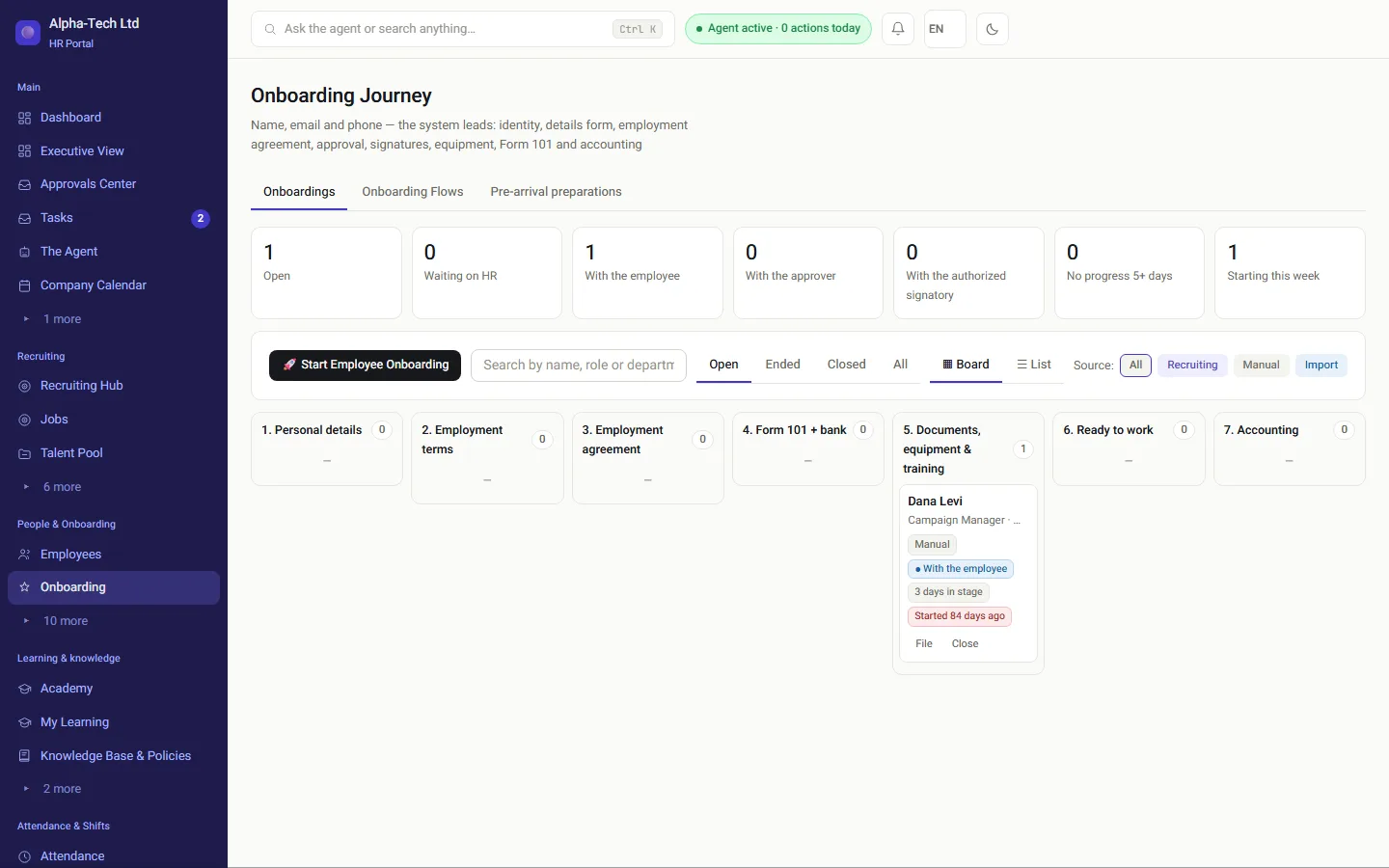
Onboarding moves along a board: personal details, terms of employment, the agreement, Form 101 and bank details, documents and equipment, and on to bookkeeping. Form 101 is the Israeli employee tax card: it tells the employer which tax credits to apply.

  • A personal link by WhatsApp or email, with no app to install and no password
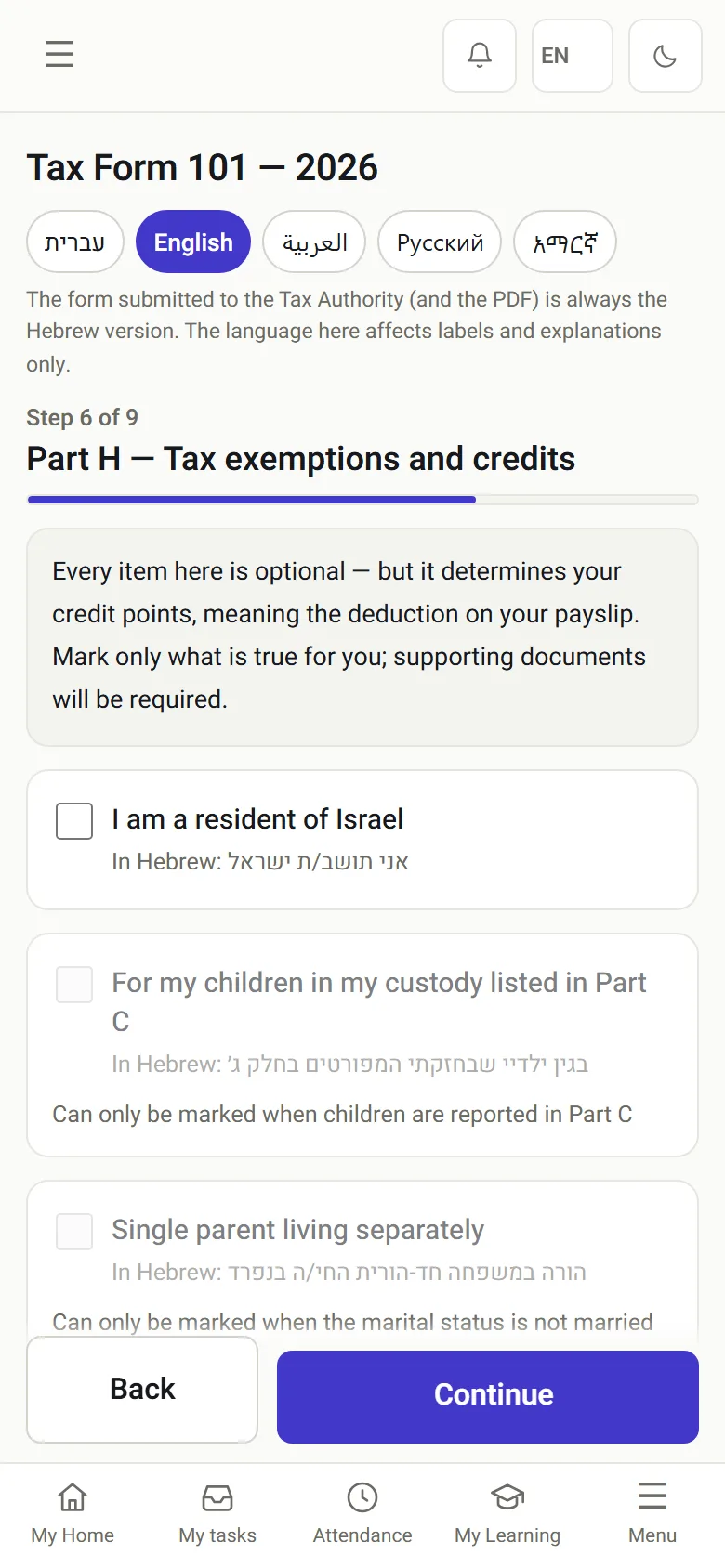
  • Form 101 in five languages, pre-filled from what the candidate gave during recruiting
  • A document that did not come back gets a reminder, and you see exactly who is holding it up

Digital Form 101 →

The onboarding journey: a seven-stage board with counters of what is waiting and with whom
Form 101 on a phone: progress by stage
04 · Attendance and shifts

Clock in from a phone, a terminal or WhatsApp

Every way of clocking in feeds the same record. A terminal at the entrance shows a rotating QR code, and an employee who is still being onboarded can already clock in with it.

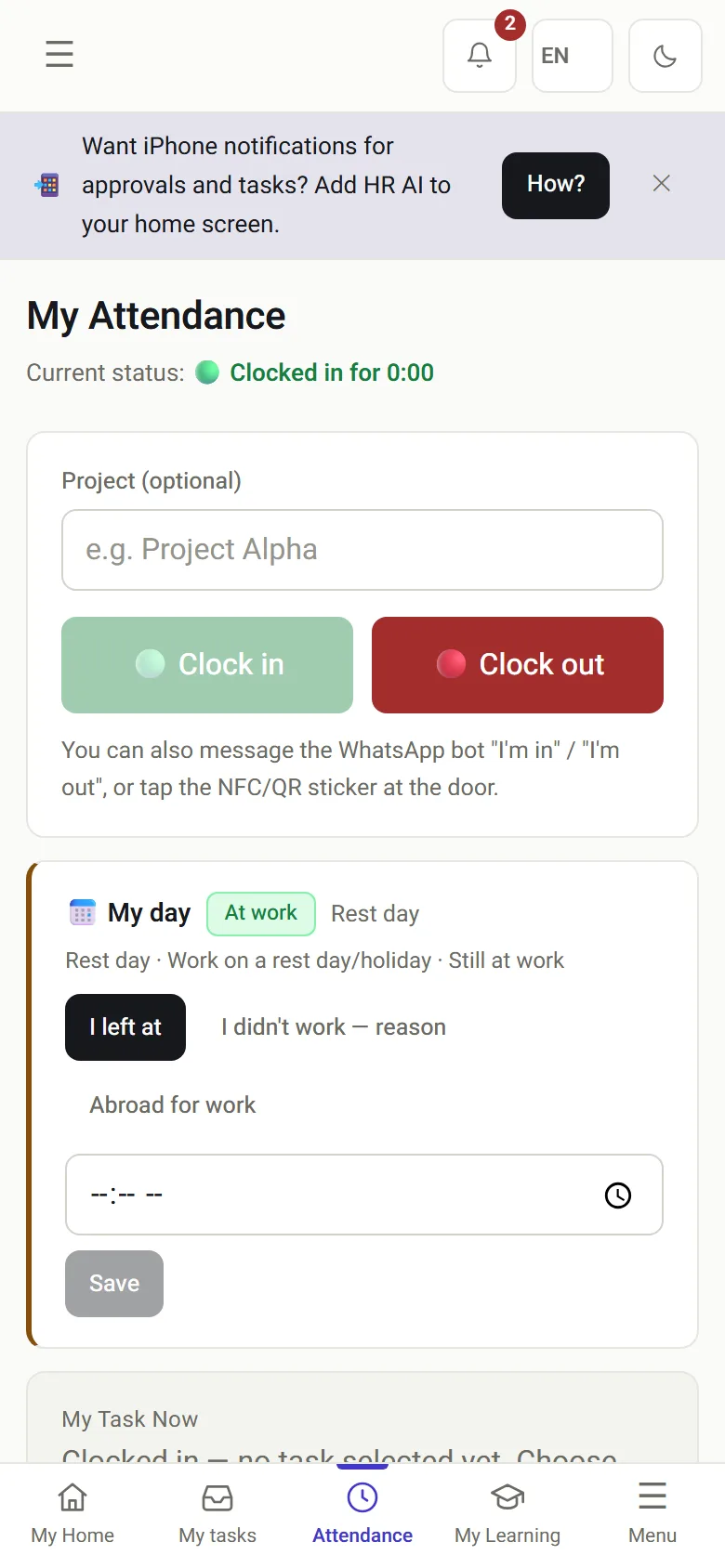
  • Clock in from the portal, the mobile app, WhatsApp, an NFC tag, a QR code or a personal code at the terminal
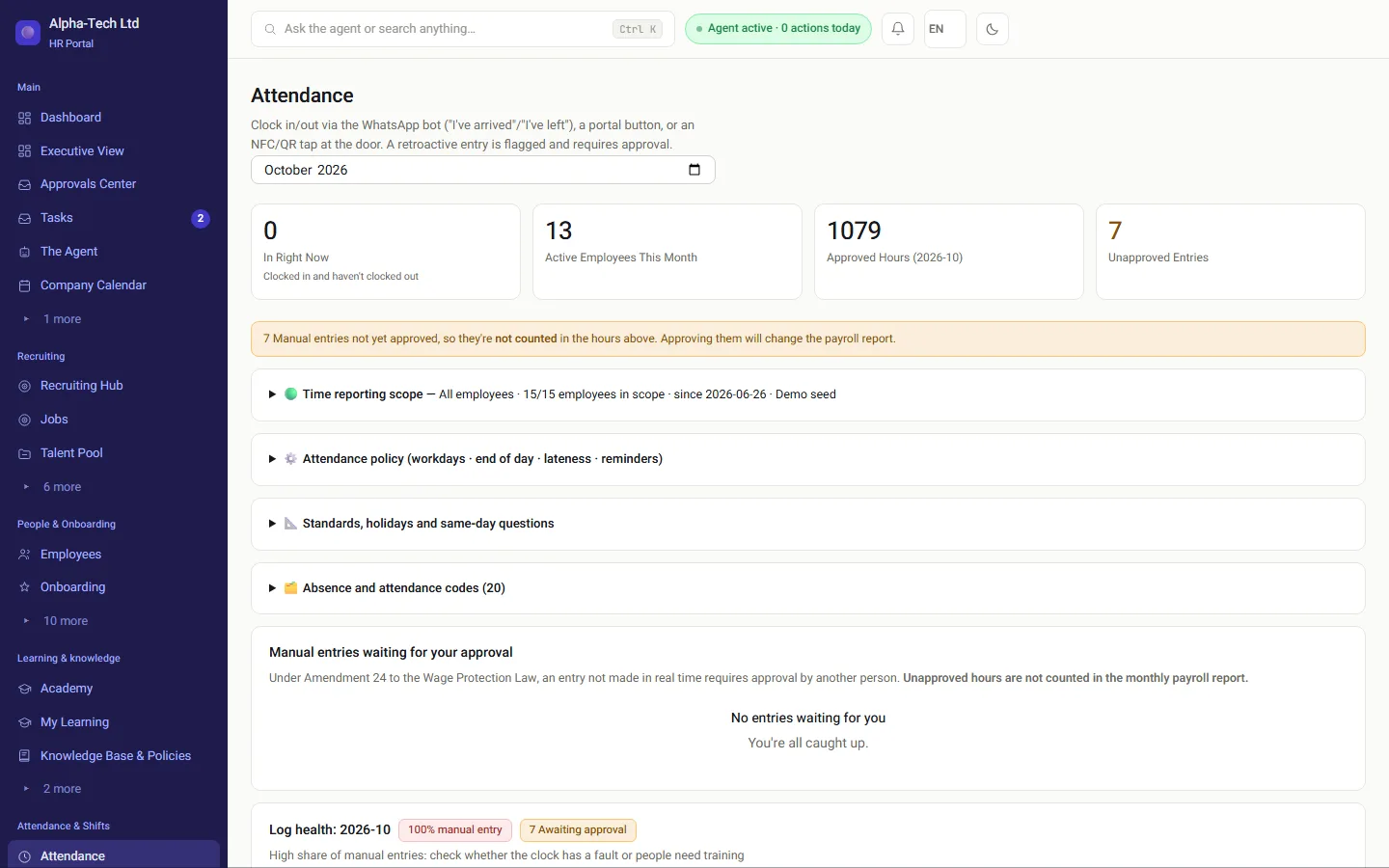
  • A manual entry is marked as manual and goes to someone else for approval
  • A shift roster built around the Hours of Work and Rest Law, and overtime from the company's threshold

Attendance in HRAI →

The HR attendance screen: who is in, and manual entries not yet approved
My attendance on a phone: clock-in and clock-out buttons
05 · The payroll department

A locked month leaves in the format your payroll department imports

Your payroll department keeps calculating pay. HRAI prepares the approved hours for it, in the file its payroll system imports.

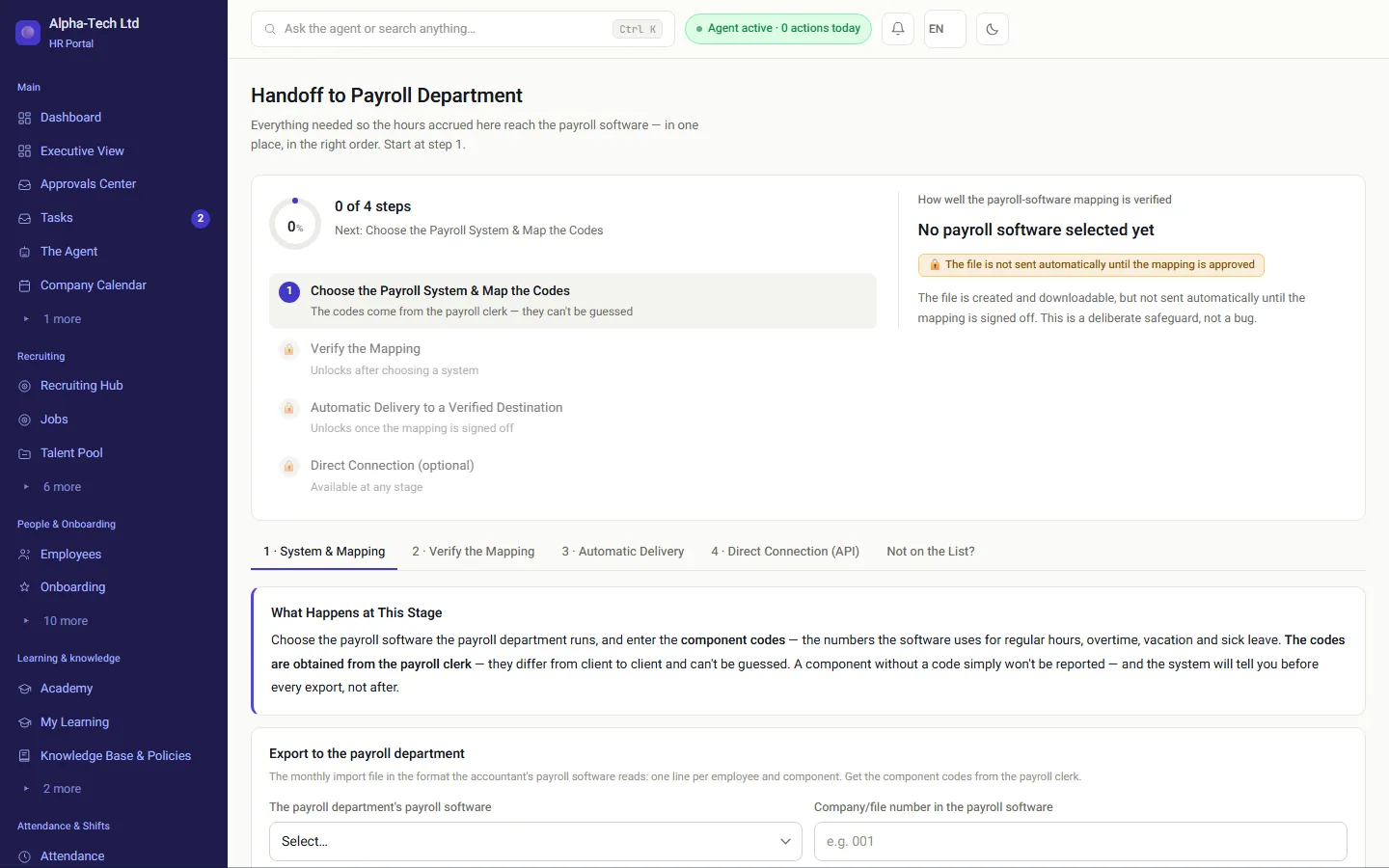
  • Choose the payroll system and map the pay-component codes once
  • The file is not sent automatically until the mapping has been approved
  • Regular hours, 125% and 150% overtime, rest-day and holiday hours as separate hour types

Leave, expenses and the payroll file →

Handing off to the payroll department: four steps, from choosing the payroll system and mapping to automatic delivery once the mapping is verified

Entered once

How does a detail entered once reach the payroll department?

The details candidates give during recruiting move into the agreement, Form 101 and the employee file, and nobody types them again. There are no two versions of the same person, and from there the approved hours go to the payroll department.

Candidate detailsName in Hebrew and English ·ID · addressEmployment agreementForm 101Employee filePayroll departmentFile, SFTP or API
Candidate detailsName in Hebrew and English · ID ·addressEmployment agreementForm 101Employee filePayroll departmentFile, SFTP or API

For foreign companies and English-speaking teams

Can a foreign company run its Israeli HR in HRAI?

Yes, and that is a common reason to choose it. If your headquarters are abroad and your team in Israel is growing, the Israeli rules have to be followed locally while the people who manage them may not read Hebrew. HRAI keeps the Israel-specific work inside the system and lets each user work in English.

  • Each user switches the interface between Hebrew and English
  • Employees fill in Form 101 in Hebrew, English, Arabic, Russian or Amharic
  • Israeli rules are built in: an attendance record under Amendment 24, roster limits from the Hours of Work and Rest Law, Form 101 and its yearly renewal, and the Hebrew holiday calendar
  • Pay stays with your Israeli payroll department, which receives a file in its own format
  • Need people as well as software? Outsourced HR in Israel runs the function for you, inside this system
What is specific to employing people in Israel, and how HRAI handles it
Israeli requirementWhat it meansIn HRAI
Form 101 (employee tax card)The employee declares personal details and tax credits at the start of employment and at the start of each tax yearA guided digital form on the phone, pre-filled, in five languages · Form 101
Amendment 24 to the Wage Protection LawA record of working hours, and a payslip that reflects actual hoursManual entries are marked and need someone else's approval; unapproved hours stay out of the payroll report · Amendment 24 explained
Hours of Work and Rest LawLimits on weekly hours, night shifts and rest between shiftsThe roster flags rest under 8 hours, weeks over 42 hours and night shifts over 7 hours · Shift scheduling
Payroll through a payroll departmentPay is usually calculated by an in-house or external payroll departmentA locked month in the file its payroll system imports · Payroll integrations

Tasks and follow-up

Who makes sure the whole team actually finished?

Tasks

One task for the whole team, even across several companies

A task opens for one person, a team, a department, a role or the whole company, and everyone gets their own copy. Whoever asked sees who finished and who is late.

  • A reminder before the due date, a reminder when overdue, and escalation to the requester or to HR
  • An onboarding stage or a document waiting for a signature opens a task by itself
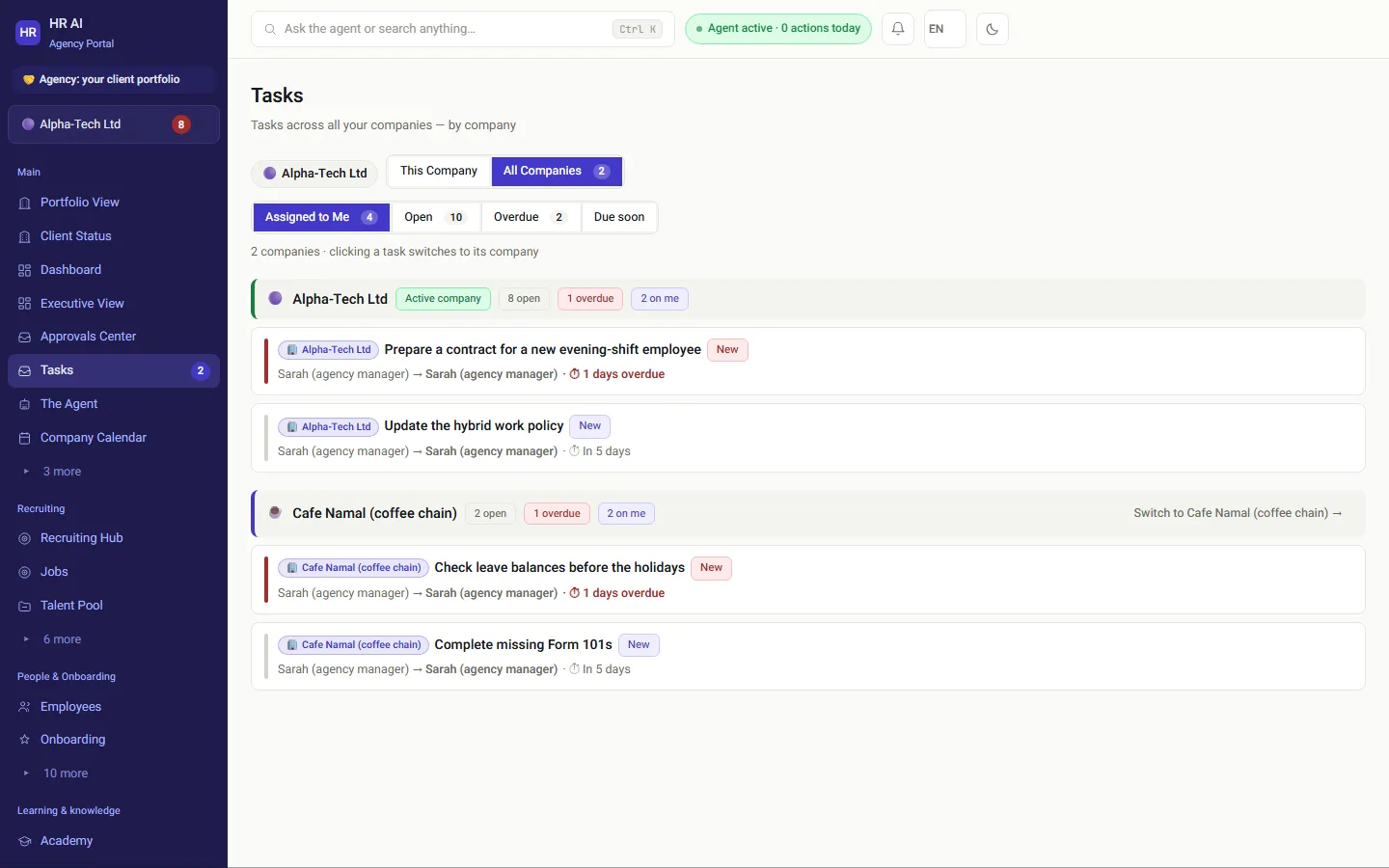
  • Running several companies? All companies shows your tasks from every company, with a company tag on every row
  • The company switcher shows open, overdue and assigned-to-you counts for each company
In practice: clicking a task from another company switches to that company and opens it. Managers and employees see only their own company.
Tasks in the all-companies view: grouped by company, with open, overdue and assigned-to-me counters
The all-companies view of the tasks screen, from an agency account in the demo.

On the phone

What can employees do from their phone?

Sign the agreement, fill in Form 101, clock in, request leave, submit an expense and tick off a task. The portal saves to the home screen like an app, and there is also an app for iOS and Android.

The employee home screen on a phone, with a banner inviting them to save the system to the home screen

My home

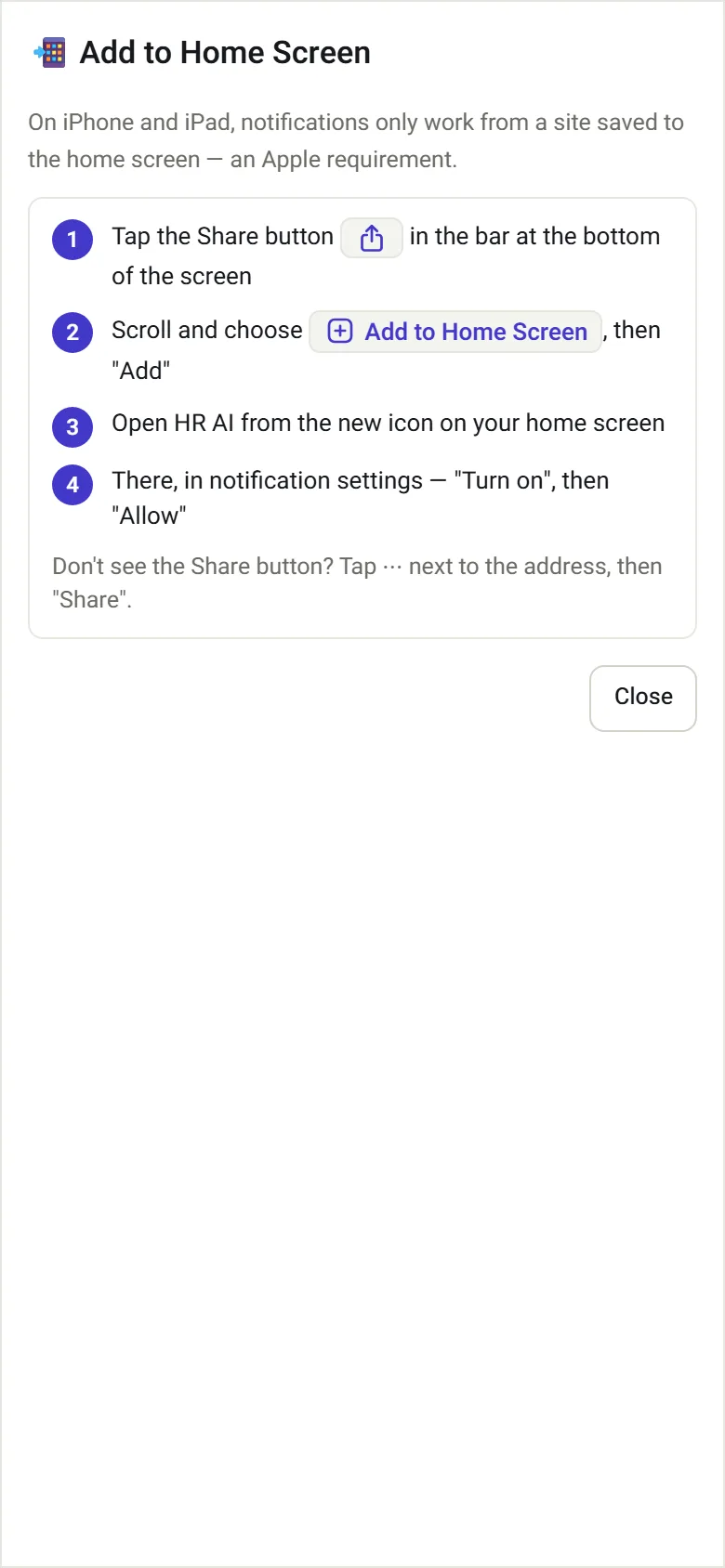
A guide to saving to the iPhone home screen: the share button, add to home screen, and turning on notifications

Save to home screen

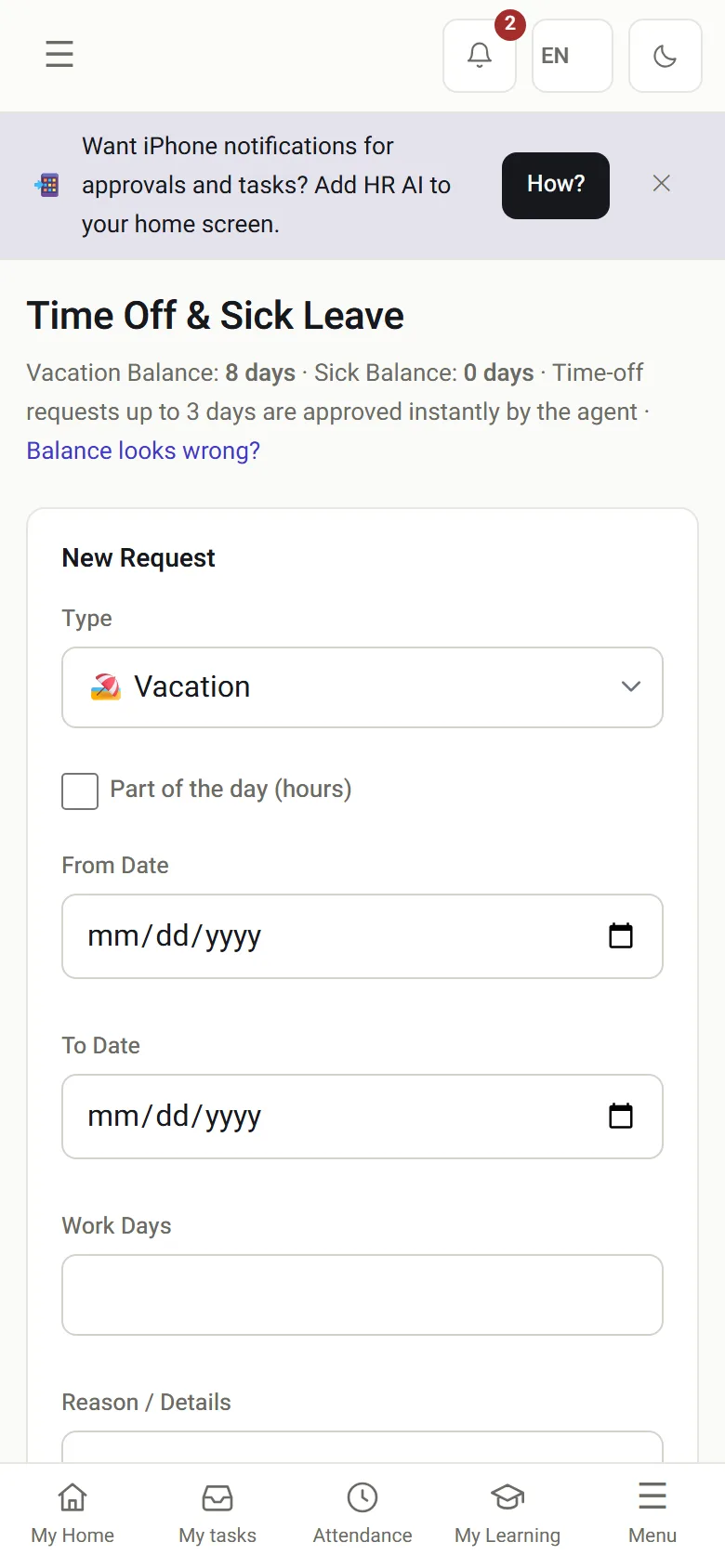
Leave and sick days on a phone: balances and a new request

Leave and sick days

On iPhone, notifications arrive only from a site saved to the home screen, so the system shows how to save it for each browser. On Android there is an install button.

AI with a person in charge

Where does AI help in HRAI, and what does it never decide?

Inside HRAI

  • Scoring CVs against the role's requirements, with a manual review queue below the threshold
  • An AI review of an agreement before the company signs: strong points, unusual clauses and changes from the template. A support tool, not legal advice
  • WhatsApp conversations that close attendance gaps, and answers to employees from company policies with the source quoted
  • A background agent at the autonomy level you set, with every action logged in the feed and the audit log

Your own AI assistant

  • Connect the AI assistant your company already uses to HRAI, through a personal connection issued to one user
  • It works with the permissions of the person using it, through the same routes as the screen
  • ID numbers and bank details are never returned to an assistant, even to someone who sees them on screen
  • A write is a request in the same approval flow as a click, and an outward action needs a second, confirmed step
Never automatic: decisions about a candidate or an employee, approving a change of bank details, ending employment or changing pay.

The AI agent and channels →

Who does what

What does each role see in HRAI?

Management

The CEO view, an AI review of an agreement before signing, and signing what needs an authorized signatory.

HR

Recruiting, agreements, onboarding, Form 101, attendance and tasks, across several companies from one account.

Recruiters

Roles, the candidate queue and match scores, and candidate emails edited on screen.

Managers

Their team, approvals and the process center. No pay data and no ID numbers.

Employees

Everything from the phone: signing, Form 101, clocking in, leave, expenses and tasks.

Payroll department

Receives a locked month and approved hours, in the format it imports.

HR as a service

Need someone to run HR for you? We can bring the people too

The HRBP team of Merav HR, led by Merav Sella, runs a company's HR inside this system: every hire, signature, task and approval the team handles appears on the screens you open in the morning.

Ongoing part-time HRAn HR manager on fixed days each week, reachable by phone and in the system in between.
Maternity leave coverA stand-in for your HR manager, from handover to a written hand-back file.
Embedded full-time HRAn HRBP who sits with you permanently, backed by a professional team.
A focused projectSetting up an HR function, volume hiring, a hearing, policies or a system migration.

In depth

Which part of HRAI do you want to see first?

Recruiting and talent pool

A branded careers page, an email address per role, match scores, and the agreement sent from the card.

Read more →

Onboarding and e-signature

An agreement with two signatures, a file that opens by itself, a pre-filled Form 101 and reminders.

Read more →

Attendance and clock-in verification

Phone, WhatsApp, a terminal with QR and NFC, a confidence score for every clock-in, and a record built for Amendment 24.

Read more →

Leave, expenses and the payroll file

Accrual by seniority, gaps closed on WhatsApp, two-step expenses, and a file for the payroll department.

Read more →

Shift scheduling

Rest between shifts, a weekly cap, approved swaps, and typed scheduling commands.

Read more →

Wellbeing budgets

Committed versus paid, a cap per event, RSVPs from employees, and a multi-year archive.

Read more →

Digital employee file

Pay agreements with countersignature, license expiry alerts and an audit log.

Read more →

Managers and sensitive processes

The process center, a lawful hearing and protected groups as built-in steps.

Read more →

The AI agent and channels

Autonomy levels, answers from company policies with the source quoted, and a WhatsApp channel for management.

Read more →

Custom screening assessments

Screening in Hebrew with confidence intervals, and a report that stays a draft until a professional signs it.

Read more →

Outsourced HR in Israel

An HR team that runs the function for you, with the system included in the service.

Read more →

Guides for employers in Israel

Payslips and Amendment 24, time clocks, shift rosters, onboarding, and offer letters versus agreements.

Read more →

Getting started

How do you start with HRAI?

Start with what hurts most and add modules when you are ready. Each module is switched on separately for each company, and everything connects to the same file and the same record. Data lives in the cloud on dedicated infrastructure, or on your own server in a full on-premises installation. Either way, separation between companies is enforced in the database layer too, and export is available at any time.

Thousandsof automated tests run on every change before it goes live
7roles with separate permissions, including fields that never reach the browser
5languages for Form 101 on the phone
2interface languages: Hebrew and English

Packages and modules →

Sources

Official sources for this page

  1. Wage Protection Law (Amendment No. 24), 5768-2008, Book of Laws 2162, Knesset website (Hebrew)
  2. Employee card and request for tax relief and tax coordination by the employer (Form 101), Israel Tax Authority, gov.il (Hebrew)
  3. Hours of Work and Rest Law, 5711-1951, Nevo (Hebrew)

Sources checked on . This page describes the product and refers to Israeli rules in general terms. It is not legal advice.

Frequently asked

What people ask before they start

Is HRAI really one system, or several products you have to connect?

One system. A detail is written once and carries forward: the chosen candidate becomes an employee with an open file and nothing retyped, the published shift roster is the expectation attendance is measured against, and approved hours are the hours that go into the payroll report. There is no export and import between modules, and no second source of truth for the same detail.

How does a candidate become an employee in HRAI?

After the interviews the default step is sending an agreement. You pick its source (the onboarding template, a text template, an approved PDF template, or a one-off PDF with a written reason), it goes through approvals under company policy, the candidate signs through a link with an SMS code, and then the company signatory signs. Only after both signatures do the employee file and onboarding open. An offer step before the agreement is optional.

Can we start with one module only?

Yes. Each module is switched on separately for each company, and a module that is off is closed, not just hidden: the screen is in nobody's menu and the server refuses the route even at a direct address. You start with what hurts most, recruiting, onboarding or attendance, and add the rest when you are ready.

We already work with a payroll department. Do we have to replace it?

No. Your payroll department, in-house or external, keeps calculating pay. HRAI produces the import file it receives. The split is deliberate: what most organizations lack is not a pay engine but the record that feeds it, and that record is also what an inspection asks about.

Where exactly is AI used, and what will it not do?

In places you can point to: scoring CVs against the role's requirements and first screening, an AI review of an agreement before the company signs, reminders and WhatsApp conversations that close attendance gaps, and a background agent at the autonomy level you set. AI never decides about an employee or a candidate. A candidate below the threshold goes to a manual review queue, not to rejection, and sensitive actions such as changing bank details are never approved automatically.

Is HRAI built for Israeli employment law?

It was built in Israel, for Israeli law. Amendment 24 to the Wage Protection Law is part of the architecture: a manual attendance entry is marked as manual, needs approval by someone else, and unapproved hours do not count in the payroll report. Alongside it: Form 101 and its yearly renewal, reserve duty as a protected group at termination, the Hebrew holiday calendar, 125% and 150% overtime, weekly rest, and a file in your payroll department's format.

Can an English-speaking team use HRAI?

Yes. Each user can switch the interface between Hebrew and English, and employees can fill in Form 101 in Hebrew, English, Arabic, Russian or Amharic. Israeli documents and official forms keep their Hebrew text where the law or the authority defines it, and the system explains them in the interface.

We manage several companies. Do we log in to each one separately?

No. Whoever runs HR for several companies switches between them in the company switcher, which shows open, overdue and assigned-to-you tasks for each company. The tasks screen also has an all-companies view, grouped by company with a company tag on every row. Managers and employees see only their own company.

What does management see in the morning?

One picture: headcount, what is happening in hiring, who joined this week, attendance, what is waiting for a signature, and the wellbeing budget against plan. All on one screen, without asking anyone for a report.

Do you also offer an HR service, not just software?

Yes. The HRBP team of Merav HR, led by Merav Sella, runs outsourced HR: ongoing part-time or full-time, as maternity leave cover, or as a focused project. The system is included in the service, and everything the team does stays recorded in your account.

What happens if we decide to leave?

Your data can be exported at any time, including signed documents and their full record. There is no technical lock-in and no waiting period. You can also install the system on your own server from the start.


Get started

Book a demo

Leave your details and we will get back to you within one business day to set a time for a 30-minute demo on your own processes. If it turns out not to be a fit, we will say so.

About the details you share. Data controller: Career and Content ltd (operator of HR AI), company no. 515523934, [email protected]. You are not legally required to provide them; without a name and email we cannot get back to you, and that is the only consequence. The information is used to respond to your inquiry, kept for up to 24 months, and shared only with our email provider and our sales team. You may review, correct or delete it at any time at the same address — Privacy Policy (Hebrew), English summary.