

Attendance and clock-in verification

At 08:04 an employee tapped a tag. This is what the system knows about it

HRAI attendance records every clock-in with its source and a confidence score built from independent signals, such as a rotating terminal code or an encrypted NFC tag. Employees clock in from the portal, the mobile app, WhatsApp or an office terminal. Manual entries need a second person’s approval, as Amendment 24 expects.

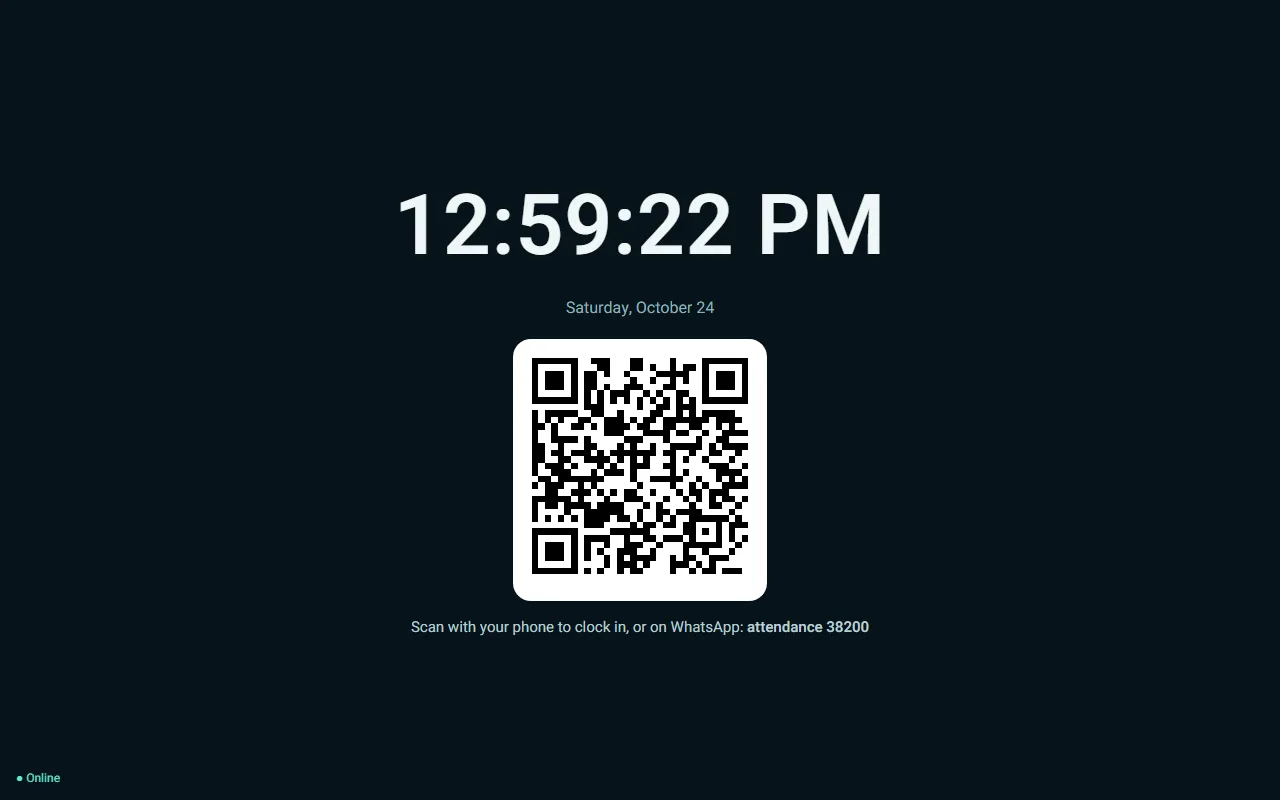
Attendance terminal at the entrance: clock, date, a rotating QR code and the option to clock in by WhatsApp
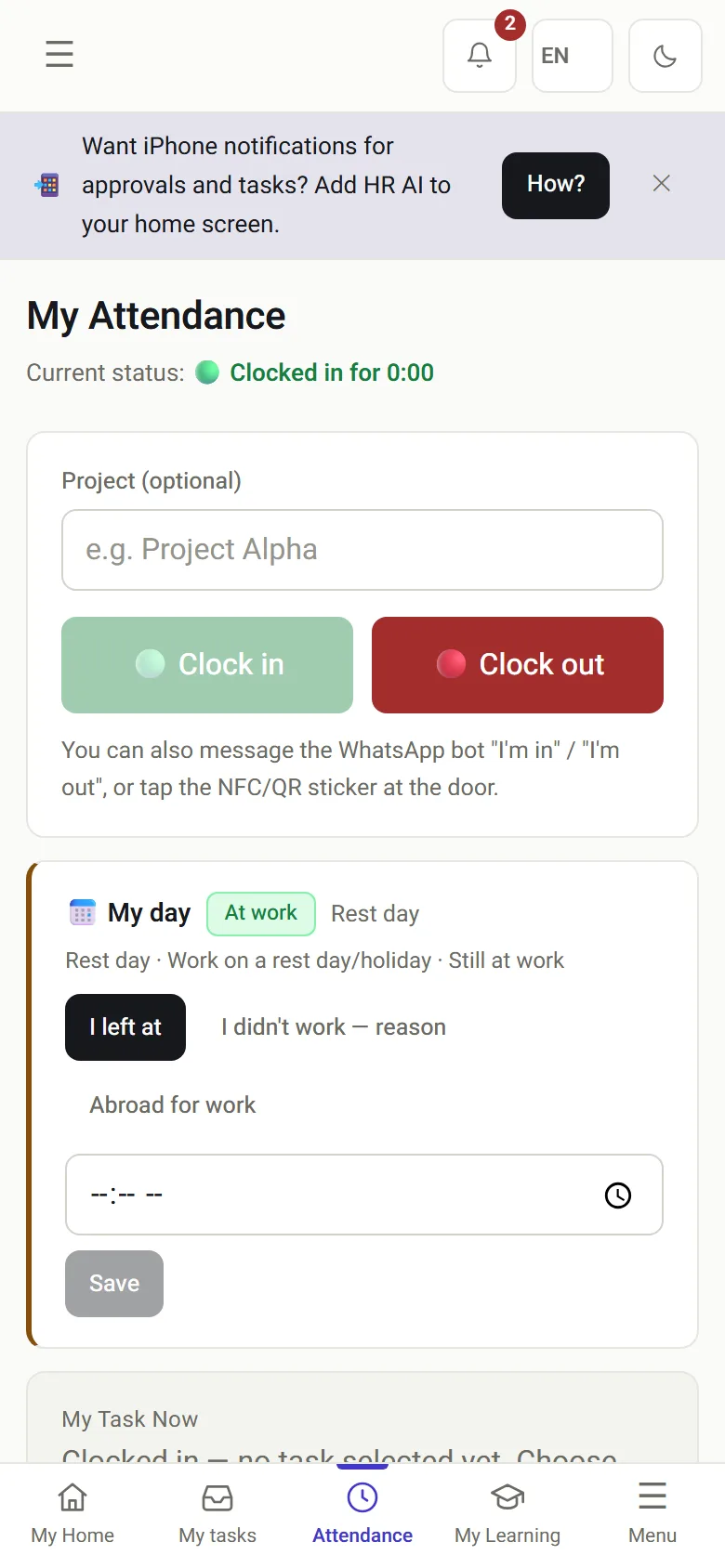
My attendance on the phone: status, clock-in and clock-out buttons
The entrance terminal and clock-in from a phone.

The problem

Why does “she clocked in at 08:04” need more than a timestamp?

Any attendance system will tell you an employee arrived at 08:04. The question that comes later, in an inspection, a labor court claim or a dispute with the employee, is different: how do you know?

A buddy punchA colleague clocks in for someone who is still on the bus.
A photographed codeA static QR code shared in the team WhatsApp group.
A manual fixAn hour typed in by hand, and nobody recorded who approved it.
A weak signalA system that locks people out at the door is switched off within a week.
Without a system
  • A punch is “approved” or “rejected”, with no reason stored
  • Manual corrections are indistinguishable from live clock-ins
  • One clock-in method, and staff without it are stuck
  • Gaps appear on the last day of the month
With HRAI
  • Every punch carries a score and the signals behind it
  • Manual entries are marked and routed to a second approver
  • Portal, app, WhatsApp, NFC, QR or a personal code, into one record
  • Open cards are asked about the same day

The difference

What is a confidence score, and why not just GPS?

Confidence score

Every clock-in is scored, not just “approved” or “rejected”

Confidence builds up from independent signals: a rotating terminal code, an encrypted tag, an approved network and device integrity. Each signal is measured on its own and stored with its weight, the score is saved on the event, and each site sets its own threshold.

  • A location detected as spoofed sets the location score to zero instead of lowering it
  • A low score does not block the clock-in: it routes it for approval, and only where the organization chose that
  • The record is stored with a hash, in the same document record as everything else
Why: a system that locks an employee out at the start of a shift because of a weak network is a system people switch off after a week.
Default weights of the clock-in confidence signals
SignalWhat it provesDefault weight
Terminal codeThe person stood in front of the screen on the wall: the code changes every few minutes40
Encrypted 424 DNA tagA physical tag whose signature is checked against its key35
Approved network or addressThe request came from the office network15
Device integrityThe app runs on an unmodified device10
Plain tagA tag ID was read (it can be copied, so it weighs less)10
Personal codeSomething the employee knows, typed at the terminal10

Default threshold: 60. Every site can set its own threshold and weights.

In the field

How do employees clock in? Several ways, one record

A terminal screwed to the wall knows where it is but not who is in front of it; an employee’s phone knows who it is but not where. Each method adds exactly the signal the other lacks.

1NFCTap a tagat the terminal2QRA rotating codescanned by phone3Portal and appFrom home orat a client site4WhatsAppOne messagenothing to install5Personal codeAt the terminalno smartphone needed
An employee who is still onboarding can already clock in with every method, terminal included.

In practice

What do the terminal, the phone and the approval look like?

01 · The terminal

An entrance terminal, paired by code and approved per site

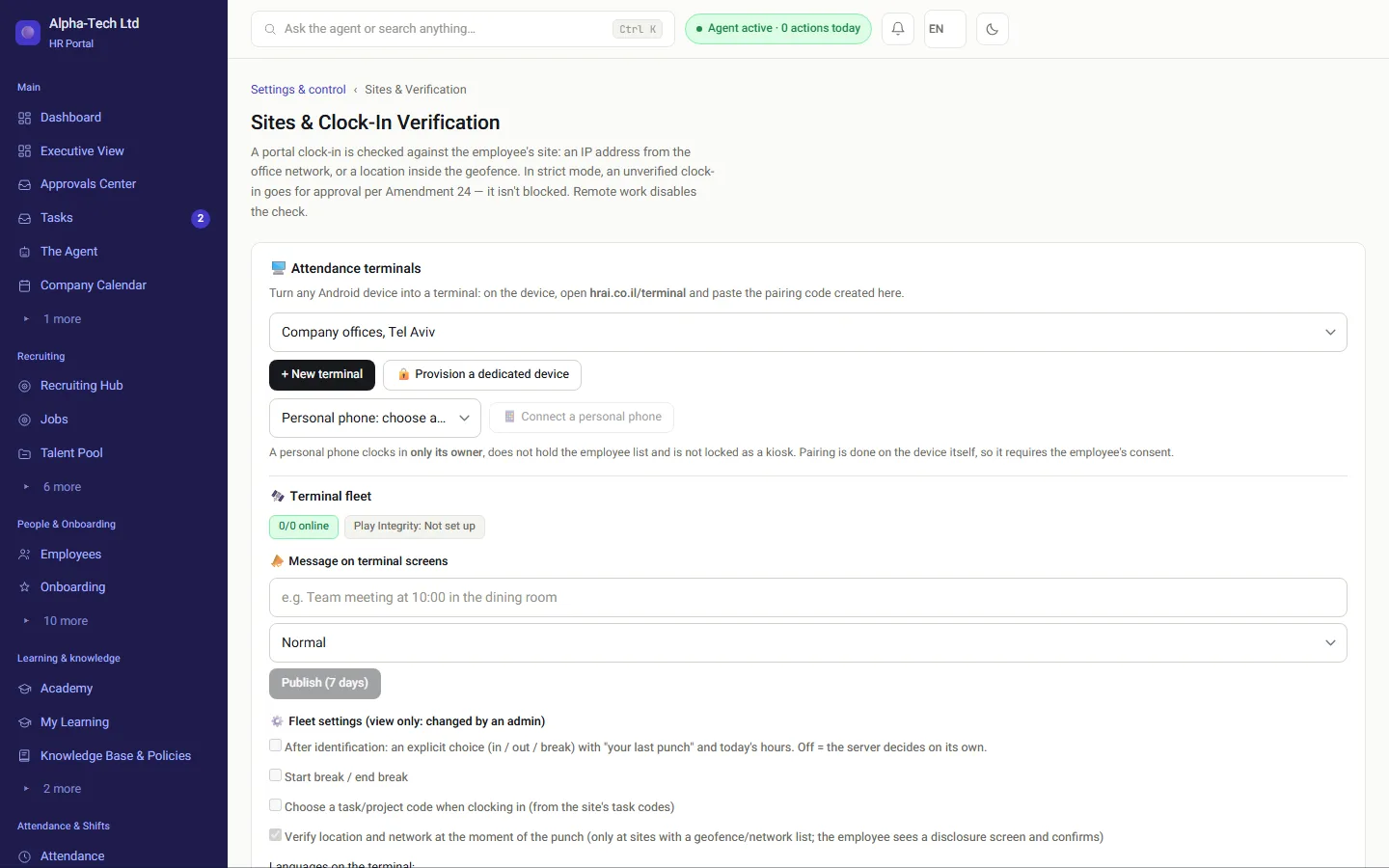
  • Any Android device becomes a terminal: open hrai.co.il/terminal on it and type the pairing code from the “Sites and verification” screen
  • The terminal waits for a brand manager’s approval before its attendance codes work
  • The code on screen changes every few minutes, so a photo of yesterday’s code is worthless
  • Identification runs from a local cache, so a brief network glitch does not create a queue at the door
Sites and clock-in verification: attendance terminals per site, pairing a new terminal and connecting a personal phone
02 · The phone

From the phone, from anywhere

  • Working from home or at a client: identity comes from the account, and the place is checked against a geofence around the registered address
  • A task code turns “was somewhere” into “was at client X”
  • Location is captured only at the moment of clock-in, and terminals collect no location at all
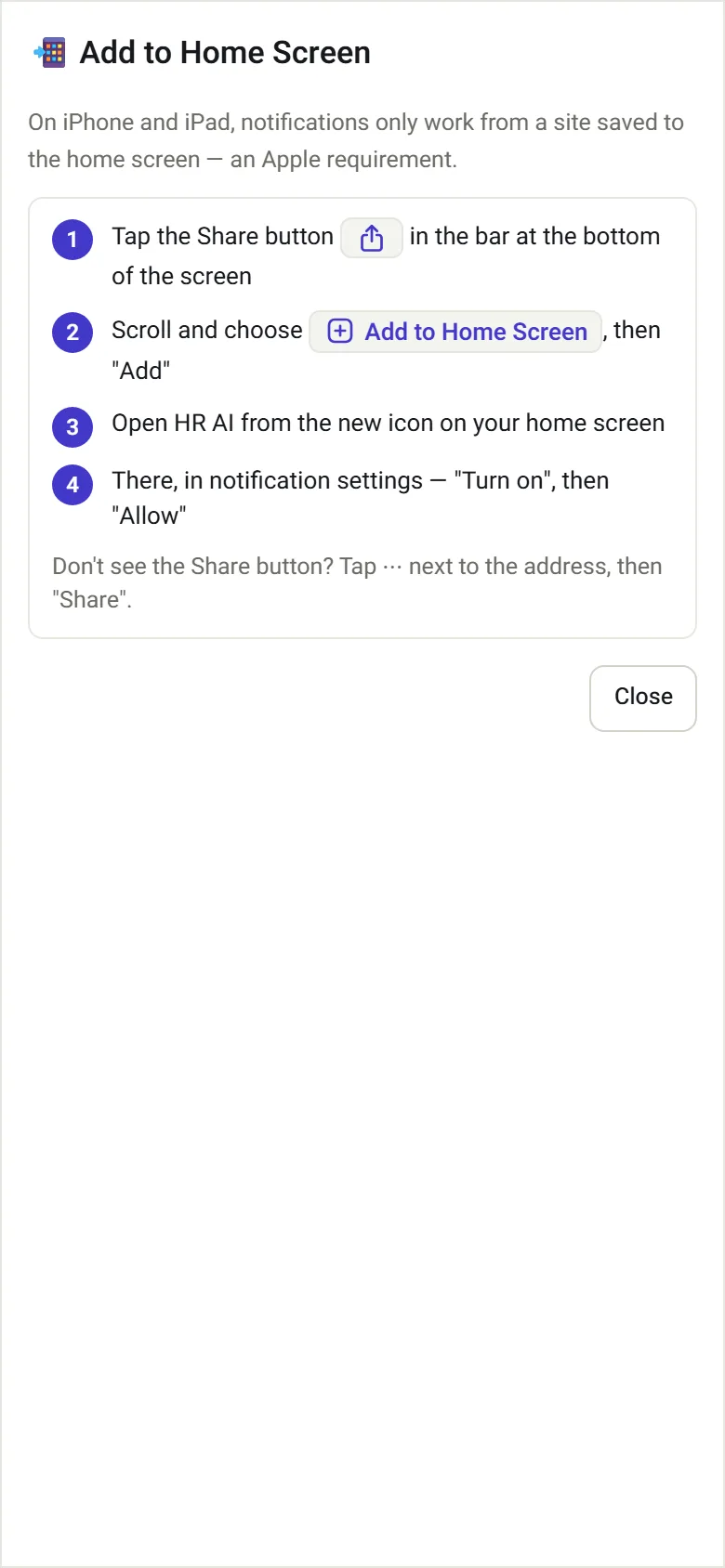
  • The portal saves to the home screen like an app, and there are also iOS and Android apps
My attendance on the phone: clock-in and clock-out buttons

Clock in by phone

Guide to saving the portal to the iPhone home screen

Save to home screen

03 · Amendment 24

Manual entries go to a second person

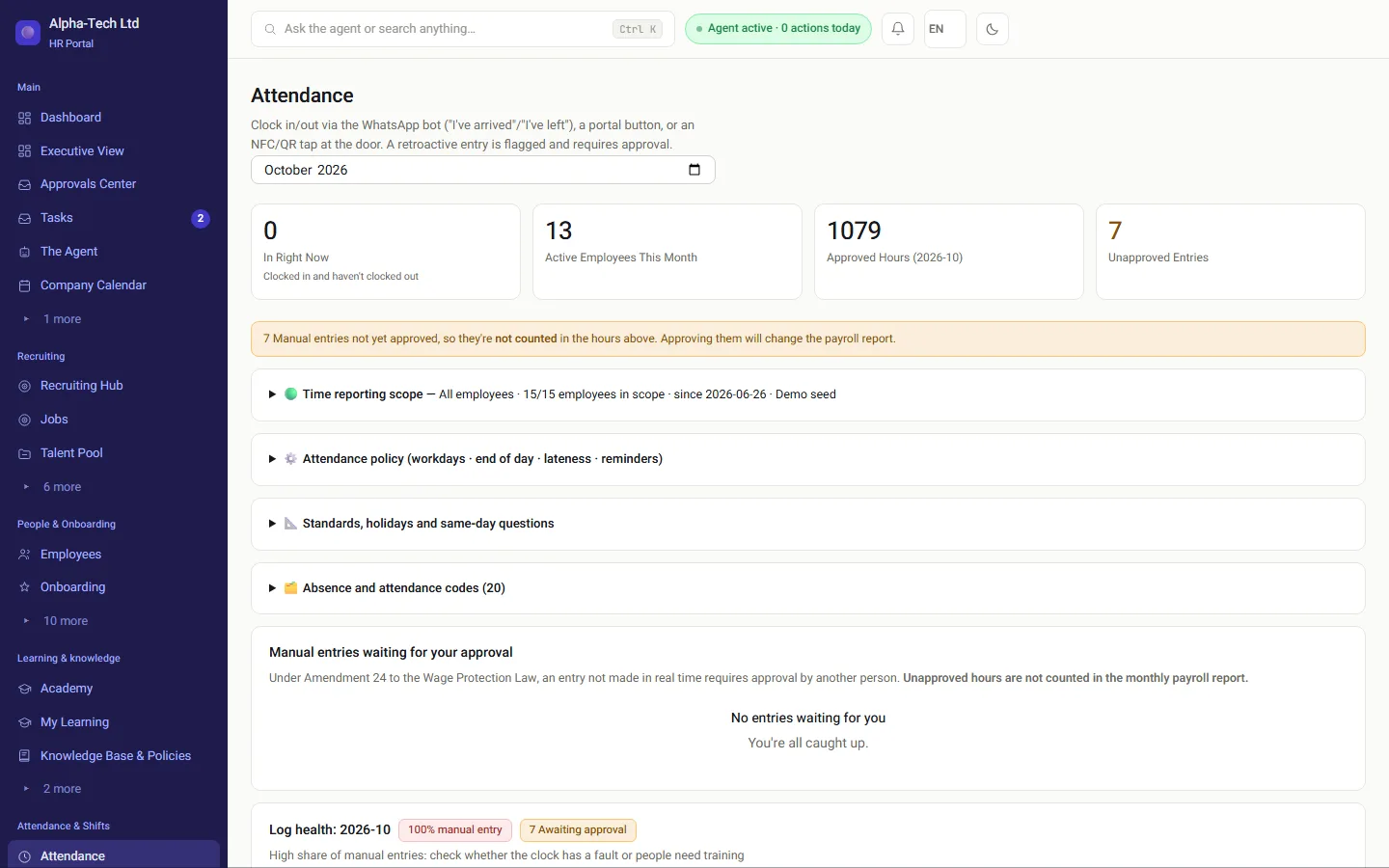
A live clock-in is marked as such and kept apart from a manual entry. A manual entry is routed to a second person for approval, always someone who is neither the entry’s creator nor the employee, and only approved hours are counted in the payroll report.

Amendment 24 explained for employers →

The HR attendance screen: manual entries awaiting approval, not yet counted in hours

Data flow

Where does a clock-in go after it is recorded?

Every method writes the same kind of event. From there, approved hours are split by the hours engine and leave as one locked month for the payroll department.

Clock-in eventsource · time · confidencescoreScore vs. sitethresholdCompared to therosterSecond-personapprovalPayroll departmentapproved hours, in its format
Clock-in eventsource · time · confidence scoreScore vs. site thresholdCompared to the rosterSecond-person approvalPayroll departmentapproved hours, in its format

Who uses it

What does each role see?

Employees

Clock in by phone, WhatsApp or terminal, and see their own hours.

Managers

Approve manual entries for their team, never their own.

HR

Sites, terminals and thresholds, open cards and the approval queue.

Payroll department

Receives approved hours only, in the format it imports.

The numbers

Which rules does the system enforce?

0manual attendance entries approved by the person who created them
60default confidence threshold; each site sets its own
24the Amendment to the Wage Protection Law the record is built around
40weight of the rotating terminal code, the strongest single signal

You can start with attendance alone. It is where the legal exposure is highest and the change is fastest, and every module is switched on separately per company. Mobile time clock: the full guide · Leave, expenses and the payroll file · Do Israeli employers need a time clock?.

Sources

Official sources for this page

  1. Wage Protection Law (Amendment No. 24), 5768-2008, Book of Laws 2162, Knesset website (Hebrew)
  2. Wage Protection Law, 5718-1958 (section 24 and the Schedule), consolidated version, Nevo (Hebrew)
  3. Protection of Privacy Law, 5741-1981, Nevo (Hebrew)

Sources checked on . This page describes the product and general Israeli rules. It is not legal advice.

Frequently asked

What people ask before they start

What is a clock-in confidence score, and how is it different from GPS?

A number from 0 to 100 built from independent signals: the rotating terminal code (40), an encrypted 424 DNA tag (35), an approved network or address (15), device integrity (10), a plain tag (10) and a personal code (10). Each signal is measured and stored with its weight. A location detected as spoofed sets the location score to zero instead of lowering it.

Is the system built for Amendment 24 to the Wage Protection Law?

It separates live clock-ins from manual entries made after the fact. A manual entry needs approval from another person, and nobody can approve an entry they created themselves, at any permission level. Hours that are not yet approved are not counted in the monthly payroll report. Every record carries its source, who entered it and who approved it.

How do attendance hours reach the payroll department?

Your payroll department keeps calculating pay. HRAI produces the import file from the approved hours, in the format the payroll system reads. The split is deliberate: what most organizations lack is not a pay engine but a reliable record feeding it, and that record is what an inspection asks about.

What is collected from the employee’s phone?

Proximity to the workplace terminal, not a location. The phone listens for one known device and reports that it heard it; it does not report where it is. This works only after the phone’s owner paired it and granted the permission, and can be disconnected as easily. GPS is captured only at the moment of clock-in, and terminals collect no location at all.

What happens when the internet drops at the start of a shift?

Clock-in continues. The event is stamped when it happens, with its real time, and written to the device’s storage. When the connection returns, queued events are sent, each with a unique ID so a resend never creates a duplicate punch. The record says “arrived at 08:00”, not “the server heard about it at 11:20”.

Can we start with attendance only?

Yes. Each module is switched on separately per company, so you can run attendance alone. Setting up the company, importing employees from a file and connecting a terminal or mobile clock-in is a day of work. Your data can be exported at any time, and the system can also be installed on your own server.

Get started

Book a demo

Leave your details and we will get back to you within one business day to set a time for a 30-minute demo on your own processes. If it turns out not to be a fit, we will say so.

About the details you share. Data controller: Career and Content ltd (operator of HR AI), company no. 515523934, [email protected]. You are not legally required to provide them; without a name and email we cannot get back to you, and that is the only consequence. The information is used to respond to your inquiry, kept for up to 24 months, and shared only with our email provider and our sales team. You may review, correct or delete it at any time at the same address — Privacy Policy (Hebrew), English summary.