

Leave, expenses and the payroll file

Every hour has a source, and someone who approved it

HRAI turns attendance into a payroll-ready month. Every manual entry is approved by a second person, vacation and sick leave accrue automatically by seniority, expenses pass two approvals with the receipt attached, and approved hours leave as one locked month, in the file format your payroll department already imports.

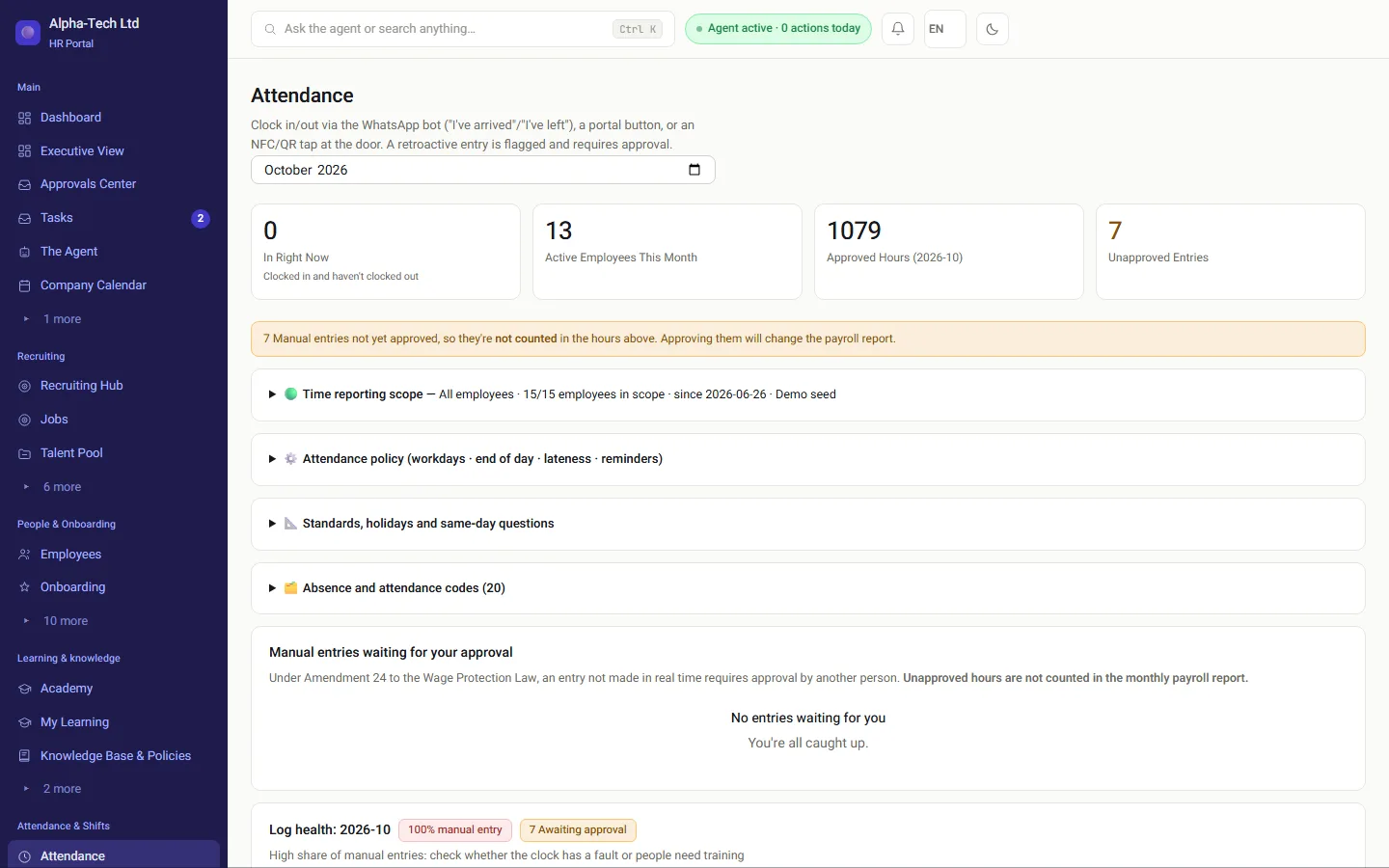
The HR attendance screen: who is in now, and manual entries not yet approved and therefore not counted
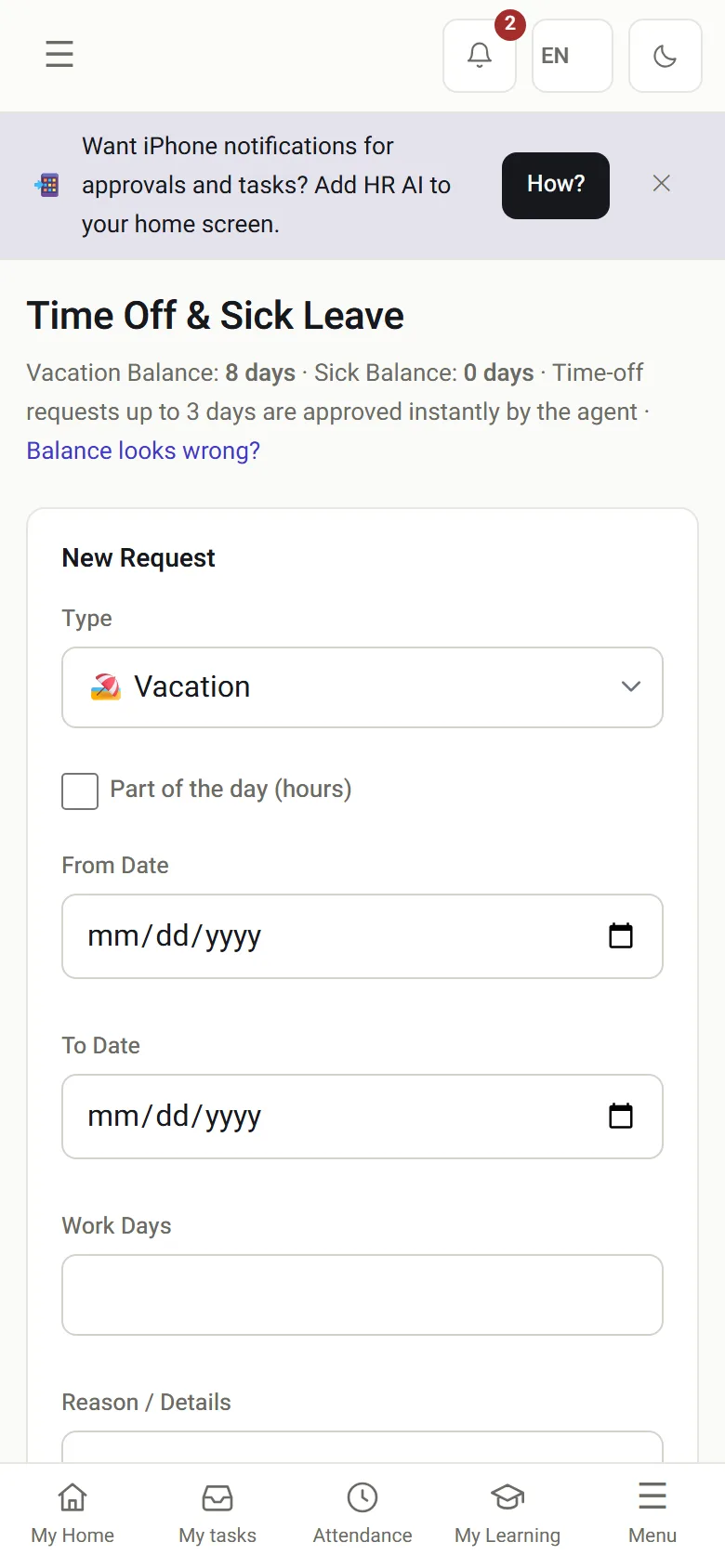
Vacation and sick leave on the phone: balances and a new request
The attendance screen on desktop, and the employee’s leave on the phone.

The problem

Why is the end of the month the wrong time to find out?

An open cardA clock-in with no clock-out, found only when the report is being prepared.
A fix nobody approvedAn hour typed in by hand, and nobody knows who signed it off.
A disputed balanceAn employee sure they are owed more days, and no record of why it changed.
Receipts in a folderA reimbursement waiting for the signature of someone on vacation.
Without a system
  • Hours corrected in a spreadsheet on the last day
  • Leave balances kept in a side file
  • Expense receipts collected on paper
  • A file re-typed into the payroll system
With HRAI
  • Open cards asked about by WhatsApp within days
  • Accrual by seniority, with every adjustment explained
  • A photo of the receipt from the phone or WhatsApp
  • A file in the payroll system’s own format

The line

From the first hour to the file for the payroll department

Israeli law distinguishes a live record from a manual entry made after the fact. HRAI keeps that distinction all the way through.

1RecordPortal, WhatsAppNFC, QR orterminal2Manual entryMarked as manualwith who enteredit3Another personapprovesNot the creatornot the employee4Leave andexpensesAccrual bysenioritytwo-step refunds5Locked monthApproved hoursonly6PayrolldepartmentIn its formatafter mappingcheck
1RecordPortal, WhatsAppNFC, QR or terminal2Manual entryMarked as manualwith who entered it3Another person approvesNot the creatornot the employee4Leave and expensesAccrual by senioritytwo-step refunds5Locked monthApproved hoursonly6Payroll departmentIn its formatafter mapping check
Hours from a manual entry enter the monthly report only once approved, so approval is a real step, not a formality.

In practice

Which four screens close the month?

01 · Gaps

The agent asks, the employee answers, the rule holds

The gap scan looks five days back, skips weekends and approved leave, and sends a plain question by WhatsApp.

Attendance completion · WhatsApp chat

Your attendance card for July 23 is still open: a clock-in at 08:45 with no clock-out. What time did you leave?

17:30

Thanks! The day is closed: 08:45–17:30 (8.8 hours).An after-the-fact entry goes to another person for approval, as Amendment 24 requires.

In practice: a gap not closed within three days rises to the HR and management feed.
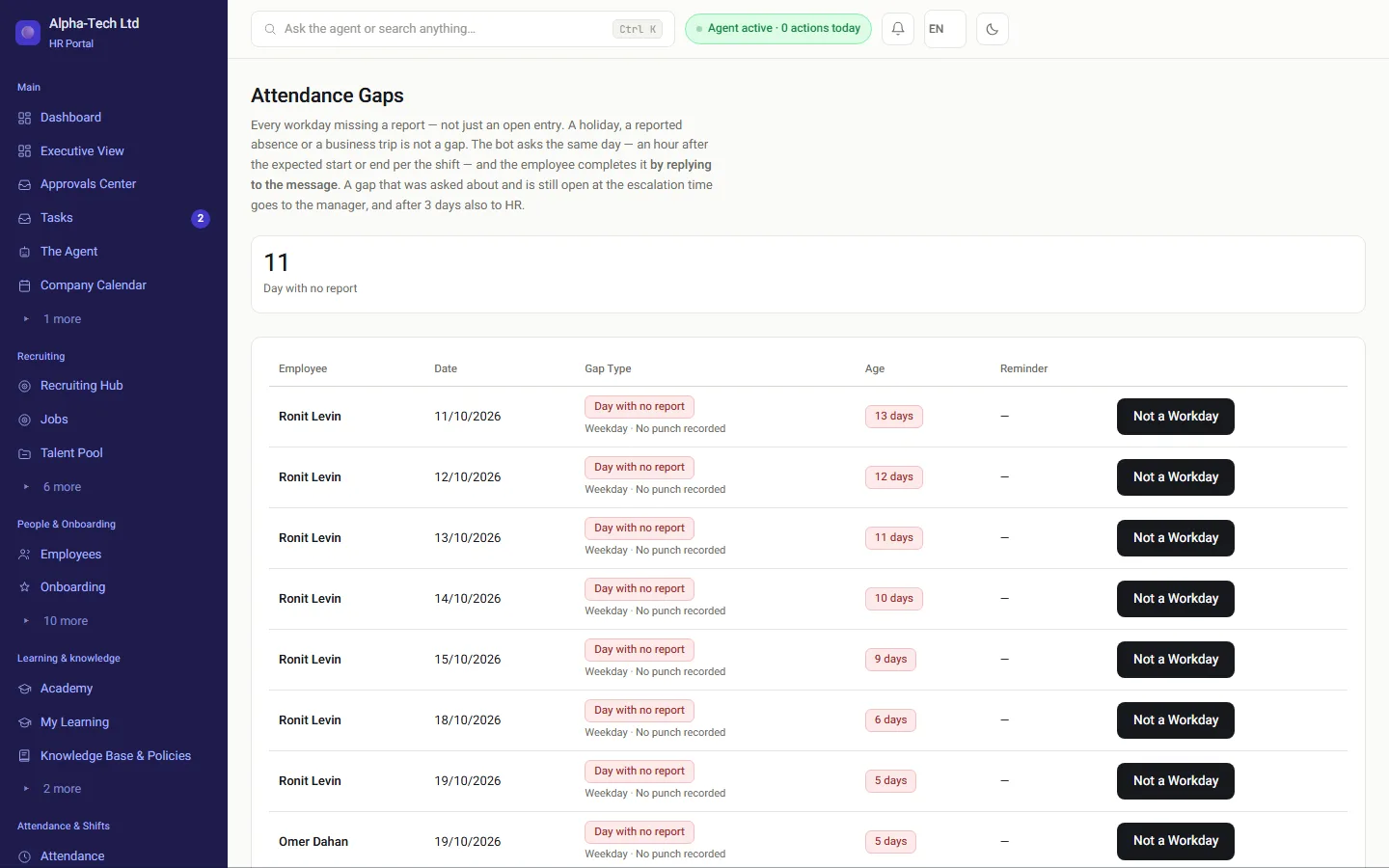
Attendance gaps: open cards and days with no record, before the month ends
02 · Leave

Automatic accrual, documented corrections

  • Vacation accrues monthly by seniority; sick leave at 1.5 days a month up to a ceiling of 90
  • A request of up to three days within the balance can be approved immediately, depending on the agent’s autonomy level
  • An employee asks for a balance correction in writing, and the decision is stored with its reason
  • A manager sees their own team and approves its leave
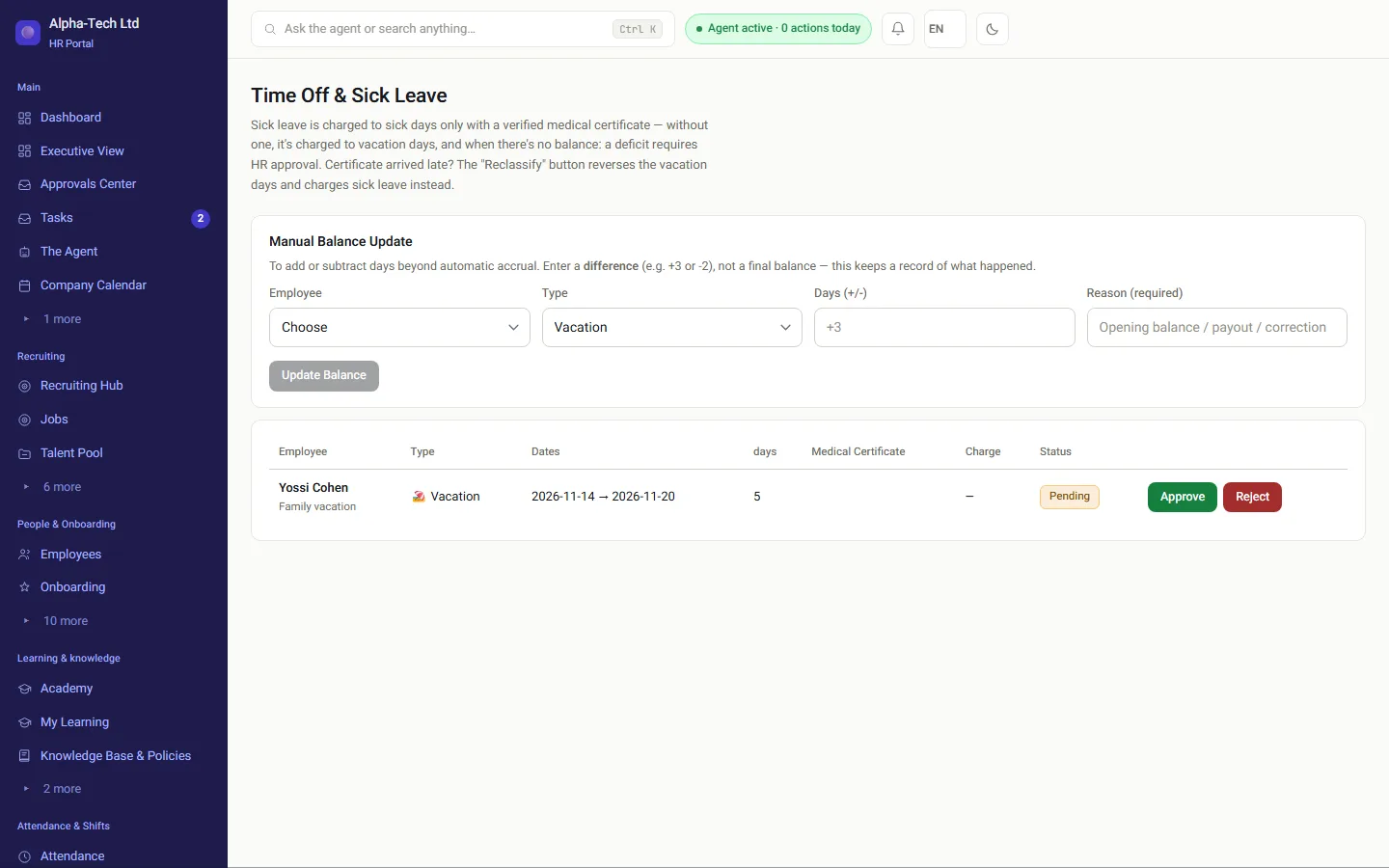
The HR leave screen: requests, balances and who is on leave
03 · Expenses

Every refund passes two people

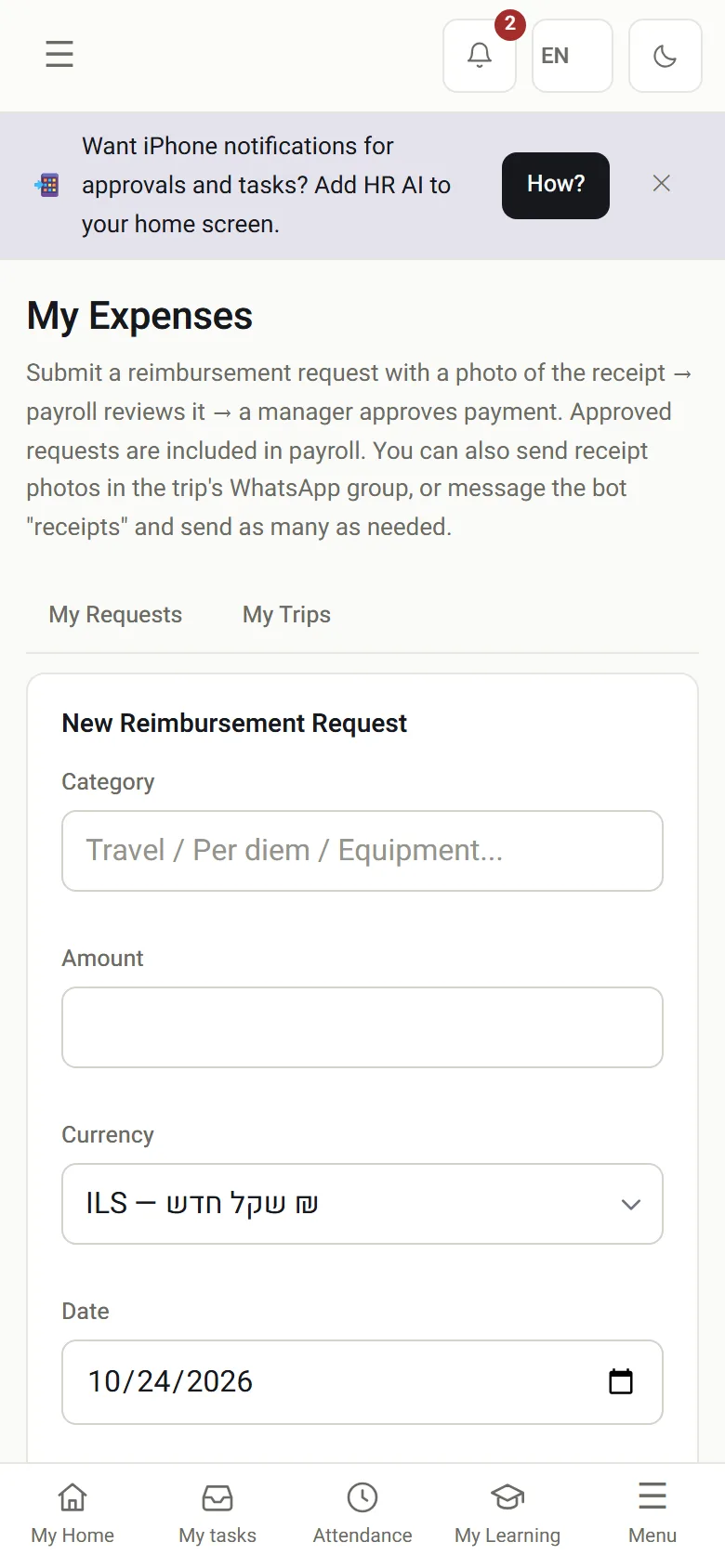
  • Submit from the phone with a photo of the receipt, or send the receipt by WhatsApp
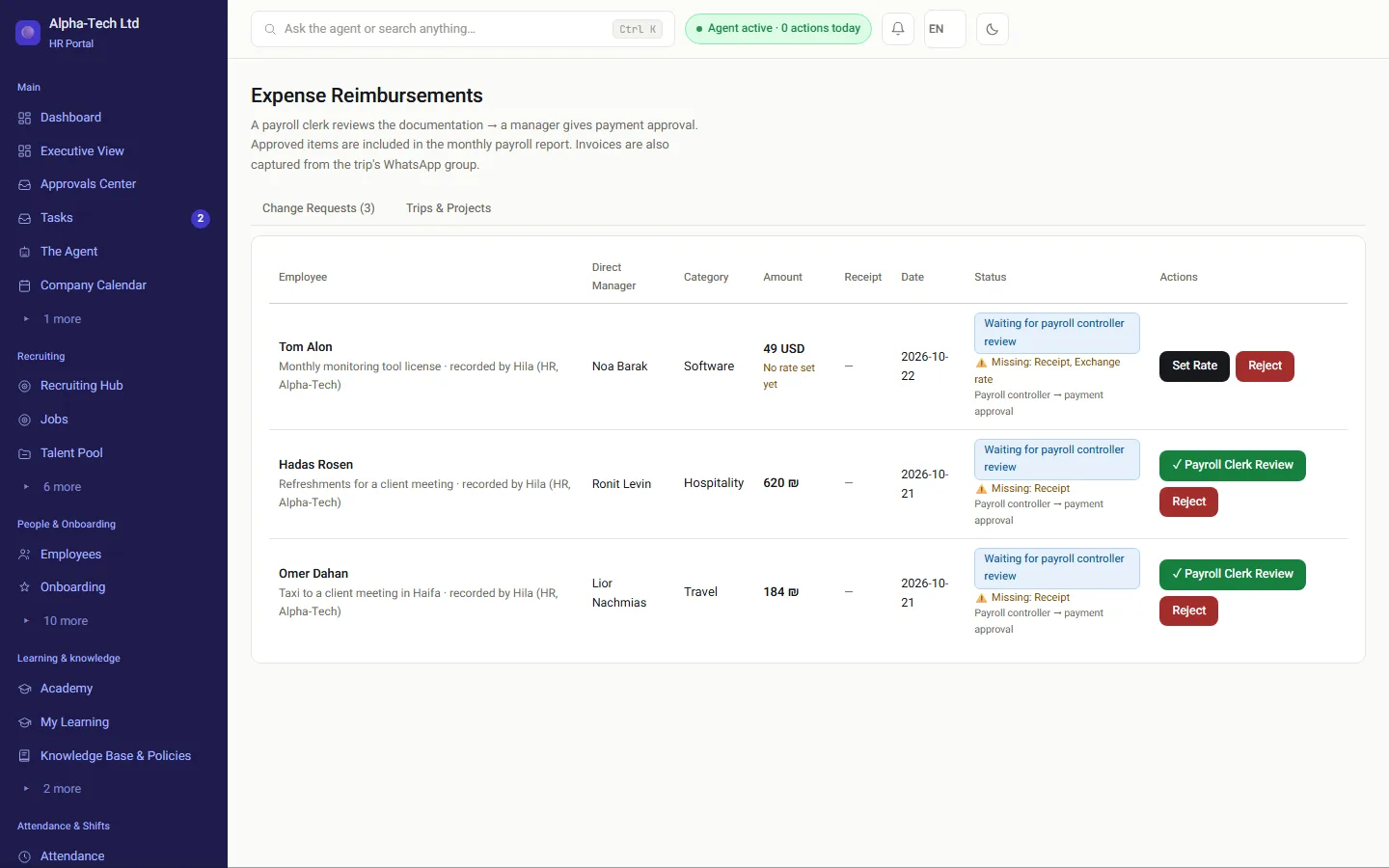
  • The payroll accountant checks the documentation, then the manager approves payment
  • Foreign currency, travel and projects; an approved refund is included in the payroll report
Expense refunds: requests waiting for the payroll accountant, with what is missing in each
My expenses on the phone: a new refund request
04 · Payroll department

A file it imports, never sent before the mapping is approved

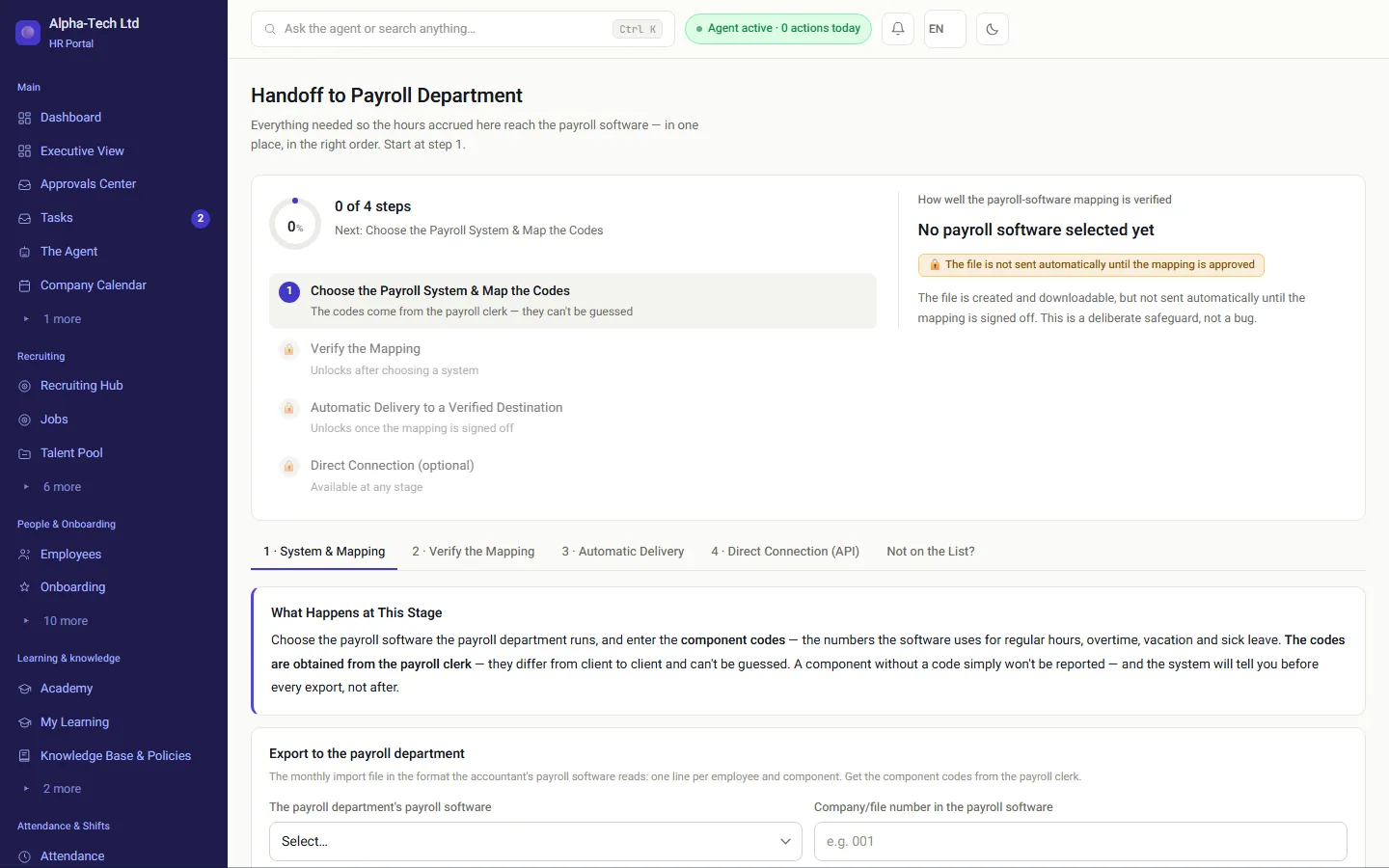
  • Choose the payroll system and map its pay-element codes once
  • The file is created and can be downloaded, but is not sent automatically until the mapping is approved
  • Regular hours, 125% and 150% overtime, and rest-day hours as a type of their own
  • From October 1, 2026 the default overtime threshold is above 8.6 hours a day (7.6 on the short day), and each company can set its own

How to send attendance to the payroll department →

Sending to the payroll department: choosing the payroll system and mapping codes, checking the mapping, automatic delivery and direct connection

Hour types

How are hours split before they reach payroll?

One hours engine splits what was actually worked. The payroll department receives each type with its own code, so nothing is recalculated by hand.

Hour types produced by the HRAI hours engine
Hour typeWhen it appliesRate in the file
RegularUp to the daily threshold set by the company100%
Overtime, first two hoursAbove the daily threshold125%
Overtime, from the third hourAfter the first two overtime hours150%
Rest day or holidayHours worked on the weekly rest day or a holiday150%
Overtime on a rest dayFirst two overtime hours / from the third175% / 200%

Shifts that cross midnight are split at the right point, including at the start of the weekly rest day.

Locked monthapproved records onlyApproved hours bytypeLeave and sick daysApproved refundsPayroll departmentfile, SFTP or API
Locked monthapproved records onlyApproved hours by typeLeave and sick daysApproved refundsPayroll departmentfile, SFTP or API

Who does what

Which role approves what?

Employees

Request leave, submit expenses and answer gap questions from the phone.

Managers

Approve their team’s leave, manual hours and expense payments.

Payroll accountant

Checks expense documentation and approves the code mapping.

HR

Balances, corrections with reasons, and the month lock.

The numbers

Which rules are built into the month?

1.5sick days accrued each month, up to a ceiling of 90
5days back that the attendance gap scan looks
2approvals on every expense refund
8.6default daily overtime threshold in hours (7.6 on the short day)

Frequently asked

What people ask before they start

What happens if a manager tries to approve attendance they entered themselves?

The action is blocked at every permission level, including admin and agency users, and the system explains that approval by another person is required under Amendment 24. The entry stays pending, its hours are not counted in the payroll report, and it waits for someone who neither created it nor is the employee concerned.

Can employees clock in without an app?

Yes. Without an app they can clock in with a button in the web portal, with a WhatsApp message, or by scanning the terminal’s QR code with their phone. At an Android terminal the organization sets up, they can also tap an NFC tag or type a personal code. There are iOS and Android apps for people who prefer one.

Are leave balances updated automatically?

Yes. Vacation accrues monthly by seniority, and sick leave at 1.5 days a month up to a ceiling of 90 days. A manual adjustment is possible, but it requires a reason, is stored in the history and stays within the legal limits, such as the 90-day sick-leave ceiling.

How does the monthly payroll file work?

You choose your payroll system and map its pay-element codes once. The file is created from approved hours only, split into regular hours, 125% and 150% overtime and rest-day hours as separate types. It is not sent automatically until the mapping has been approved, and you can download it at any stage.

We already have a working time clock. Why switch?

You do not have to switch in one day; you can run both in parallel. The question is not whether your clock records hours but what happens to an hour entered by hand: who approved it, where that is recorded, and whether it was counted for pay before approval. If you have good answers to all three, your clock is fine.

Get started

Book a demo

Leave your details and we will get back to you within one business day to set a time for a 30-minute demo on your own processes. If it turns out not to be a fit, we will say so.

About the details you share. Data controller: Career and Content ltd (operator of HR AI), company no. 515523934, [email protected]. You are not legally required to provide them; without a name and email we cannot get back to you, and that is the only consequence. The information is used to respond to your inquiry, kept for up to 24 months, and shared only with our email provider and our sales team. You may review, correct or delete it at any time at the same address — Privacy Policy (Hebrew), English summary.