

Recruiting and onboarding · Digital job offer · Employment agreement

E-signing an employment agreement in Israel: from offer to a signed agreement, on a phone

E-signing an employment agreement means the employee and the employer sign it on screen instead of paper. In HRAI the candidate verifies identity with a one-time SMS code, signs on a phone, and the company signs the same approved text. The system records who signed, when, from which IP address and on exactly which wording.

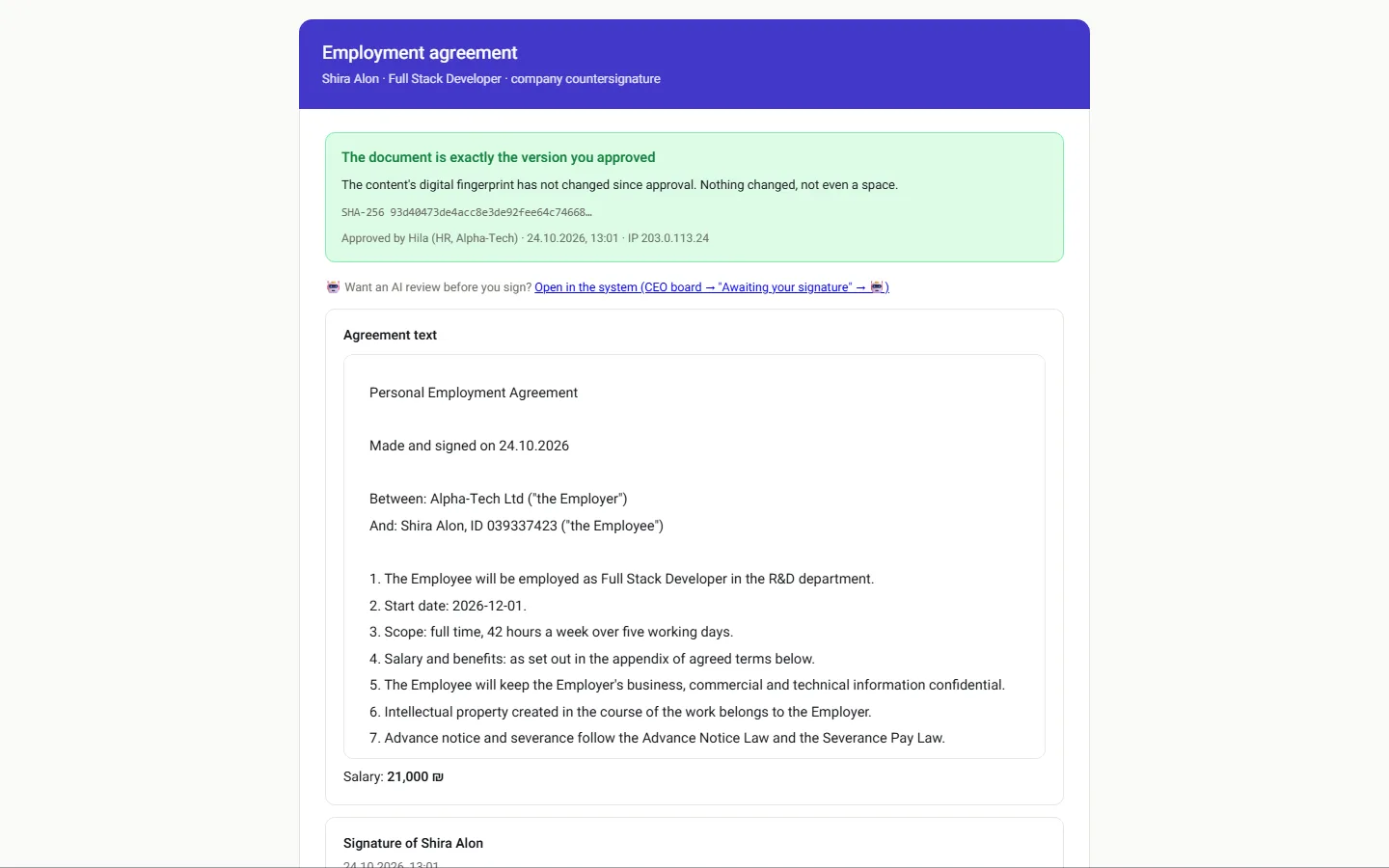
The company signing page: the document matches the approved text, with its digital fingerprint and the full text below
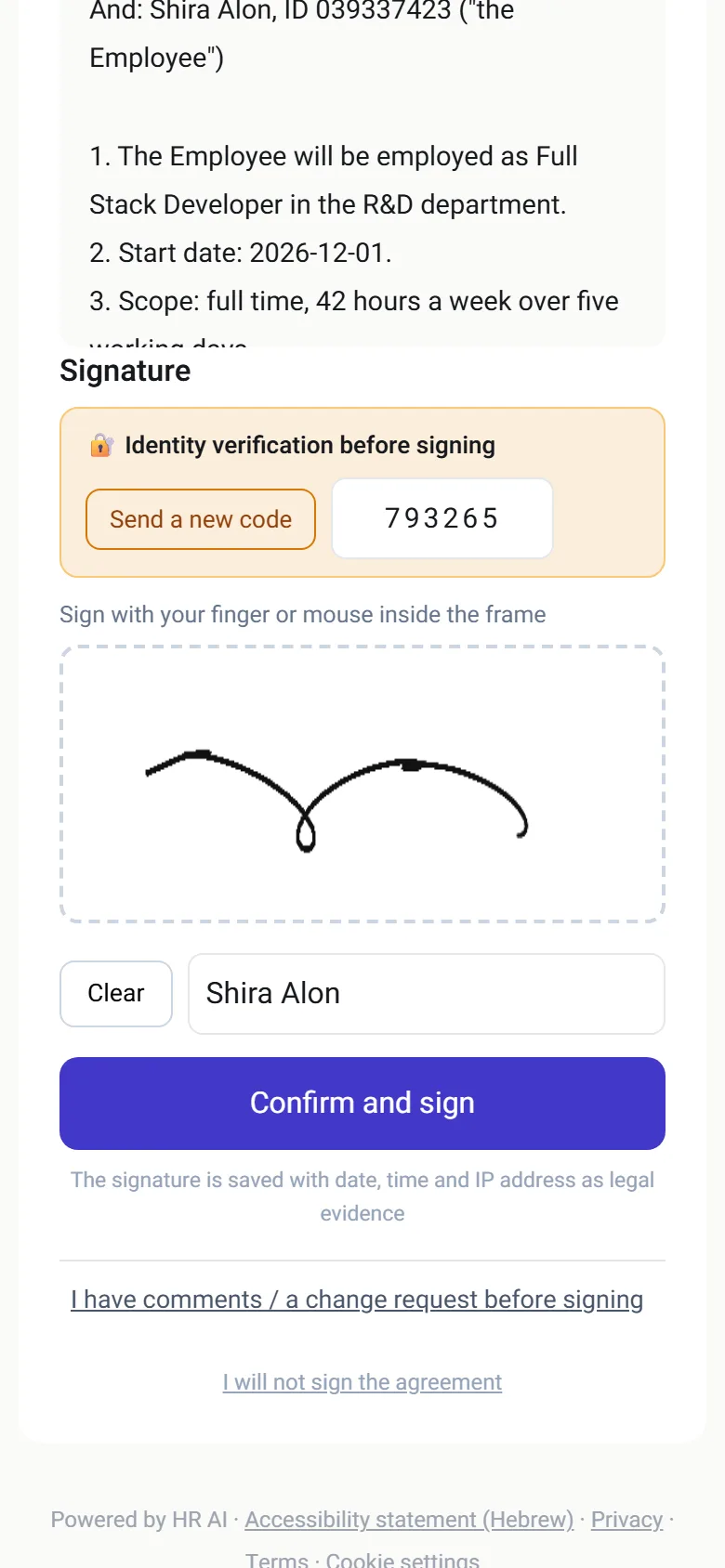
Signing page on a phone: verification code, finger signature on the screen, and an option to ask for a change before signing
The candidate signs on a phone, the company signs exactly the same text.

Last reviewed

Definition

What does it mean to e-sign an employment agreement?

In short

E-signing an employment agreement means signing the employment contract from a phone or computer. The candidate receives a link, verifies their identity, reads the text and signs, and the company then signs the same text. What matters afterwards is the record: who signed, when, and on exactly which wording.

The Electronic Signature Law, 5761-2001 (Hok Hatima Elektronit, חוק חתימה אלקטרונית) distinguishes three levels: an electronic signature, a secure signature and a certified signature. The signature in HRAI is not a certified signature: a certified signature relies on an electronic certificate issued by a certification authority registered in the Ministry of Justice register, and HRAI does not rely on such a certificate. Where an enactment requires a signature on a document, an electronic document meets that requirement only with a certified signature (sections 1 and 2 of the law). The system documents every signature so that it can be checked later who signed, when and on which text. For a document where the law requires a particular kind of signature, or in an unusual case, consult a lawyer.

The three levels of electronic signature in the Israeli law, and where HRAI sits
Electronic signatureSecure signatureCertified signature
What it is, in shortAny electronic sign attached to a documentA signature unique to the signer, under their sole control, that reveals later changesA secure signature backed by a certificate from a registered certification authority
Meets a statutory requirement for a signature on a documentNoNoYes
Who grants itThe signing method itselfThe signing method itselfA certification authority in the Ministry of Justice register
HRAI signingThis is where HRAI's record sits: SMS verification, time, IP, text fingerprint, both signaturesThe law's criteria are a legal question; ask your lawyerNo: HRAI does not rely on a certification authority's certificate

The text of the law: Electronic Signature Law on the Knesset website (Hebrew) · register of certification authorities at the Ministry of Justice (Hebrew). The summary of the three levels is general information, not legal advice.

Without a system

What goes wrong when an agreement moves by email?

The agreement travels by email between several people, and in the end nobody is sure which version was signed. In HRAI there is one text, one path and a record of every step.

Versions in emailSeveral copies of the same agreement, and nobody is sure which is final.
Print, sign, scanThe candidate needs a printer, or a trip to the office.
Approval in the corridorWho approved this salary, and when? Hard to tell afterwards.
Onboarding that waitsUntil someone remembers to open it, after the agreement came back signed.
Without a system
  • Versions travel by email
  • Signed on paper, scanned back
  • Salary approved verbally
  • Onboarding opened by hand, later
With HRAI
  • One text built from the template and agreed terms
  • Signed on a phone with an SMS code
  • Approval by policy, after the approver opened it
  • Onboarding opens when both sides have signed

How it works in HRAI

From a job offer to an agreement signed by both sides

Six stations, and onboarding opens only at the end, after both signatures. The offer is optional: you can send the agreement directly. Candidates who declined the offer or did not sign are not onboarded.

1Offer(optional)Opened with an SMScode: accept,decline or counter2Agreement builtFrom the agreedterms: templatetext, approved PDFtemplate orone-off PDF with areasonAutomatic3ApprovalsBy policy, afterthe approversopened theagreementBy policy4Signed on aphoneSMS code, and afinger signatureon the screen5Company signsThe same text:identicalfingerprintText check6OnboardingopensForm 101,documents and bankdetailsAutomatic
1Offer (optional)Opened with an SMS code:accept, decline or counter2Agreement builtFrom the agreed terms:template text, approved PDFtemplate or one-off PDF with areasonAutomatic3ApprovalsBy policy, after the approversopened the agreementBy policy4Signed on a phoneSMS code, and a fingersignature on the screen5Company signsThe same text: identicalfingerprintText check6Onboarding opensForm 101, documents and bankdetailsAutomatic
The agreement can be built from a template text, an approved PDF template, or a one-off PDF with a reason

PDF agreements

Can a lawyer-drafted PDF be signed on a phone?

01 · PDF template

Upload once, and every agreement fills itself in

Some companies' agreement is a PDF their lawyer drafted, not text in an editor. That works on the same path.

  • Upload the file and mark its fields: name, ID number, date, employee signature and company signature
  • Once the template is approved, every agreement is built from it: fields are filled from what the candidate gave in recruiting, and the terms appendix is added
  • An agreement drafted for one employee? Attach a one-off PDF and write why. The reason is recorded in the log and the agreement, and without it the agreement is not sent
  • Both kinds follow exactly the same path: approvals, candidate signature, company signature, onboarding
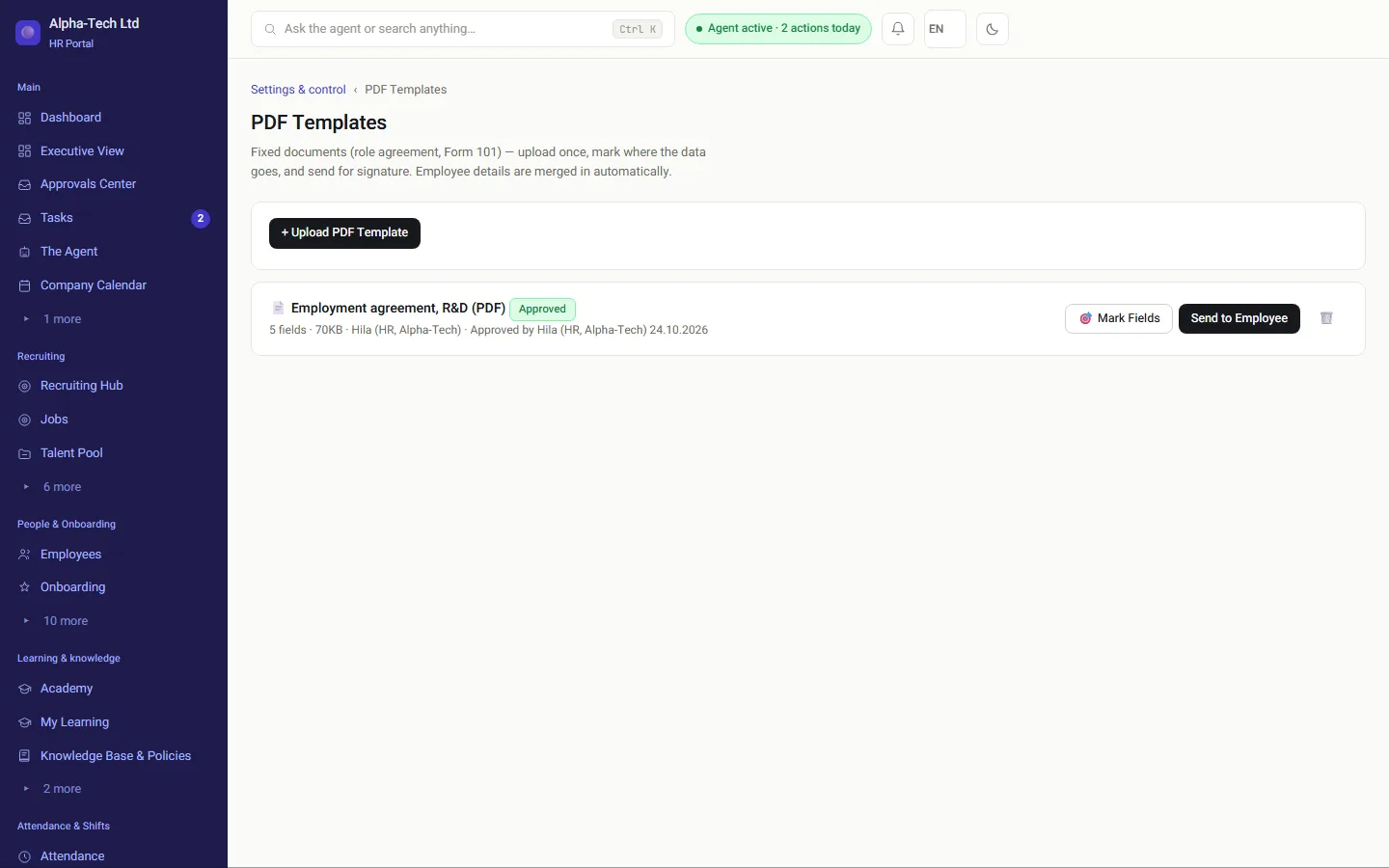
PDF templates screen: an employment agreement in PDF format, approved, with five marked fields
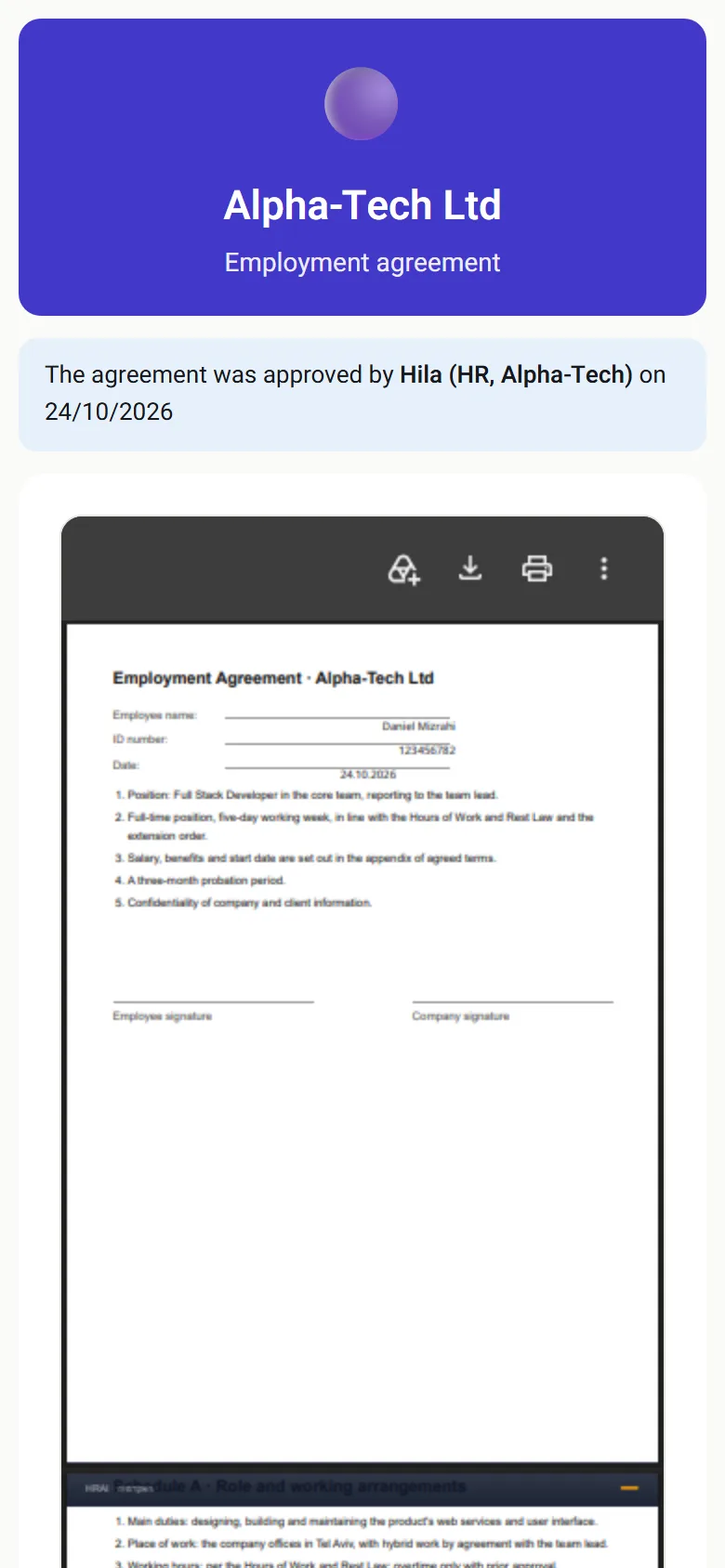
Signing page on a phone: an agreement from a PDF template, with name, ID number and date already filled in

Questions before signing

What happens when a candidate asks for a change?

Candidates ask questions about the agreement, and that is good. When change requests are turned on for the role (off by default), the request comes straight from the signing page, and the whole conversation is kept next to the agreement.

Change requestfrom the signing pageReply onlyagreement stays with youCandidate answersfrom the signing pageTalk firstText or filechanged?YesNew versionwith what changedApproval againaccording to policyBack to signingon a phone, SMS codeNoText unchanged: straight back to signing, no approval round
Change requestfrom the signing pageReply onlystays with youCandidateanswersTalk firstText or filechanged?YesNew versionwith what changedApproval againaccording to policyBack to signingon a phone, SMS codeNoText unchanged: straight backto signing, no approval round
An approval round repeats only when the text or file really changed
02 · Change request

A conversation next to the agreement, and a new version only when agreed

The request returns the agreement for edits, opens a task and emails HR. The version you sent is kept in the history.

  • Reply only: the candidate receives a message with a link and can respond, while the agreement stays with you
  • Text that did not change goes straight back to signing, with no approval round
  • Text or a file that changed is saved as a new version, with what changed, and goes through the approval policy again
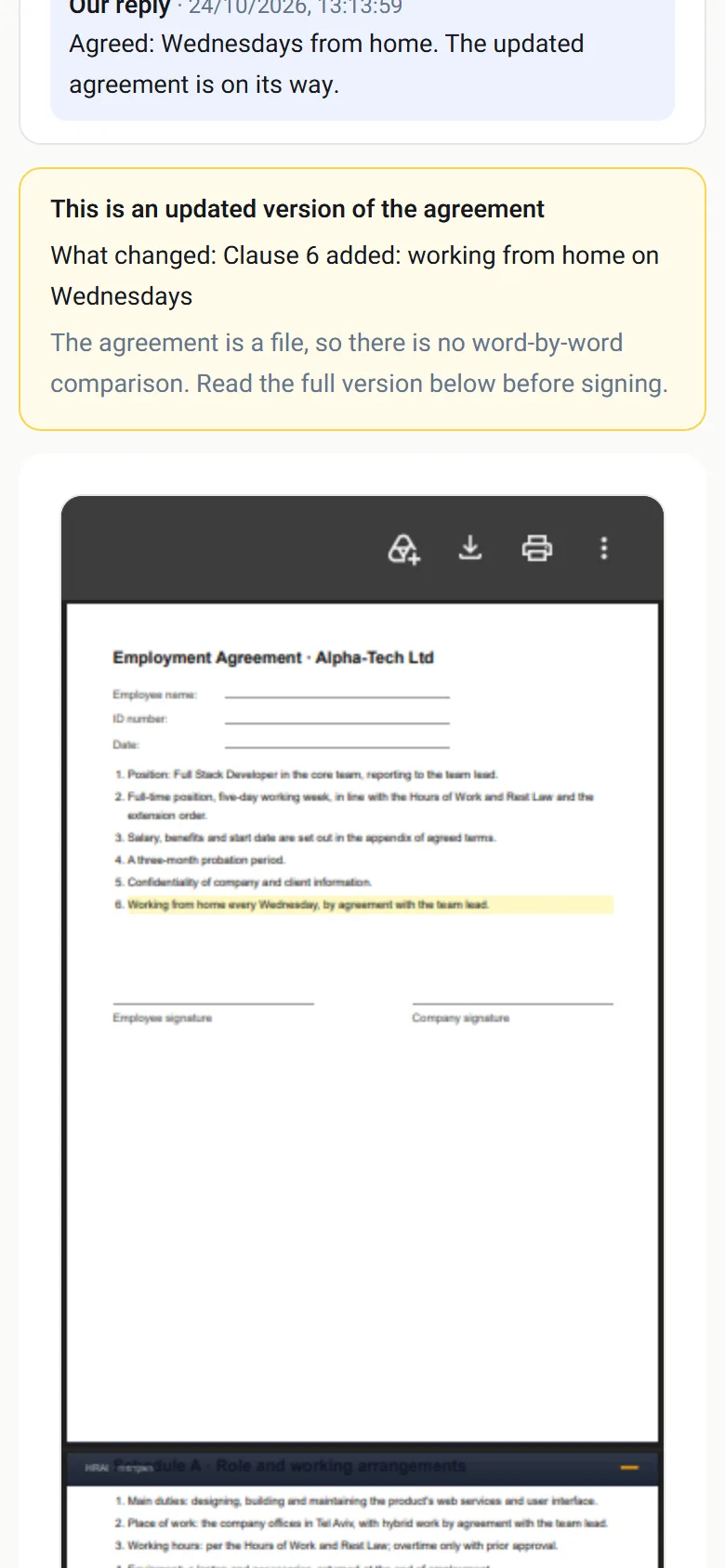
  • A PDF cannot be compared word for word, so the signing page says it is an updated version, shows your explanation, and asks the candidate to read the full version
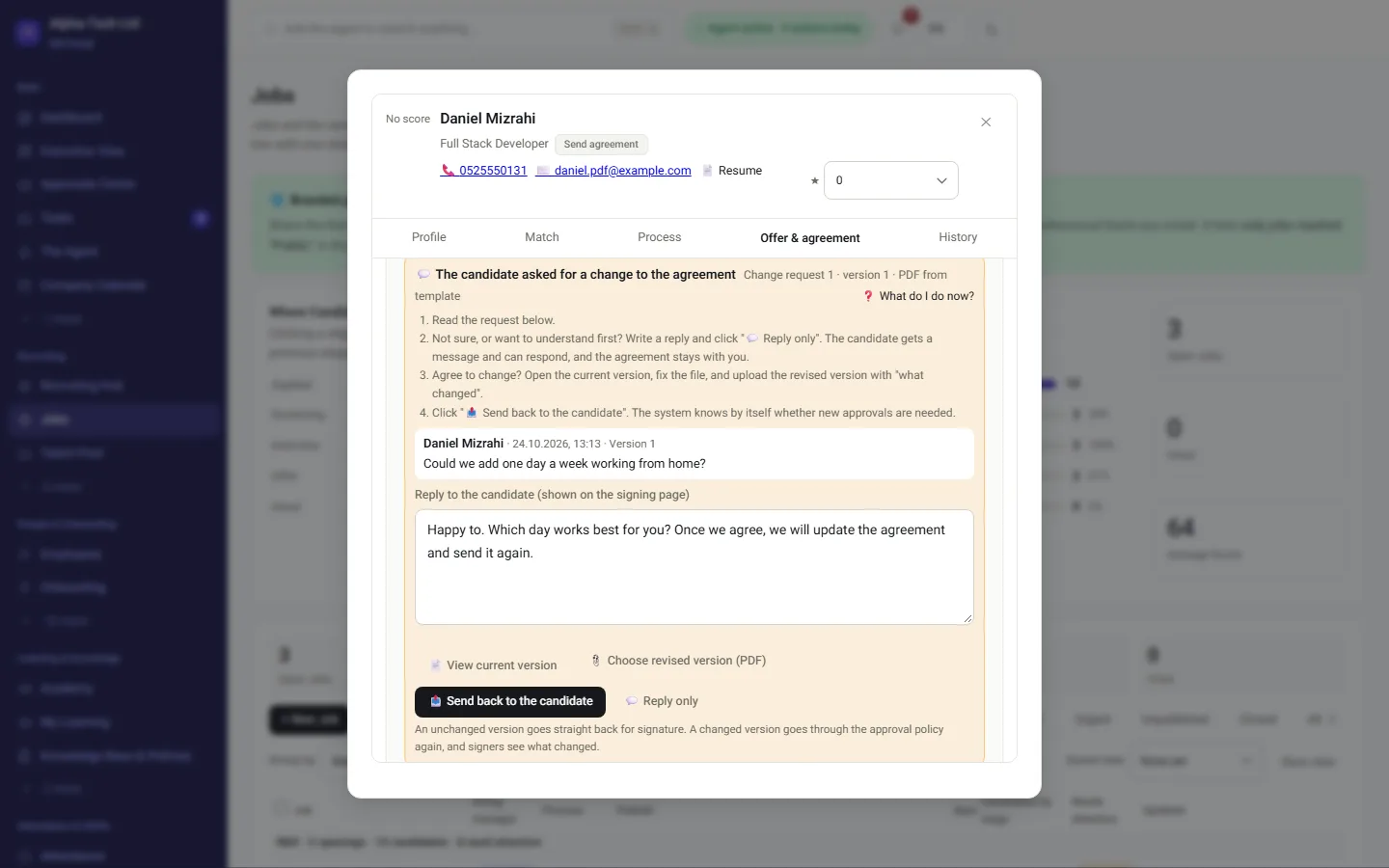
Important: a change to a PDF agreement is made in the file itself, outside the system. Whoever edits the file is responsible for the new version being identical to the previous one in everything that was not agreed to change.
Candidate card: the change request, a reply to the candidate, and choosing a corrected version of the PDF file
Signing page on a phone: the notice that this is an updated version of the agreement, and what changed

The record

What does HRAI record about each signature?

03 · The record

Who signed, when, and on exactly which text

  • A one-time SMS code to the signer's phone: links the signature to the phone given in recruiting
  • The time the agreement was opened and the time it was signed: shows when it was read and when it was signed
  • IP address: from which network the signature was made
  • A digital fingerprint (SHA-256) of the exact text: any change to the wording, even one word, produces a different fingerprint
  • Both signatures: the employee's and the company's, on the same text

The signed document is sealed with the organization's asymmetric seal (Ed25519). An organizational seal shows that the document has not changed since it was sealed; it is not a certified electronic signature under the law.

In the demo: we send an agreement to a phone, go through the approval round and sign on both sides. If you like, on your own agreement template.
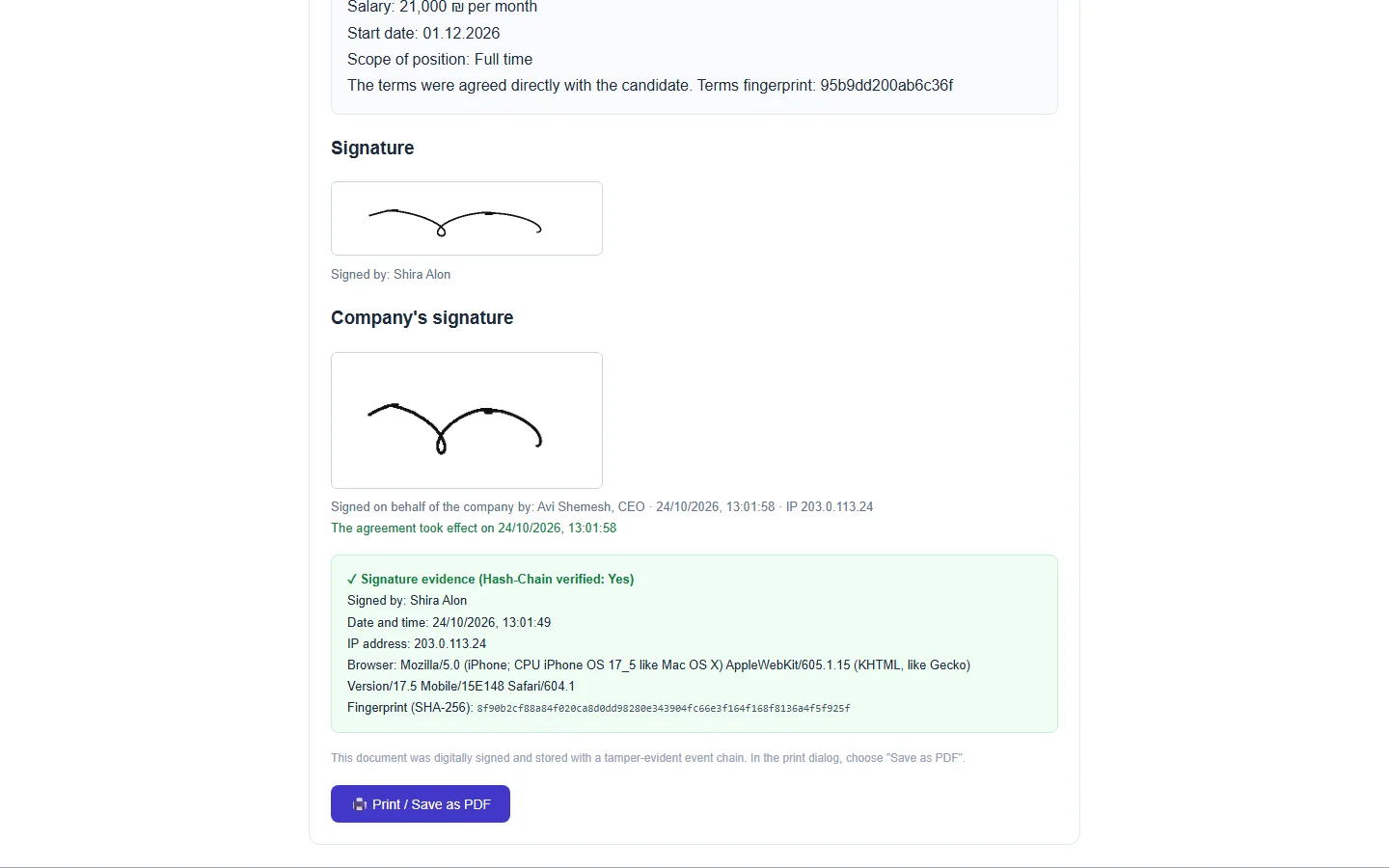
The signed document: the candidate signature, the company signature, the times, the IP address and the digital fingerprint

Names, times and values are illustrative. The structure is what the system actually records.

Roles

Who does what in the signing flow?

The candidate

Opens the agreement (or the offer) with a code, asks questions, and signs on a phone.

HR

Builds the agreement in one click, answers requests, and sends a corrected version.

The approvers

Open the agreement, and only then can approve, according to the policy you set.

The authorized signatory

Signs last, on a text checked against the approved text.

The full sequence

What are the steps, station by station?

Open the full list

Job offer by personal link (optional)

When you choose to send an offer before the agreement, the candidate opens it after an SMS code. You see when the link was opened and how many times.

Accept, decline or counter-offer

The candidate accepts the offer, declines it or proposes other terms, and you answer from the same screen.

Agreement from your template

The system builds the agreement from the company template and the agreed terms (in the offer, or directly on the candidate card): from text in the editor, an approved PDF template, or a one-off PDF with a reason.

Approval by policy

For example, an agreement with a salary above a threshold you set goes to a VP for approval. The approve button is available only after the approvers opened the agreement.

Signing on a phone with an SMS code

The candidate reads and signs on the phone. If change requests are on for the role, they can also ask for a change before signing. Unchanged text does not go back to the approval round.

AI review before the company signs

An optional review that flags clauses worth reading again. It is an aid, not legal advice.

The company signs the same text

The company signing page checks that the text matches the approved wording, and only then you sign.

Onboarding opens

Only after both signatures: Form 101, the document kit and bank details. Candidates who declined or did not sign are not onboarded.

✓ on a number: a gate, where the next step waits for a person’s approval

Sources

Official sources for this page

  1. Electronic Signature Law, 5761-2001, Book of Laws 1785, Knesset website (Hebrew)
  2. Register of certification authorities under section 9(b) of the Electronic Signature Law, Ministry of Justice, gov.il (Hebrew)

Sources checked on . This page describes the product and general Israeli rules. It is not legal advice.

Frequently asked

What people ask before they start

Does Israeli law recognize an electronic signature on an employment agreement?

Generally yes: Israeli law recognizes electronic signatures, and an employment agreement does not need a particular form to exist. What changes is the strength of the evidence. The Electronic Signature Law, 5761-2001, distinguishes between an electronic, a secure and a certified signature, and only a certified signature automatically meets a requirement in an enactment to sign a document. HRAI records the SMS verification, time and IP address of each signature, a fingerprint of the exact text and both signatures; it is an electronic signature with a recorded identity check, not a certified one. For unusual cases, ask your lawyer.

Can we send a digital job offer before the agreement?

Yes, and it is an optional step: you can also send the agreement directly, without an offer. The offer goes by personal link and the candidate opens it after a one-time SMS code. They can accept, decline or make a counter-offer, and HR sees when the link was opened and how many times. The agreement itself is then built from the company template and the agreed terms.

What if the candidate wants to change a clause before signing?

If you have turned on change requests for the role (off by default, in which case the candidate can only sign), they ask for a change straight from the agreement screen. HR answers, amends and resends. If the text did not change, it returns to signing without another approval round; if it did, it goes through the round your policy sets.

How do we know the company signs the same text that was approved?

The company's signing page compares the text it shows with the text that was approved and that the employee signed. If there is any difference, it is shown before signing. So the company signs exactly the same wording, and both signatures in the record point to the same digital fingerprint of the text.

Does the AI review the contract instead of a lawyer?

No. The AI review is an optional aid before the company signs: it flags clauses worth reading again. It is not legal advice, and the decision stays with you and whoever advises you. You can sign without running it, and it never changes the text of the agreement on its own.

What happens when a candidate declines the offer or does not sign?

The offer or agreement is closed as declined and onboarding does not open: no Form 101, no document kit and no portal user. Onboarding opens only after both sides have signed the agreement, so nobody is half onboarded on the strength of an agreement that was never completed.

Can a candidate sign, on a phone, a PDF agreement our lawyer drafted?

Yes. Upload the PDF once as a template, mark the fields and signature places, and approve it. From then on each agreement is built from the file: fields are filled from what the candidate gave in recruiting, and the terms appendix is added. You can also attach a one-off PDF drafted for one employee, with a reason recorded in the log and the agreement. Both go through the same approvals and signatures.

What do we see in the signing demo?

We send an agreement to a phone, directly or after an offer and counter-offer, go through the approval round, and sign on both sides. If you like, we do it on your own agreement template. 30 minutes, no slides.

Get started

Book a demo

Leave your details and we will get back to you within one business day to set a time for a 30-minute demo on your own processes. If it turns out not to be a fit, we will say so.

About the details you share. Data controller: Career and Content ltd (operator of HR AI), company no. 515523934, [email protected]. You are not legally required to provide them; without a name and email we cannot get back to you, and that is the only consequence. The information is used to respond to your inquiry, kept for up to 24 months, and shared only with our email provider and our sales team. You may review, correct or delete it at any time at the same address — Privacy Policy (Hebrew), English summary.