

Attendance and payroll · Closing the month

How to send attendance to the payroll department without errors

Close the month before you export it. Approve every manual completion, give every absence and every rest-day hour a code, make sure each employee has an employee number, lock the month, and only then send one file that the payroll department imports. Most payslip errors start in an unclosed last week.

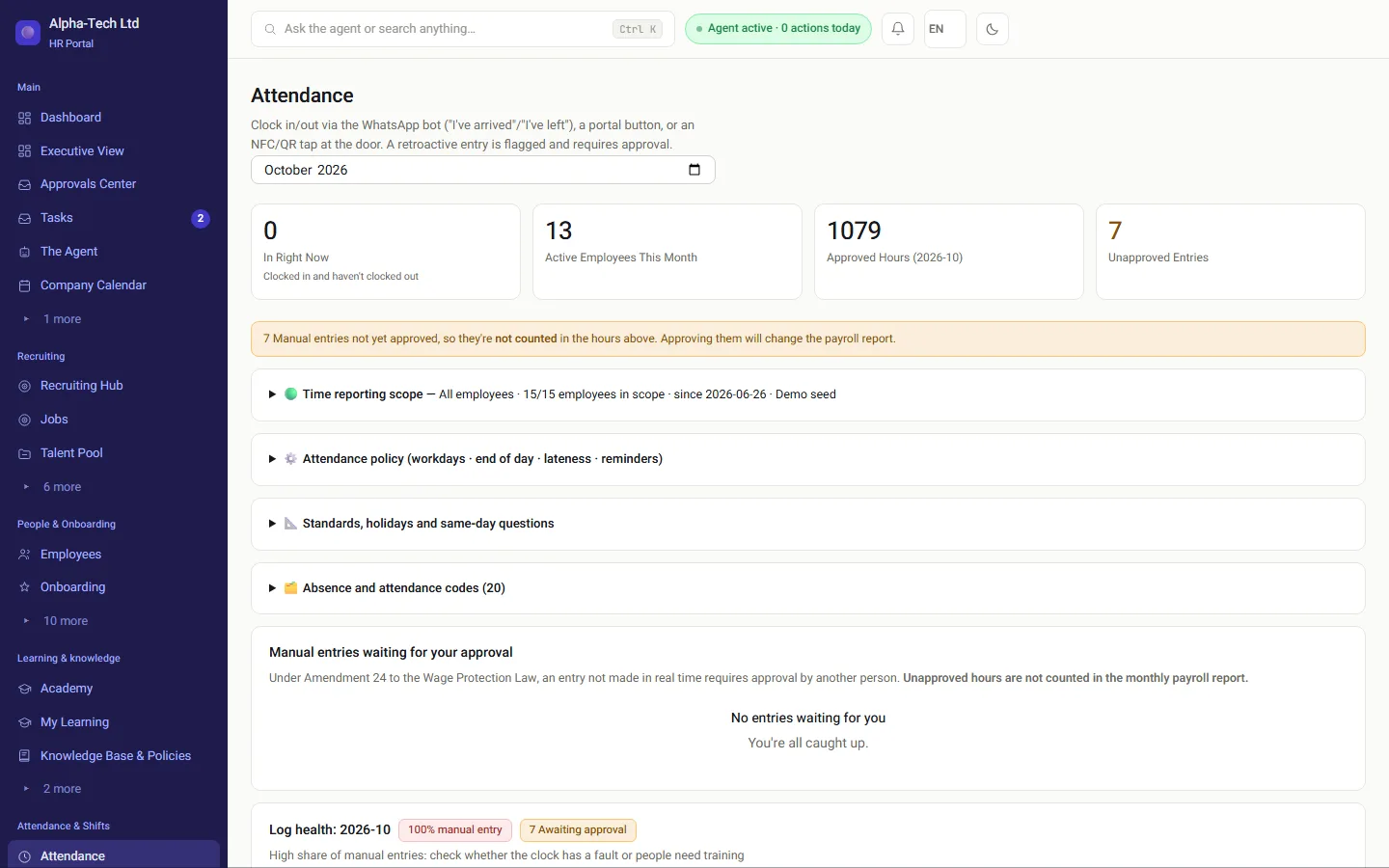
Attendance in HRAI: manual entries that were not approved yet do not count toward payroll hours
Attendance in the demo environment: an unapproved manual entry is flagged and not counted in the hours that go to payroll.

The problem

Where do attendance-to-payroll errors come from?

Many payslip errors are born before the hours reach the payroll department: in the last week of the month, when attendance that was never closed leaves as if it were final.

Late correctionsAn employee completes a forgotten clock-out after the file left, or a manager approves completions in bulk on the first of the next month. The hours are right, but they land on the wrong month’s payslip, or not at all.
Absence with no codeAn empty day on the card can be vacation, sick leave, reserve duty or an unapproved absence. Each is treated differently in pay and in leave balances, and the payroll department cannot guess which one happened.
Hours on the rest dayThe Hours of Work and Rest Law sets pay for work during the weekly rest (section 17), and case law adds a higher cumulative rate for overtime on that day. A file that sends them as regular hours, or as weekday overtime, produces a wrong payslip even when every clock-in is right.
Shifts that cross midnightA night shift belongs to two dates, and a shift that is partly on a weekday and partly on the rest day splits across two rates. A calculation that assigns the whole shift to the day it started loses the difference.
Employee numbers that do not matchPeople who joined mid-month and were not opened in the payroll system yet, or a different employee number in the two systems. The line is rejected or, worse, imported against someone else.

The path

What is the right order from clock-in to the payroll department?

Each station relies on the previous one. That is why the lock comes after everything else was checked, and the file leaves only from a locked month.

1Clock-insEvery clock-in hasa clock-out2CompletionsapprovedBy someone who didnot enter them3Absence codesVacation,sickness, reserveduty, unapproved4Rest-day hoursRegular andovertime, eachwith its own code5Month lockedFrom here, achange is adocumenteddecisionGate6File to payrollFile, SFTP or API,in the payrollsystem’s layout
1Clock-insEvery clock-in has a clock-out2Completions approvedBy someone who did not enterthem3Absence codesVacation, sickness, reserveduty, unapproved4Rest-day hoursRegular and overtime, eachwith its own code5Month lockedFrom here, a change is adocumented decisionGate6File to payrollFile, SFTP or API, in thepayroll system’s layout
The payroll department imports the file and returns a list of what was rejected.

Checklist

What should you check before sending attendance to payroll?

The difference between a month that closes quietly and one that closes under pressure is mostly when each thing is done:

Month startMonth endNext month Month startMonth endNext month When everything waits for month end Open timecards until the last day Approvals all at once Fix after the file left Hours on the wrong payslip An orderly close Open cards closed the same week Approve · code · lock One file leaves

Seven steps, in this order. Each relies on the one before, which is why locking the month comes last.

  1. Close open timecardsEvery clock-in needs a clock-out. Contact employees with an open day before the month ends, while they still remember.
  2. Approve every manual completionBy someone who did not enter it. An hour that was not approved does not go into the file.
  3. Code every absenceVacation, sick leave, reserve duty or unapproved absence, using the codes the payroll department defined.
  4. Separate rest-day hoursRegular hours on the weekly rest day and overtime on it, each with its own code, not mixed into regular overtime.
  5. Check every employee numberEspecially for people who joined or left this month.
  6. Compare with last monthStart with employees whose hours rose or fell sharply without an explanation.
  7. Lock the monthAfter the lock, a change is a documented decision with a name and a date, not a quiet edit of a cell.

This list is about the hours that go to the payroll department. What the payslip itself must show, and when it is due, is in the guide to the payslip and Amendment 24.

Ownership

Who owns what at month end?

A checklist works only when every step has an owner. In a small organization one person can hold several steps, but it should be clear who closes what, and by which day.

Line managers

Close the team’s open timecards and approve other people’s manual completions. They know the day someone forgot to clock in, so the decision is theirs.

HR

Code every absence, check people who joined or left, and lock the month once everything else is ready.

The payroll department

Defines component codes and employee numbers, imports the file and returns a list of what was rejected. When a code changes on its side, it says so before the next month, not after.

Some problems start earlier. Rest-day and night hours are set in the roster, so a roster built to the rules saves corrections at month end: shift rosters under the Hours of Work and Rest Law. And if you are still choosing how to record hours in the first place: do you need a time clock?

The format

File, SFTP or API: how do the hours leave?

Three ways attendance reaches the payroll department
ChannelHow it worksWhat to watch
FileYou produce a file in the layout the payroll system imports, and send it to the payroll department.Who sent it, which version was sent, and that nobody edited the file on the way.
SFTPThe file is transferred over an encrypted channel to a folder the payroll department reads from.Folder permissions, and who is notified when a file arrives.
APIThe systems connect directly, with no file in between.Not every payroll system opens such an interface. Check what is supported for you.

The layout itself changes from system to system. Michpal and Shiklulit each publish their record layout in an official document. In most other payroll systems, the layout and the codes are set with each company’s payroll accountant. So the first question for the payroll department is not which software it runs, but which import file it accepts today and which component codes it has defined.

In most cases the file carries quantities, meaning hours and days per code, and the payroll system calculates the pay from them. The existing connectors, and what is known about each layout: payroll system integrations.

After sending

What do you check after the file is sent?

Import confirmationAsk the payroll department to confirm the file was imported, and that the number of employees imported equals the number in the file. A difference of one line is an employee who will not get their hours.
Rejected linesA code the payroll system does not know, or an employee number that does not exist there, is rejected on import. Ask for the rejection list, and fix the source, not only the file.
Sample payslipsBefore payslips go out, review a few: night-shift workers, people who worked on the rest day, and anyone with a manual completion this month. That is where a file error shows first.
Late correctionAnything found after the month was locked goes as a difference next month, with a record of what changed and who approved it. The month that was sent stays as it was sent.

When the payslip is due and what it must contain are set by the Wage Protection Law. For questions about calculating a specific component, or a collective agreement or extension order that applies to you, consult your accountant or an employment lawyer.

In HRAI

How does HRAI send the month to the payroll department?

Only approved hours leave, and only from a locked month

When the month has been checked, you lock it with a signature, and the data leaves in your payroll system’s layout: as a file, over SFTP or by API.

  • Only approved hours are counted in the monthly report, and a manual completion goes for approval by someone who did not enter it.
  • A component that has a quantity but no defined code is not swallowed: it appears as a warning on screen before sending.
  • An employee with neither an employee number nor an ID number is left out of the file, and their name appears in the warnings list.
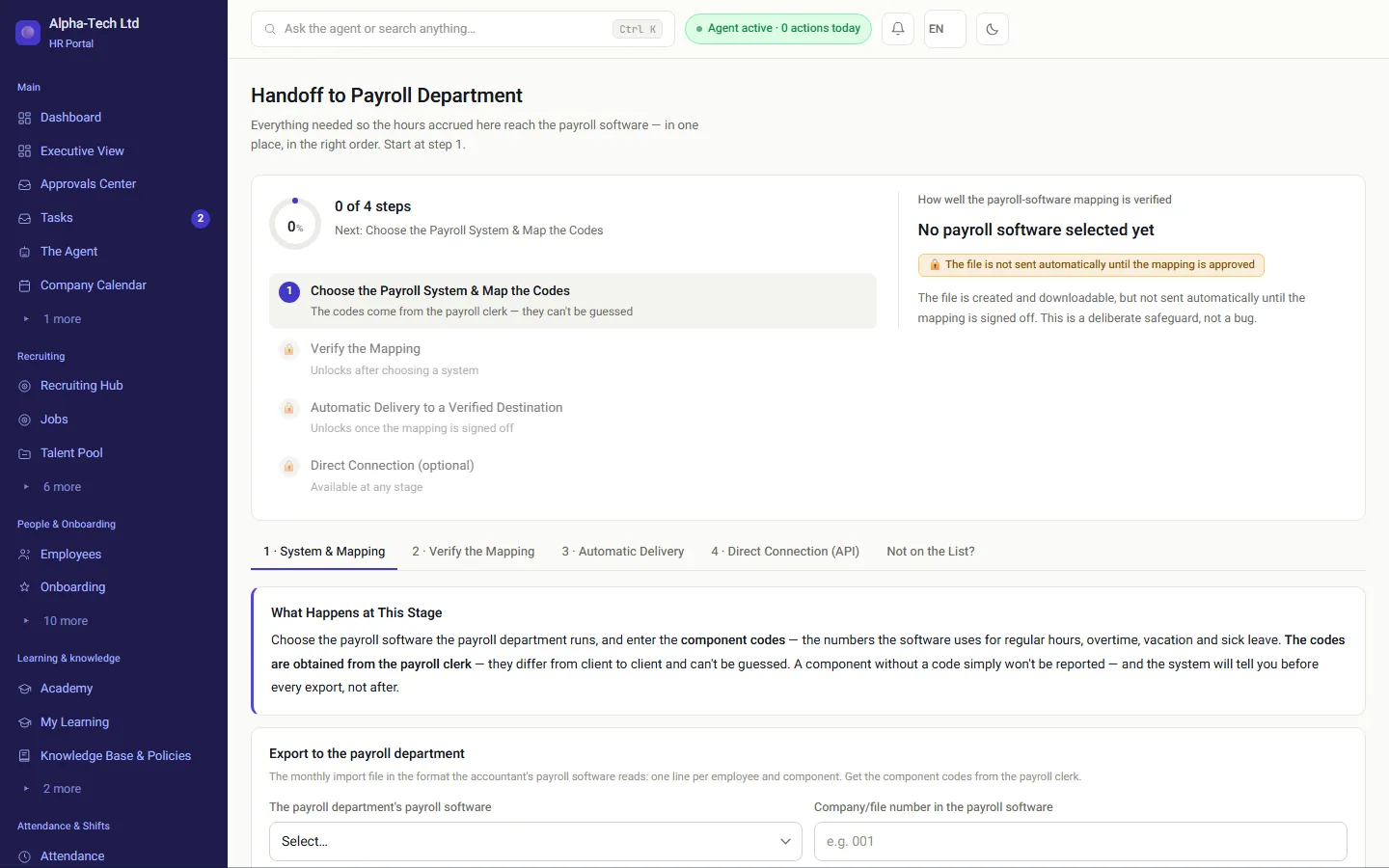
  • When the payroll system’s layout has not been verified yet, the file is held until the payroll accountant approves the mapping.

The attendance, leave and approvals that feed the file: leave, expenses and the payroll file.

The payroll hub in HRAI: the payroll system and codes, mapping verification and delivery
The payroll setup in the demo environment: the payroll system and its codes, mapping verification, and delivery to an approved destination.

Get started

A month close that reaches the payroll department ready

In the demo we close a sample month: approve a manual completion, code an absence, lock the month and look at the file that leaves for your payroll system.

Sources

Official sources for this guide

  1. Hours of Work and Rest Law, 5711-1951, Nevo (Hebrew)Section 7: the weekly rest, and the rest day for non-Jewish employees. Section 17: pay for work during the weekly rest. Section 25: the hours-of-work register.
  2. Wage Protection Law, 5718-1958, Nevo (Hebrew)Section 24 and the Schedule: when the payslip is delivered and what it must show, including overtime and weekly-rest pay.
  3. Pay for work during the weekly rest, Kol Zchut (secondary explainer) (Hebrew)An explanation of the cumulative rate for overtime during the weekly rest, as set by case law.

Nevo texts are consolidated versions; the authoritative text is the one published in the official gazette (Reshumot). All sources are in Hebrew. Sources checked on October 24, 2026.

Frequently asked

What people ask before they start

When should we lock the attendance month?

After every open timecard is closed, every manual completion is approved and every absence has a code. The date should leave the payroll department enough days to issue payslips on time. A common practice is a fixed day early in the following month, announced to managers in advance.

What do we do with a correction that arrives after the file was sent?

Do not edit the file that was already sent. Document the correction, approve it like any manual completion, and pass it as a difference next month, or coordinate with the payroll department if the payslip has not been issued yet. That way there is a record of what was sent and when.

What is a pay component code in the attendance file?

A number the payroll system uses to know how to pay a line: regular hours, overtime, vacation, sick leave or hours on the rest day. The codes are defined by the payroll department, usually separately for each company, so a file without an up-to-date code map produces lines with no meaning.

How do we report hours worked on Shabbat or a holiday?

In lines separate from regular hours: one code for regular hours on the rest day and another for overtime on it. The weekly rest day is not always Saturday: under section 7 of the Hours of Work and Rest Law, for non-Jewish employees it can be Saturday, Sunday or Friday, as is customary for them. Confirm the pay rates that apply to you, including any collective agreement or extension order, with your accountant.

Can attendance reach the payroll system without sending a file?

Sometimes. Some payroll systems pick up files from an encrypted SFTP folder, and some open an API. Where neither exists, you send a file. In every case, what decides the result is that the month was closed and checked before it left, not the channel it left through.

Get started

Book a demo

Leave your details and we will get back to you within one business day to set a time for a 30-minute demo on your own processes. If it turns out not to be a fit, we will say so.

About the details you share. Data controller: Career and Content ltd (operator of HR AI), company no. 515523934, [email protected]. You are not legally required to provide them; without a name and email we cannot get back to you, and that is the only consequence. The information is used to respond to your inquiry, kept for up to 24 months, and shared only with our email provider and our sales team. You may review, correct or delete it at any time at the same address — Privacy Policy (Hebrew), English summary.